

Accounts and integrations
Every channel your customers use reaches Replyco through an account: a marketplace such as Amazon or eBay, a webstore such as Shopify, a mailbox, a messenger such as WhatsApp, and beside them the order management system that holds your orders and the Aircall phone system your team calls from. Marketplaces, webstores and mailboxes bring in their messages as tickets, messengers as chats, and Aircall its calls; an account’s name labels every ticket it brings in, so your team sees at a glance where a customer wrote. An order management system brings no messages and adds its view of the order to your tickets instead. To work with what arrives, see Tickets and Chats.
Administrators connect a channel with + Add Account in the top bar and look after every connected account under AdminAccounts: whether it still syncs, its name and options, a new sign-in when a channel stops accepting Replyco’s access, and deleting it when you stop selling there. An account that Replyco can no longer reach is blocked and brings in nothing until you fix the cause, so the sync times on that screen are the first thing to check when a channel goes quiet. Linnworks and Billbee each add a screen of their own to the Admin menu once they are connected.
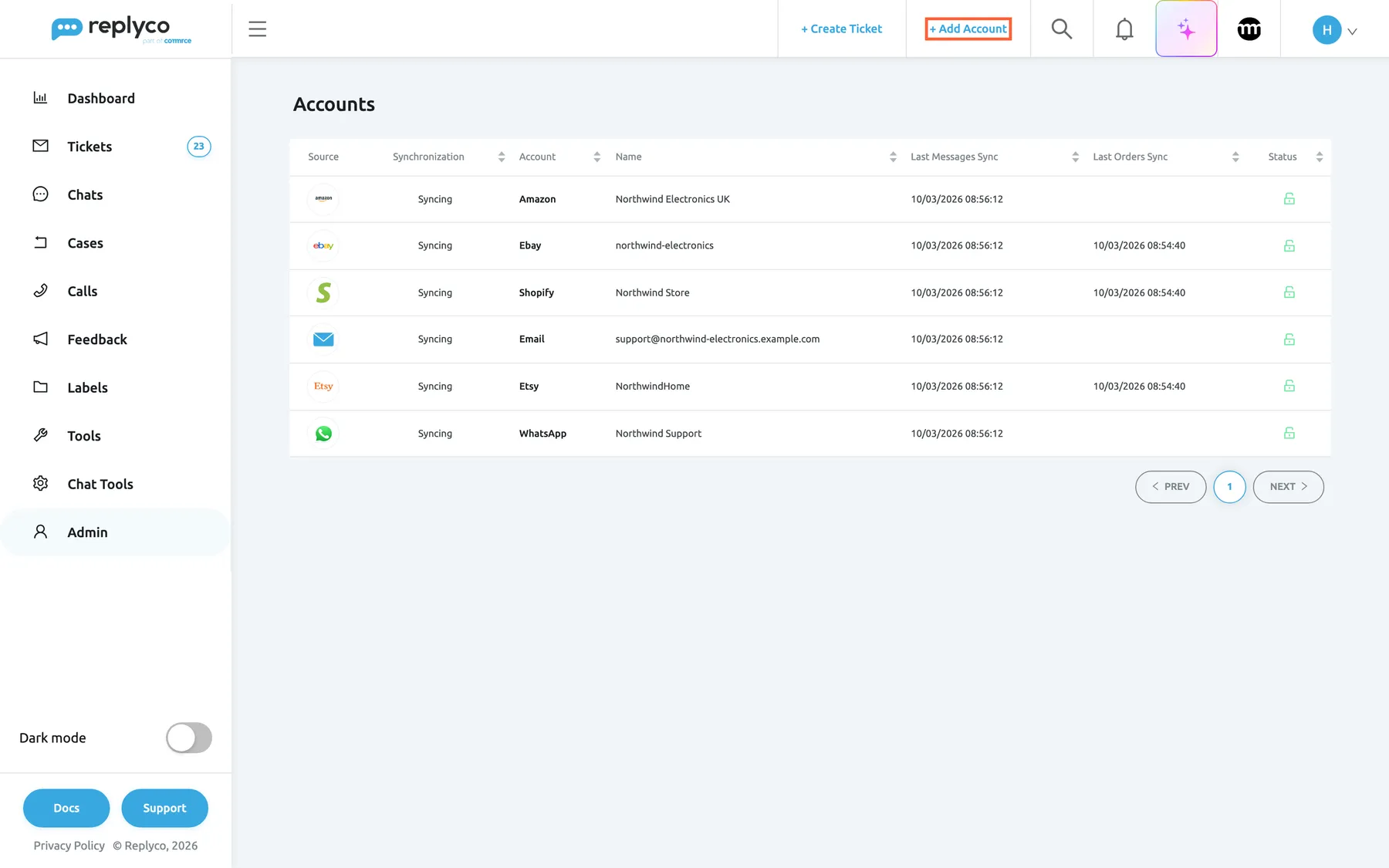
What this screenshot shows
- Screen
- Accounts (/integrations)
- Highlighted
- link “+ Add Account”, top-bar-right, enabled. opens the Add Account page with one tile per channel
- Also visible
- 6 connected accounts: Amazon, Ebay, Shopify, Email, Etsy, WhatsApp; all Syncing, green open locks under Status; Sidebar: Admin selected
- Purpose
- where connected accounts live and where a new one is connected
The screens in this area
Section titled “The screens in this area”| Screen | Where to find it | What it is for |
|---|---|---|
| Accounts | AdminAccounts | Every connected account with its sync status; open one to rename it, sign in again, unblock it or delete it |
| Add Account | + Add Account in the top bar | One tile per channel in four groups; each tile starts that channel’s connection |
| Linnworks settings | AdminLinnworks settings, while Linnworks is connected | For each channel account, the Linnworks reference fields Replyco compares with an order number |
| Billbee Configuration | AdminBillbee Configuration, while Billbee is connected | The custom triggers agents send to a Billbee order from the ticket |
The channel groups
Section titled “The channel groups”Each group has its own overview, with a guide for every channel in it.
| Group | Channels | What they bring in |
|---|---|---|
| Marketplaces | Amazon, eBay, Etsy, OTTO, Kaufland, Fruugo, Wish | Buyer messages as tickets, with the marketplace order beside them |
| Webstores | Shopify, WooCommerce, BigCommerce, Magento, Shopline | Customer emails as tickets, and the store’s orders |
| Mailboxes | Gmail, Outlook, and any mailbox by forwarding or with IMAP and SMTP | Customer emails as tickets; your replies go out from your own address |
| Order management systems | Linnworks, Billbee, Veeqo, ChannelAdvisor, Brightpearl, Katana | No messages; the system’s order number and order data in your tickets |
| Social media and phone accounts | WhatsApp, Facebook Messenger, Instagram, Telegram, TikTok Shop, Aircall | Messages as chats under Chats; Aircall calls under Calls |
What you can do here
Section titled “What you can do here”- Connect a channel from its tile: depending on the channel, you sign in to it, paste API keys, or forward your mail to an address Replyco creates. Add Account.
- Check that every account still syncs, with the time Replyco last fetched its messages and orders, and rename an account so your team recognises its tickets. Accounts.
- Bring a blocked or silent account back with Re-login or Unblock, or find out why nothing arrives. Fix a blocked or silent account.
- Decide what a mailbox imports and get your replies delivered, with its folders and domain authentication. Mailboxes · Mailbox by forwarding.
- See the order from your order management system in every ticket, and set how Linnworks finds orders and which Billbee triggers your team can send. Order management systems · Linnworks settings · Billbee Configuration.
- Find a quick answer to the questions customers ask most about accounts. Accounts and integrations FAQ.
Concepts
Section titled “Concepts”- Blocked. Replyco stops syncing an account when it can no longer reach the channel: its sign-in expired, its connection failed more than five times, or it is over your plan’s number of accounts. The account shows Blocked and brings in nothing until you fix the cause; order data can also be blocked on its own while messages keep arriving. Understand an account’s status explains every status.
- Re-login. When a channel no longer accepts Replyco’s access, Re-login in the account’s details repeats the channel’s sign-in for the same account, so its name, tickets and settings stay. A block that needs no new sign-in is lifted with Unblock once you have fixed the cause. Sign in to a marketplace again.
- Your plan’s number of accounts. When your company has a set number of accounts, every connected account counts towards it: each store, mailbox, order management system, messenger and phone account. During a trial there is no limit. Once the number is reached, + Add Account disappears, and accounts over the number after a plan change do not sync until support lifts their block. Stay within your plan’s number of accounts.
- The Replyco address. For a forwarded mailbox, the webstores and Amazon, Etsy, OTTO and Fruugo, Replyco creates an address for the account; every email that reaches it becomes a ticket of that account. Mailbox by forwarding.
Availability: every plan includes every channel, and the orders from your marketplaces and stores. The Aircall tile needs the Calls feature and the WhatsApp tile the WhatsApp feature, both part of every plan, and the eBay v2 tile appears only when beta features are switched on for your company. Connecting and managing accounts needs the Admin permission, which also shows the Admin menu; see User permissions and roles. Companies on an older plan may not have every feature, such as order sync; see What each plan includes.