

Ticket merging
A customer asks Where is my parcel?, gets your answer, and two days later writes a fresh email instead of replying: Parcel still not here. Now one conversation sits in two tickets, perhaps with two agents on it. Ticket merging puts it back together. You can merge a customer’s tickets by hand in the ticket list or from a child ticket, and you can tell Replyco, account by account, to add a customer’s new messages to their latest ticket instead of opening another one.
What it does
Section titled “What it does”Duplicates come from customers, not from mistakes: people start a new email instead of replying, write from a marketplace and then from your shop, or chase with a new subject line. Each new conversation opens a ticket, so the history is split, the second agent does not see what the first one promised, and your ticket counts show one problem twice.
Replyco handles it in two ways. Merging by hand joins two or more tickets of the same customer on the same account into the oldest of them, which keeps its number and receives every message, note, file and history row of the others; the others are deleted. Automatic merging is a per-account switch: when a new message arrives that belongs to no ticket yet, Replyco adds it to the customer’s latest ticket on that account if that ticket’s last message is no more than a set number of days old.
- Merge a customer’s tickets from the ticket list or the search results, with a confirmation. See merging from the ticket list.
- Merge a child ticket, one created by forwarding a message, back into the ticket it came from. See child tickets.
- Let Replyco add a customer’s new emails to their latest ticket for a number of days you choose, or without a time limit. See the same-customer switch.
- Keep eBay’s own notifications about one item in one ticket. See the eBay switch.
- Merge two customer records first when one person wrote from two addresses. See merging customers first.
Every manual merge leaves a history row in the kept ticket naming who merged which ticket number, and the kept ticket’s subject starts with MERGED:, so a merged ticket can always be recognised and explained.
Before you start
Section titled “Before you start”| Requirement | Details |
|---|---|
| Plan | Merging is part of every plan, and there is nothing to switch on for merging by hand. See What each plan includes. |
| Merging by hand | Anyone who can see the tickets can merge them; there is no separate permission. The icon is in the bulk action bar of every ticket list and of the search results. See Ticket lists. |
| Automatic merging | Set per account under AdminCompany Settings › Specific Account Settings. The screen appears and opens only for users with the Admin permission with Edit rights. See Specific Account Settings. |
| One customer record | Tickets merge only when they belong to the same customer record on the same account. When one person wrote from two addresses, merge the two customers first under ToolsCustomers, which needs the Customers permission. See merging customers first. |
| History rows | The merge row appears in the ticket for users who have Load user logs in the ticket switched on in Account Settings › Settings. See Account Settings. |
| Cost | None. Merging uses no AI and no quota. |
Understanding which ticket a message joins
Section titled “Understanding which ticket a message joins”Every message Replyco collects from an account either joins an existing ticket or opens a new one. Merging changes that outcome, before the fact or after it:
| Mechanism | When it acts | Which ticket you end up with | Example |
|---|---|---|---|
| Normal matching | Always, for every channel | The ticket the reply belongs to, found by the channel’s own thread, reply headers or order number | Sophie replies to your answer: the reply joins Where is my parcel? |
| Merge Tickets from the Same Customer | When normal matching found no ticket and the switch is on for the account | The customer’s ticket with the most recent last message, if that message is within the day limit | Sophie writes a new email, Parcel still not here, two days later: it joins Where is my parcel? instead of opening a ticket |
| Merge eBay Notifications | For messages from eBay itself on an eBay account | The ticket that already holds eBay’s messages about the same item | A second eBay notice about the Smart Kettle listing joins the first one |
| Merge Tickets in a list | When you select it | The oldest of the selected tickets | You tick both of Sophie’s tickets and merge them into Where is my parcel? |
| Merge on a child ticket | When you select it | The older of the two, which is the original ticket | You merge the forwarded copy back into the ticket it came from |
How Replyco decides
Section titled “How Replyco decides”Merging by hand follows four rules, the same from the list and from a child ticket:
- One customer, one account. Every selected ticket must have the same customer record and must have come in on the same connected account. Otherwise nothing is merged and Replyco shows You cannot merge Tickets from different Customers or Accounts.. In the list this check happens before anything is sent; for a child ticket Replyco’s server makes it and answers “You cannot merge Tickets from different Customers or Integrations.”
- The oldest ticket stays. The ticket that was created first keeps its number and becomes the merged ticket, whichever one you ticked or opened first.
- Its subject records the merge. The kept ticket’s subject becomes
MERGED:followed by its own subject and then the subjects of the others, for exampleMERGED: Where is my parcel? Parcel still not here. The prefix is alwaysMERGED:, in every language, and the subject is cut at 450 characters. - No limit on how many. You can merge as many tickets as you can tick on one page of a list, up to the page size you chose.
What happens to each part of the tickets:
| Part | After the merge |
|---|---|
| Messages | All messages move to the kept ticket and appear there in date order. |
| Internal notes | Move to the kept ticket. |
| Files kept with the ticket | Move to the kept ticket. Files attached to messages move with their messages. |
| History rows | Move to the kept ticket, and a new row records the merge. |
| Labels, AI categories, custom field values | The kept ticket keeps its own. Those of the other tickets are not carried over. |
| Assignee, status, priority, deadlines, star, snooze, archive | The kept ticket keeps its own, unchanged. The merge does not recalculate the respond and resolve deadlines. |
| Linked order | The kept ticket keeps its own order. The order links of the other tickets are not carried over; the orders themselves stay under Orders and can be linked again from the ticket. |
| AI summary | The kept ticket keeps its summary until you regenerate it. AI suggested replies of the other tickets are deleted. |
| Unread | The kept ticket is unread if any of the messages is unread. |
| Child tickets | Children of the kept ticket stay linked. Children of the other tickets lose their link to a parent. |
| The other tickets | Deleted. They disappear from every list, the search and the ticket counters, and their links lead nowhere. |
Automatic merging runs only for a message that normal matching could not place. How each channel matches first:
| Channel | Normal matching, checked first |
|---|---|
| Mailboxes over IMAP, Shopify, WooCommerce, BigCommerce, Magento, ShopLine, OTTO | The email’s reply headers point to a message already in Replyco |
| Gmail | Gmail’s own conversation, then a ticket of the same customer address with the same subject |
| Outlook | Outlook’s own conversation, then a ticket you started with the same subject that has no reply yet |
| Amazon | The order number together with the buyer’s address; Amazon’s own notifications are never matched this way |
| eBay | The order number with the buyer. The item with the buyer is checked after the same-customer switch; for eBay’s own messages, only with Merge eBay Notifications |
| eBay v2 | eBay’s own conversation |
| Etsy | Etsy’s own conversation |
| Kaufland | Kaufland’s own conversation, then the customer’s address with the product |
| Fruugo | The same subject from the same address, then the reply headers |
When none of that finds a ticket and Merge Tickets from the Same Customer is on, Replyco looks at the account’s tickets whose customer has the same email address as the new message. It takes the one with the most recent last message, and adds the new message to it if that last message was no more than the set number of days ago. Otherwise the message opens a new ticket, as it would with the switch off.
- Same account only. A customer’s ticket on your eBay account never receives a message that arrived on your mailbox.
- Any state. A resolved, snoozed or archived ticket qualifies. The new message then works as a new message in that ticket always does: the ticket is open, unread and back in the lists again, and its assignee is notified.
- The last message counts, yours or theirs. Every reply you send and every message the customer sends moves the ticket’s last message forward, so an active conversation keeps collecting messages.
- Days are calendar days in UTC. Replyco counts how many midnights (UTC) lie between that last message and the moment it collects the new message, and the set number itself still counts.
With Merge Tickets Within set to 7 and a new email from Sophie collected on 10 March:
| Last message in Sophie’s latest ticket | Days counted | Result |
|---|---|---|
| 10 March, 06:00 | 0 | joins that ticket |
| 4 March, 12:00 | 6 | joins that ticket |
| 3 March, 00:05 | 7 | joins that ticket; the limit itself is included |
| 3 March, 23:55 | 7 | joins that ticket, although only a little over six days have passed |
| 2 March, 23:55 | 8 | opens a new ticket |
| any date, with the limit set to 0 | not counted | joins that ticket |
What does not get merged
Section titled “What does not get merged”- Tickets of different customer records, even when the name is the same. Merge the customers first; see merging customers first.
- Tickets that came in on different accounts, such as a customer’s Amazon ticket and their email to your mailbox.
- Chats. Conversations under the chat channels are not tickets and have no merge settings; chat accounts are not listed on the Specific Account Settings tab.
- Tickets you already have when you switch automatic merging on. It never goes back over existing tickets; merge those by hand.
- Messages without a customer email address. The same-customer switch needs one, so such messages are matched only the normal way.
- Amazon’s own notifications through Merge Amazon Notifications: that box has no effect, and only the same-customer switch groups them. See the Amazon switch.
- Tickets you create yourself with + Create Ticket, and child tickets: automatic merging acts only on messages Replyco collects from an account.
Setting it up in five steps
Section titled “Setting it up in five steps”Merging by hand needs no set-up. These steps switch on automatic merging for one account; repeat them for each account you want it on.
-
Open the tab. Go to AdminCompany Settings and select Specific Account Settings under System. The left column lists your accounts that receive tickets or orders; the right side stays empty until you pick one.
-
Pick the account. Select the account, for example your eBay account, then open Ticket Merge Settings on the right. It shows Merge Tickets from the Same Customer for every account, plus Merge eBay Notifications on eBay accounts and Merge Amazon Notifications on Amazon accounts. Every box starts clear.
-
Tick the same-customer switch and set the days. Tick Merge Tickets from the Same Customer. The line Merge Tickets Within appears with 15 days; type the number of days you want, such as 7, or 0 for no limit.
-
Tick the eBay switch (optional, eBay only). On an eBay account, tick Merge eBay Notifications if eBay’s own messages about an item should share one ticket.
-
Save. Select Save Changes, which appears below the sections as soon as something differs from what is saved. A short Success confirms it, and the next message Replyco collects from that account follows the new settings.
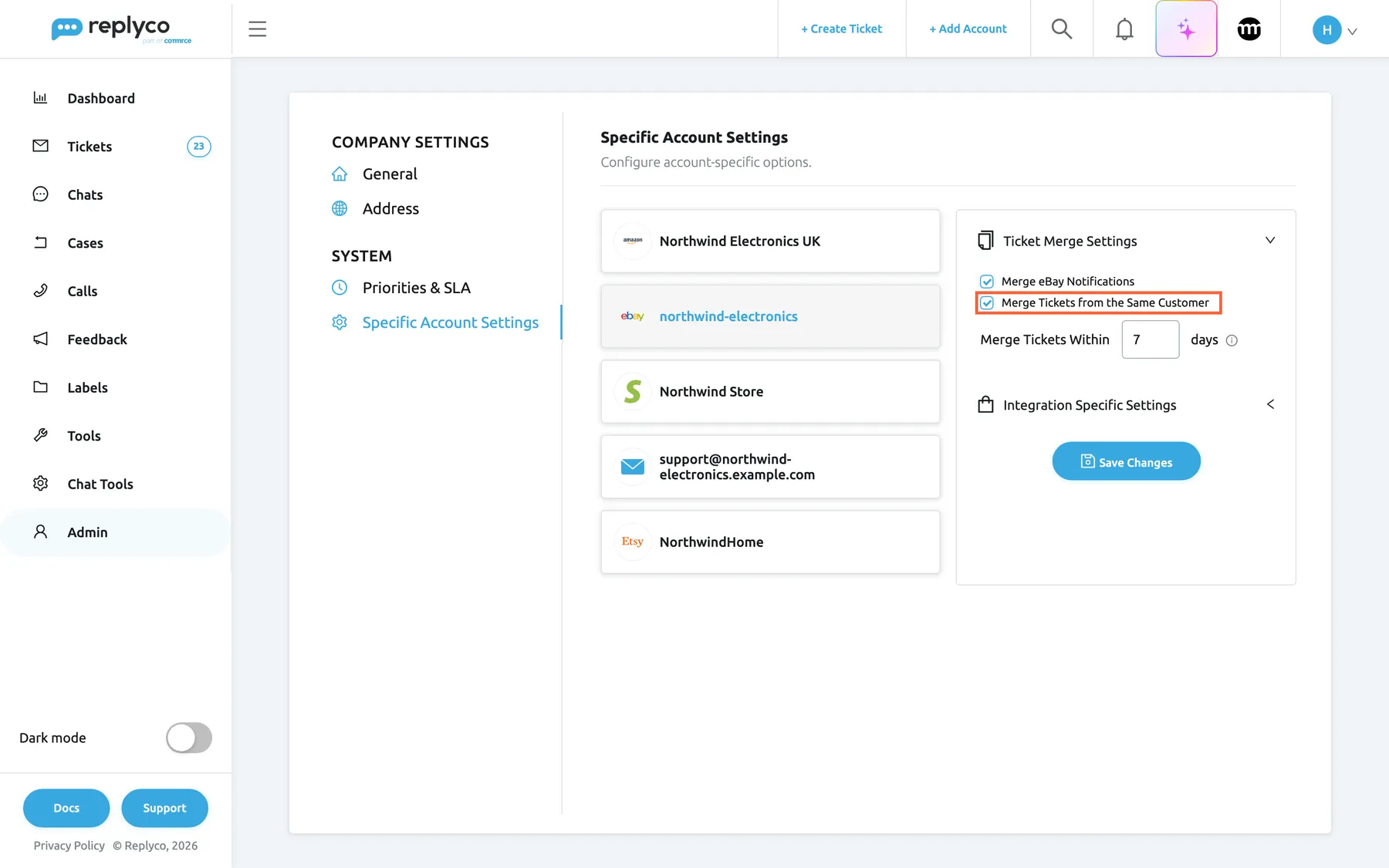
Tick the switches for one account, set the number of days and save; every account keeps its own merge settings. What this screenshot shows
- Screen
- Specific Account Settings (/company?tab=accountSpecificConfiguration)
- Highlighted
- checkbox “Merge Tickets from the Same Customer”, right-panel, checked. adds new messages from a customer to their latest ticket on this account instead of opening a new one
- Also visible
- account list: Amazon, eBay (selected), Shopify, mailbox, Etsy; Merge eBay Notifications ticked; Merge Tickets Within 7 days with an information icon; Save Changes button
- Purpose
- the automatic merge switches of one account, configured and ready to save
Every setting, explained
Section titled “Every setting, explained”The merge settings live on AdminCompany Settings › Specific Account Settings, in the section Ticket Merge Settings of each account, in the order below. Each account has its own values, and nothing takes effect until you select Save Changes.
Merge Tickets from the Same Customer, the main switch
Section titled “Merge Tickets from the Same Customer, the main switch”AdminCompany Settings › Specific Account Settings, select an account, open Ticket Merge Settings; the last check box in the section. Shown for every account that receives tickets. Saved with Save Changes.
Off by default. On: a new message on this account that normal matching could not place joins the ticket of the same customer email address with the most recent last message, if that message is within Merge Tickets Within. Off: such a message opens a new ticket. Ticking it shows the day limit; clearing it hides the limit but keeps its value for next time. Clearing the switch stops future joining only; tickets that were already joined stay together. It applies to messages Replyco collects from now on and never changes existing tickets.
Many customers do not reply to your answer; they write again. With the switch on, their second email lands in the ticket where your first answer already is, in front of the agent who handled it.
Merge Tickets Within, the time limit
Section titled “Merge Tickets Within, the time limit”The line under Merge Tickets from the Same Customer, shown only while that box is ticked: a number box, the word days and an information icon whose tooltip says that the days count from the last message in the customer’s latest ticket and that 0 removes the limit. Saved with Save Changes.
The number of calendar days, counted in UTC, between the last message in the customer’s latest ticket and the moment Replyco collects the new message. The limit itself is included: with 7, a ticket whose last message was 7 days ago still receives the message, one from 8 days ago does not. 0 means no limit: every new message from that address joins their latest ticket, however old. The default is 15. The box takes whole days from 0 upwards.
A short limit keeps a customer’s follow-ups together while treating a new question weeks later as a new ticket. A limit of 0 suits accounts where each customer only ever has one conversation, such as a wholesale mailbox.
| Do | Don’t |
|---|---|
| Use a few days, like your usual delivery time, on shop and mailbox accounts | Set 0 on a marketplace account where regular buyers order often: every new question joins one ever-growing ticket |
| Start short and lengthen it once you have checked the results | Expect a long limit to merge tickets you already have; it only places new messages |
| Keep in mind that your own replies keep a ticket’s last message recent | Count from when the ticket was opened; Replyco counts from its last message |
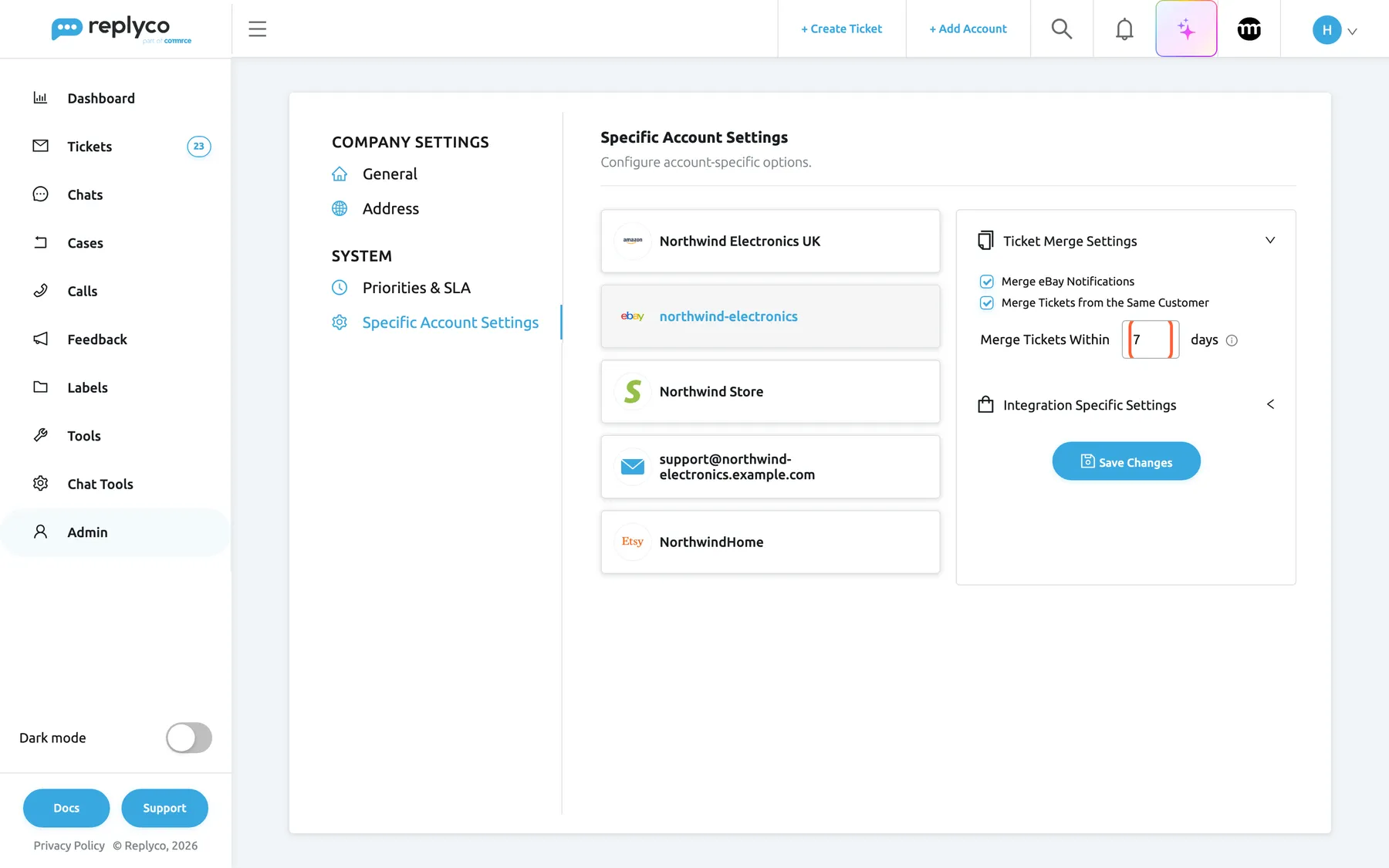
What this screenshot shows
- Screen
- Specific Account Settings (/company?tab=accountSpecificConfiguration)
- Highlighted
- spinbutton “”, right-panel, filled. sets how many days after the last message in the customer's latest ticket a new message still joins it
- Also visible
- Merge Tickets from the Same Customer ticked; Merge Tickets Within 7 days
- Purpose
- what the day limit means and where it is set
Merge eBay Notifications, eBay notices per item
Section titled “Merge eBay Notifications, eBay notices per item”In Ticket Merge Settings of an eBay account, the first check box. Saved with Save Changes.
Off by default. It concerns messages that come from eBay itself rather than from a buyer. Off: each of them opens a ticket of its own. On: eBay’s messages about the same item join the ticket that already holds eBay’s messages about that item, with no time limit. Buyers’ messages are not affected by this box: on a standard eBay account they join the buyer’s ticket for the same order or item. For everything else about eBay accounts, see eBay.
eBay can send several notices about one listing. Keeping them in one ticket per item leaves your queue for buyers.
Merge Amazon Notifications, shown for Amazon accounts
Section titled “Merge Amazon Notifications, shown for Amazon accounts”In Ticket Merge Settings of an Amazon account, the first check box. Saved with Save Changes.
This box can be ticked and saved, but it has no effect: Replyco sorts Amazon messages the same way whether it is ticked or not. Buyer messages join the ticket with the same order number and buyer. Amazon’s own notifications, sent from Amazon’s no-reply and seller-notification addresses, each open a ticket of their own, unless Merge Tickets from the Same Customer is on for the account: that switch treats Amazon’s sending address like any customer address, so notifications from one Amazon address within the day limit share a ticket. For everything else about Amazon accounts, see Connect Amazon.
If Amazon’s notifications crowd your queue, the same-customer switch is the setting that groups them.
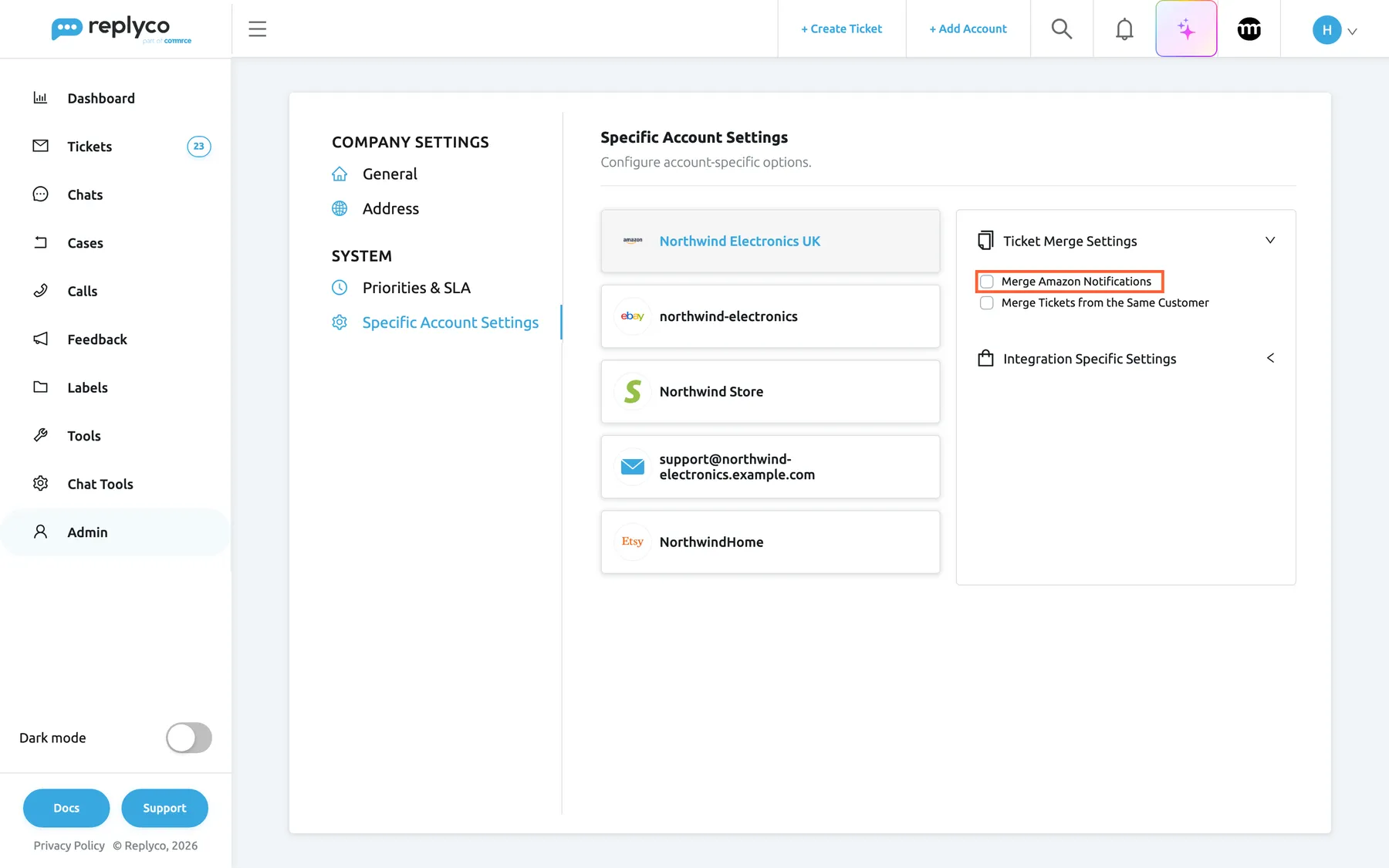
What this screenshot shows
- Screen
- Specific Account Settings (/company?tab=accountSpecificConfiguration)
- Highlighted
- checkbox “Merge Amazon Notifications”, right-panel, unchecked. none; saved but not used when messages are sorted into tickets
- Also visible
- Amazon account Northwind Electronics UK selected; Merge Tickets from the Same Customer clear; default state: both boxes clear
- Purpose
- the Amazon-only switch and the default state of an account
How the settings combine
Section titled “How the settings combine”What happens to a new message that normal matching could not place:
| Merge Tickets from the Same Customer | Merge eBay Notifications | A customer’s new email | eBay’s own message about an item (standard eBay) | Amazon’s own notification |
|---|---|---|---|---|
| clear | clear | new ticket | new ticket | new ticket |
| clear | ticked | new ticket | joins eBay’s ticket for that item | new ticket |
| ticked | clear | joins the customer’s latest ticket within the limit | new ticket, unless the same-customer switch matches it first | joins the latest ticket from that Amazon address within the limit |
| ticked | ticked | joins the customer’s latest ticket within the limit | the same-customer switch is checked first, then the item | joins the latest ticket from that Amazon address within the limit |
Merge Amazon Notifications changes no row of this table.
Merging in the ticket list and the ticket
Section titled “Merging in the ticket list and the ticket”Merges and merged tickets show in four places. What to look for:
| Indicator | Where | Meaning |
|---|---|---|
Subject starting with MERGED: | Ticket list, ticket header, search | The ticket is the result of a merge by hand; the subjects of the merged tickets follow its own |
| Child Ticket block with a number and Merge | Right panel of a ticket | A ticket was created by forwarding one of this ticket’s messages; yellow border: open, green: resolved |
| Parent Ticket: block | Right panel of a child ticket | The ticket this one was forwarded from |
| Grey history row naming the merged ticket numbers | Conversation of the kept ticket | Who merged which tickets into this one, and when |
The ticket list and search results: Merge Tickets
Section titled “The ticket list and search results: Merge Tickets”- Open a ticket list that shows the customer’s tickets, such as TicketsNot Resolved, or search for the customer’s email address to see all their tickets on one page.
- Tick the tickets to merge. The bulk action bar appears at the top; Merge Tickets is in it once two or more tickets are ticked.
- Select Merge Tickets. Replyco asks Are you sure you want to merge tickets? This action CANNOT be undone.
- Select Yes. The list reloads with the kept ticket, now with its
MERGED:subject, and Tickets merged. confirms it. No closes the question without merging.
For example, Sophie Turner’s new ticket #32538 Parcel still not here and her ticket #32534 Where is my parcel? are both on Northwind Electronics Store. Merged, #32534 stays, because it was created first, and #32538 is gone. To learn the other bulk actions and the columns of the list, see Ticket lists.
Why: the fastest way to tidy up several duplicates at once, and the only way to merge tickets that are not linked as parent and child.
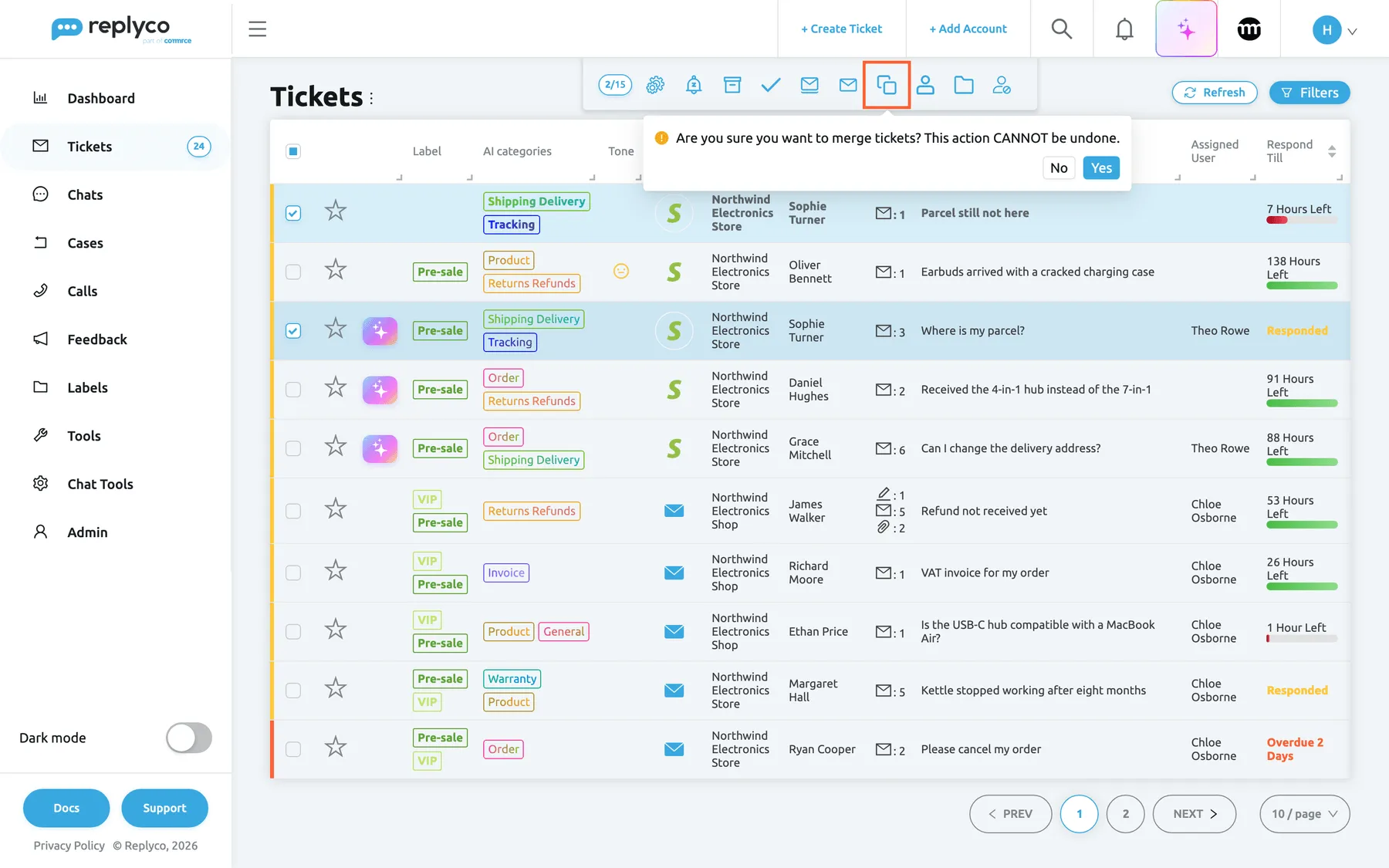
What this screenshot shows
- Screen
- Not Resolved (/tickets/notresolved)
- Highlighted
- button “Merge Tickets”, top-center, open. asks for confirmation
- Also visible
- two tickets of one customer ticked; counter 2/15; confirmation with No and Yes; the new ticket #32538 has no label and no assignee
- Purpose
- merge tickets from the ticket list
If the ticked tickets belong to different customer records or came in on different accounts, Replyco merges nothing and shows You cannot merge Tickets from different Customers or Accounts. The ticks stay, so you can clear the ticket that does not belong.
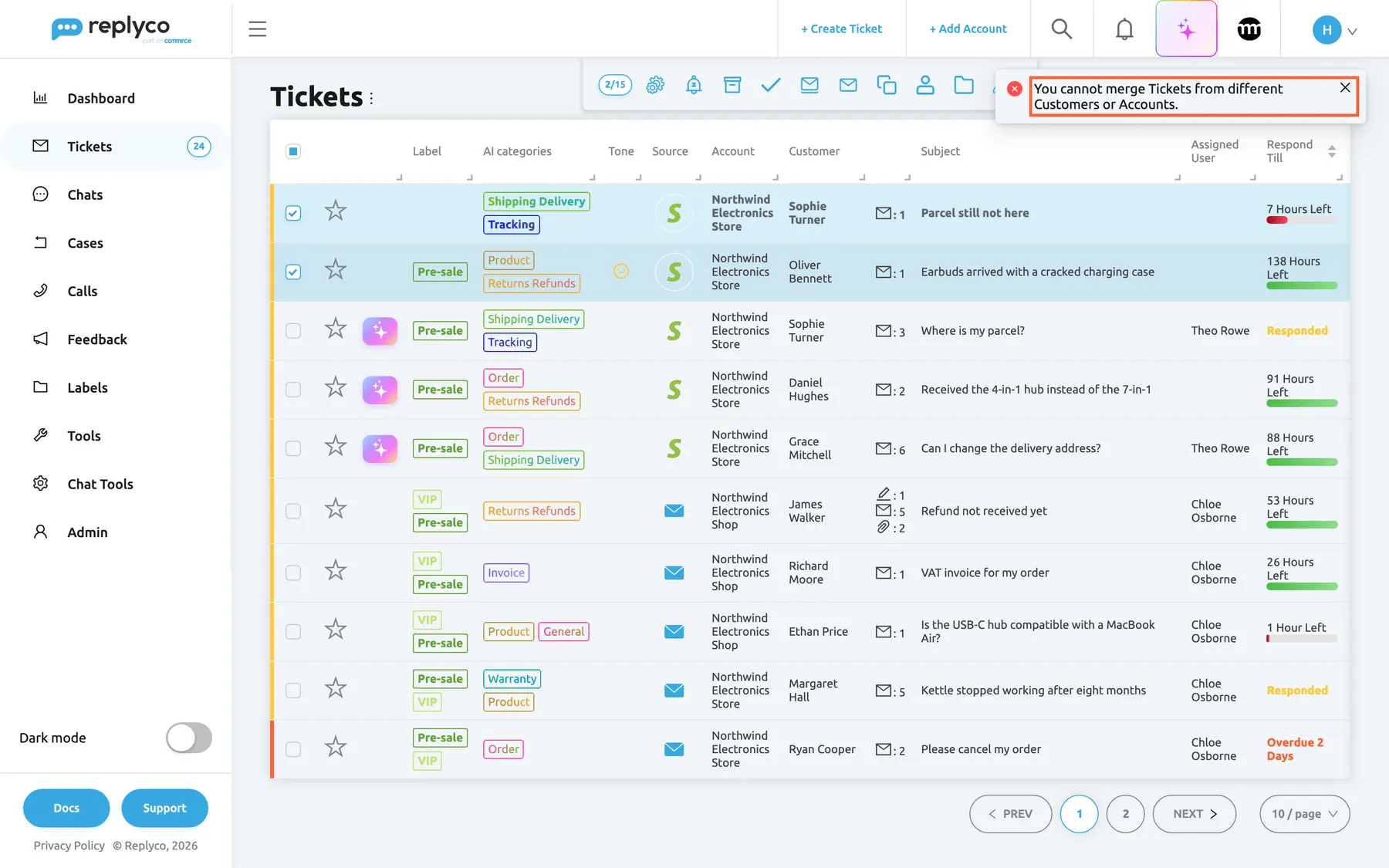
What this screenshot shows
- Screen
- Not Resolved (/tickets/notresolved)
- Highlighted
- alert “You cannot merge Tickets from different Customers or Accounts.”, top-right, shown. none; the merge was refused
- Also visible
- two tickets of different customers ticked; red error notification; list unchanged
- Purpose
- the rule that blocks a merge, as the user sees it
Inside the ticket: child tickets and their merge button
Section titled “Inside the ticket: child tickets and their merge button”When you forward a message from a ticket, the new ticket becomes that ticket’s child. The original shows a block Child Ticket with a number and the child’s subject, with a yellow border while the child is open and a green one once it is resolved; the child shows Parent Ticket: with the original’s subject. Select a subject to open that ticket. To learn how forwarding works, see Create Ticket.
Select Merge in a child block and confirm Are you sure you want to merge tickets? This action CANNOT be undone. with Yes. The same rules apply as in the list: the two tickets must have the same customer and account, and the older one, the original, stays. A forward usually goes to someone else, such as your warehouse or a supplier, from the account you pick, so that child has another customer and often another account, and Replyco refuses the merge with “You cannot merge Tickets from different Customers or Integrations.” After a successful merge the child block disappears, and the original ticket holds the child’s messages under its MERGED: subject. To learn the rest of the ticket screen, see The ticket screen.
Why: the blocks link the two tickets both ways, so the warehouse’s answer is one click away from the customer’s ticket. The merge joins them when the forward stayed with the same customer and account, for example a message you forwarded to the customer themself from the account the ticket came in on.
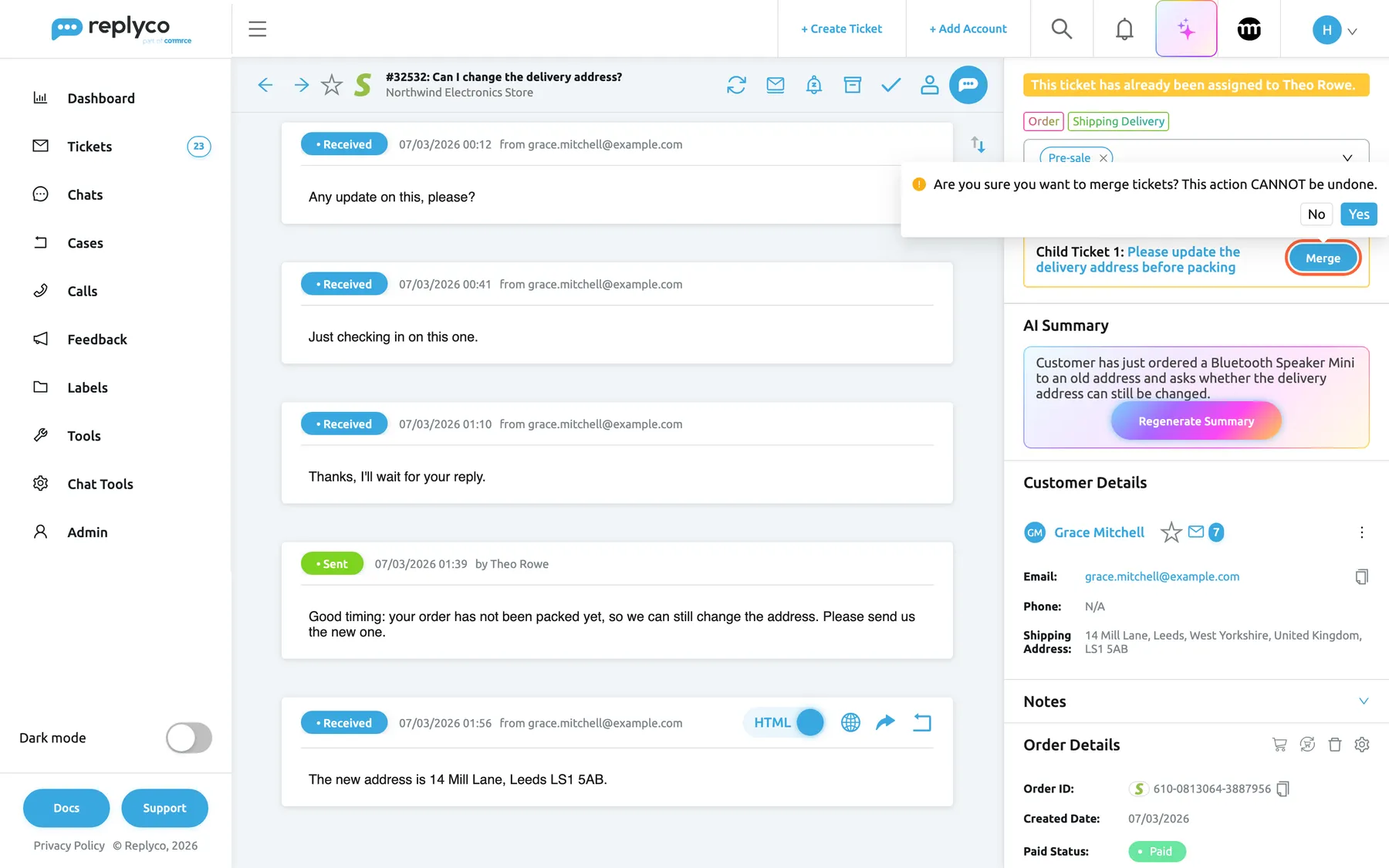
What this screenshot shows
- Screen
- Respond (/ticket/:threadId)
- Highlighted
- button “Merge”, right-panel-top, open. asks for confirmation
- Also visible
- Child Ticket 1 block with a yellow border; confirmation with No and Yes
- Purpose
- merge a child ticket from the parent ticket
The merged ticket
Section titled “The merged ticket”The kept ticket shows every message of the merged tickets in date order, so the customer’s new message sits after your earlier reply. Its header shows the number and the MERGED: subject. The right panel still shows its own label, priority, assignee, order and AI summary; the summary describes the conversation as it was before, until you select Regenerate Summary. See AI summaries.
Why: one ticket with the whole story means the next agent sees what was already promised.
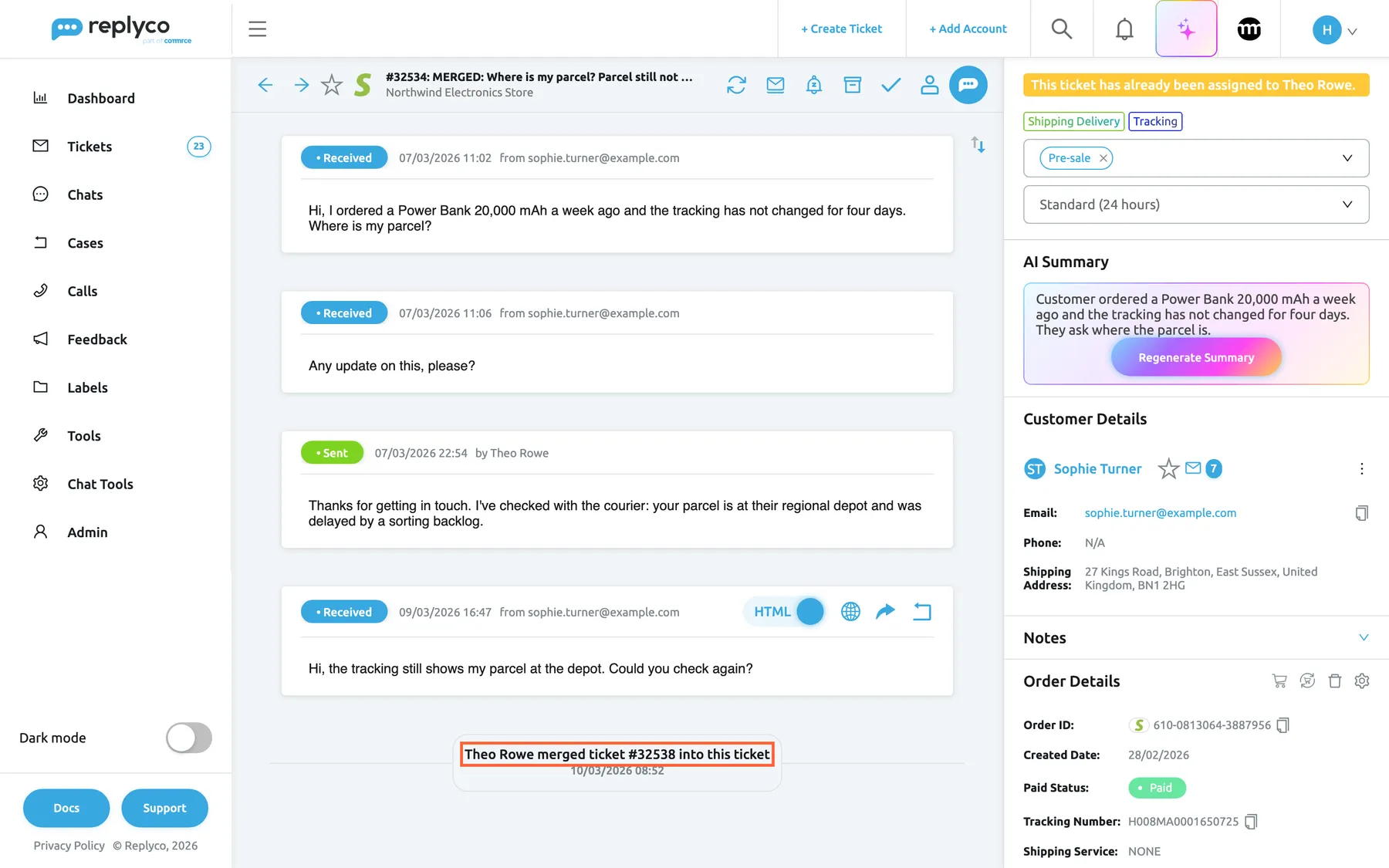
What this screenshot shows
- Screen
- Respond (/ticket/:threadId)
- Highlighted
- paragraph “{{name}} merged ticket #{{number}} into this ticket”, conversation, shown. none; records the merge
- Also visible
- subject MERGED: plus both subjects; the moved message of 09/03/2026 16:47 last in the conversation; label, priority and assignee of the kept ticket; AI summary not regenerated
- Purpose
- what a merged ticket looks like, and its history row
Ticket history
Section titled “Ticket history”Every merge by hand writes one grey row in the kept ticket, with the name of the person who merged and the numbers of the tickets merged into it:
Theo Rowe merged ticket #32538 into this ticket
With several tickets merged at once, it reads Theo Rowe merged tickets #32538, 32540 into this ticket. The history rows of the merged tickets move with them. Automatic merging writes no row, because nothing is merged: the new message simply arrives in the existing ticket. History rows appear only for users who have Load user logs in the ticket switched on in Account Settings › Settings.
Why: when a ticket number a customer quotes no longer exists, the row tells you which ticket it went into and who merged it.
Merge two customer records first
Section titled “Merge two customer records first”ToolsCustomers, open the customer you want to keep and select the people icon, Merge Customers, in their details. A small box opens with the drop-down Select customer; choose the other record there and select Merge next to it. Needs the Customers permission. To learn the rest of that screen, see Customers.
The record you have open is kept. The tickets, orders, notes, feedback, cases and chats of the record you choose move to it, and the chosen record is deleted; there is no confirmation. Only customers of the same account are offered. After that, the tickets of both records belong to one customer and can be merged as usual, as long as they came in on the same account.
Replyco decides “same customer” by the customer record, not by the name on screen. Someone who wrote from their work and their private address is two customers until you merge them.
Three situations where this is the first step:
- Sophie wrote from sophie.turner@example.com and later from her work address: merge the two customers, then merge the two tickets.
- A customer’s tickets show the same name but Merge Tickets reports You cannot merge Tickets from different Customers or Accounts. merge the customers, then try again.
- You expect Merge Tickets from the Same Customer to catch a customer’s new emails from both addresses: it compares the address of each new message with the address on the customer’s tickets, so new emails from the other address still open tickets of their own. Merge those by hand.
What you need to know
Section titled “What you need to know”| Topic | Fact |
|---|---|
| Cannot be undone | Merged tickets are deleted, and their messages cannot be split off again. There is no undo and no restore. |
| Which ticket stays | The ticket created first. Its number, subject prefix, state, assignee, priority, labels and order stay. |
| Nothing reaches the customer | Merging is internal. Nothing is sent to the customer, the marketplace or the mailbox. |
| Replies after a merge | On mailboxes, a reply that answers a moved message finds the kept ticket. |
| Per account | Automatic merging is set account by account; tickets never merge across accounts. |
| Not retroactive | Automatic merging places new messages from the moment you save. It never combines tickets you already have. |
| Days | Calendar days in UTC, counted from the last message in the customer’s latest ticket; the set number is included; 0 means no limit; the default is 15. |
| Same customer | By hand: the same customer record. Automatically: the same email address on the same account. |
| Deadlines | The merge does not recalculate the kept ticket’s respond and resolve deadlines; they follow its next message. |
| AI | Merging uses no AI. The kept ticket’s AI summary is not regenerated on its own. |
| History | One row per merge by hand, in the kept ticket, for users with Load user logs in the ticket on. Automatic merging writes none. |
| How many | No limit on the number of tickets per merge; you can tick up to one page of a list. |
| Amazon switch | Merge Amazon Notifications has no effect; use Merge Tickets from the Same Customer to group Amazon’s notifications. |
Frequently asked questions
Section titled “Frequently asked questions”General
Section titled “General”What does merging tickets do?
Section titled “What does merging tickets do?”It joins two or more tickets of the same customer on the same account into the oldest one. That ticket keeps its number, gets a subject starting with MERGED: and receives every message, note, file and history row of the others, which are deleted. You merge with Merge Tickets in a ticket list or Merge on a child ticket.
Can I undo a merge?
Section titled “Can I undo a merge?”No. Replyco asks Are you sure you want to merge tickets? This action CANNOT be undone. because the merged tickets are deleted and their messages cannot be split off again. Check the ticket numbers and subjects before you select Yes.
Does the customer notice that I merged their tickets?
Section titled “Does the customer notice that I merged their tickets?”No. Merging happens only inside Replyco: nothing is sent to the customer, the marketplace or your mailbox. Their next reply still arrives. On a mailbox it finds the kept ticket through the earlier message it answers.
Is ticket merging included in my plan?
Section titled “Is ticket merging included in my plan?”Yes. Merging by hand and the automatic merge switches are part of every plan, with nothing to switch on for merging by hand. The automatic switches under AdminCompany Settings › Specific Account Settings need the Admin permission with edit rights.
Who is allowed to merge tickets?
Section titled “Who is allowed to merge tickets?”Anyone who can see the tickets in a ticket list or the search results can merge them with Merge Tickets; there is no separate permission. Changing automatic merging needs the Admin permission with edit rights, and merging customer records needs the Customers permission.
Merging by hand
Section titled “Merging by hand”How do I merge two tickets from the same customer?
Section titled “How do I merge two tickets from the same customer?”Open a ticket list or search for the customer’s email address, tick both tickets and select Merge Tickets in the bulk action bar at the top. Confirm Are you sure you want to merge tickets? This action CANNOT be undone. with Yes. The oldest ticket stays and the list reloads.
Which ticket survives the merge?
Section titled “Which ticket survives the merge?”The ticket that was created first, whichever you ticked first. It keeps its number, status, assignee, priority, labels and linked order, and its subject becomes MERGED: followed by its own subject and the subjects of the other tickets.
Why can’t I merge the tickets I selected?
Section titled “Why can’t I merge the tickets I selected?”Replyco merges only tickets of the same customer record that came in on the same account; otherwise it shows You cannot merge Tickets from different Customers or Accounts. If one person wrote from two addresses, merge the customers first under ToolsCustomers: open the one to keep, select the people icon, choose the other record in Select customer and select Merge. Tickets from different accounts, such as Amazon and your mailbox, never merge.
Where is the merge icon? I only see the other icons.
Section titled “Where is the merge icon? I only see the other icons.”Merge Tickets appears in the bulk action bar of a ticket list or the search results only when two or more tickets are ticked. With one ticket ticked, the bar has no merge icon. The ticks cover one page of the list, so show more tickets per page or search for the customer.
What happens to the labels and custom fields of the merged tickets?
Section titled “What happens to the labels and custom fields of the merged tickets?”The kept ticket keeps its own labels, AI categories and custom field values. Those of the other tickets are not carried over and are deleted with them. Add any label you need to the kept ticket after the merge.
What happens to notes, attachments and the order of the other ticket?
Section titled “What happens to notes, attachments and the order of the other ticket?”Internal notes, files kept with the ticket and the files attached to messages move to the kept ticket. Its linked order stays; the order links of the other tickets are not carried over. Link another order from the order panel of the ticket if you need it; see The ticket screen.
The merged ticket is resolved, but the customer’s new message is unanswered. Why?
Section titled “The merged ticket is resolved, but the customer’s new message is unanswered. Why?”The merged ticket keeps the status of the oldest ticket. If that one was resolved, archived or snoozed, the merged ticket is too, even when a newer ticket held an unanswered message. Reopen the ticket in its header, or unarchive it, and answer it.
Can I merge more than two tickets at once?
Section titled “Can I merge more than two tickets at once?”Yes. Tick all of them on one page of a ticket list and select Merge Tickets. They must all belong to the same customer record and the same account. The oldest stays, and the history row lists the numbers of all the others.
Automatic merging
Section titled “Automatic merging”How do I make Replyco put a customer’s new emails into their existing ticket?
Section titled “How do I make Replyco put a customer’s new emails into their existing ticket?”Go to AdminCompany Settings › Specific Account Settings, select the account, open Ticket Merge Settings, tick Merge Tickets from the Same Customer, set Merge Tickets Within and select Save Changes. It applies to new messages on that account only.
What does the number of days mean?
Section titled “What does the number of days mean?”It is how old the last message in the customer’s latest ticket may be for a new message to join it: calendar days counted in UTC, with the number itself included. With 7, a last message from 7 days ago still counts and one from 8 days ago does not. 0 means no limit. The default is 15.
I switched on automatic merging, but my existing duplicate tickets are still separate. Why?
Section titled “I switched on automatic merging, but my existing duplicate tickets are still separate. Why?”Merge Tickets from the Same Customer only decides where new messages go, from the moment you save it; it never combines tickets you already have. Merge existing duplicates by hand with Merge Tickets in a ticket list.
A customer’s new email opened a new ticket although automatic merging is on. Why?
Section titled “A customer’s new email opened a new ticket although automatic merging is on. Why?”In order: the switch is set per account, so check it is ticked and saved for the account the email came in on. The last message in the customer’s latest ticket may be older than Merge Tickets Within. The email may come from another address than their ticket. Messages without a customer email address are never joined this way.
A customer’s unrelated new question was added to an old ticket. How do I stop that?
Section titled “A customer’s unrelated new question was added to an old ticket. How do I stop that?”Merge Tickets from the Same Customer joins every new message from that address within the day limit, whatever it is about. Shorten Merge Tickets Within under AdminCompany Settings › Specific Account Settings, or clear the switch, and select Save Changes. A message that has joined a ticket cannot be moved to a ticket of its own.
Does automatic merging work across my accounts?
Section titled “Does automatic merging work across my accounts?”No. Replyco only looks at tickets of the account the new message arrived on. A customer who writes to your mailbox and to your Amazon account has a ticket on each, and the two cannot be merged by hand either.
Why did a resolved ticket reopen when a new email arrived?
Section titled “Why did a resolved ticket reopen when a new email arrived?”With Merge Tickets from the Same Customer on, a resolved, snoozed or archived ticket can receive the customer’s new message if its last message is within the day limit. The new message then reopens the ticket, brings it back into the lists and notifies its assignee, as any new message in a ticket does.
eBay and Amazon
Section titled “eBay and Amazon”What does the eBay notifications switch do?
Section titled “What does the eBay notifications switch do?”Merge eBay Notifications concerns messages sent by eBay itself, not by buyers. With it ticked, eBay’s messages about the same item join one ticket instead of opening a ticket each, with no time limit.
Why does the Amazon notifications switch change nothing?
Section titled “Why does the Amazon notifications switch change nothing?”Merge Amazon Notifications has no effect: Replyco sorts Amazon messages the same way whether it is ticked or not. Buyer messages join by order number and buyer, and each Amazon notification opens its own ticket. To group Amazon’s notifications, tick Merge Tickets from the Same Customer on the Amazon account.
Do buyer messages on eBay and Amazon need the merge switches?
Section titled “Do buyer messages on eBay and Amazon need the merge switches?”No. On a standard eBay account a buyer’s messages join their ticket for the same order or item, and on Amazon a buyer’s messages join the ticket with the same order number, without any switch. The switches only matter for messages that this normal matching cannot place.
Child tickets
Section titled “Child tickets”What is a child ticket?
Section titled “What is a child ticket?”A ticket created by forwarding a message from another ticket. The original ticket shows a block Child Ticket with a number, the child’s subject and Merge; the child shows Parent Ticket:. A yellow border means the linked ticket is open, a green one that it is resolved.
Why can’t I merge a child ticket back?
Section titled “Why can’t I merge a child ticket back?”Merge follows the same rule as the list: both tickets must have the same customer record and the same account. A forward to your warehouse or a supplier has them as its customer, so Replyco refuses with “You cannot merge Tickets from different Customers or Integrations.” Keep such a child as a linked ticket.
History and data
Section titled “History and data”How can I see which tickets were merged into this one?
Section titled “How can I see which tickets were merged into this one?”Look for the grey history row in the kept ticket, such as Theo Rowe merged ticket #32538 into this ticket. History rows appear only when Load user logs in the ticket is on in Account Settings › Settings. The subject also lists the merged tickets’ subjects after MERGED:.
A customer quotes a ticket number I can’t find. Was it merged?
Section titled “A customer quotes a ticket number I can’t find. Was it merged?”Probably. Merged tickets are deleted, so their numbers lead nowhere. Search for the customer’s email address and open their ticket whose subject starts with MERGED:; its history row names the ticket numbers merged into it, for users with Load user logs in the ticket on.
Does merging change my ticket counts?
Section titled “Does merging change my ticket counts?”Yes. The merged tickets are deleted, so the counters next to the ticket lists in the menu drop by the number of tickets merged away, and only the kept ticket appears in lists and search. The messages themselves are not deleted: they moved to the kept ticket.
Troubleshooting
Section titled “Troubleshooting”| Symptom | What to check |
|---|---|
| Merge Tickets is not in the bulk action bar | Only one ticket is ticked. Tick two or more on the same page of the list. |
| You cannot merge Tickets from different Customers or Accounts. | The ticked tickets have different customer records or came in on different accounts. Clear the ones that do not belong; if one person has two records, merge them under ToolsCustomers first. |
| “You cannot merge Tickets from different Customers or Integrations.” after Merge on a child ticket | The child ticket was forwarded to someone else, or from another account. It cannot be merged; keep it as a linked ticket. |
| The merged ticket is resolved, archived or assigned to the wrong person | The oldest ticket’s state was kept. Reopen, unarchive or reassign the merged ticket. |
| Labels, AI categories or field values of a merged ticket are gone | Only the kept ticket’s own are kept. Add them again to the kept ticket. |
| A ticket number no longer opens | The ticket was merged into another one or deleted. Search for the customer’s email address and look for the MERGED: subject. |
| No merge row in the history | Switch on Load user logs in the ticket in Account Settings › Settings. A message joined by automatic merging writes no row. |
| A customer’s new email still opens a new ticket | In order: is Merge Tickets from the Same Customer ticked and saved for the account the email arrived on? Is the latest ticket’s last message older than Merge Tickets Within? Did the email come from another address? Did it have no customer address? |
| Unrelated questions pile up in one old ticket | Merge Tickets Within is too long or 0. Shorten it or clear the switch, then select Save Changes. |
| Amazon notifications still open one ticket each | Merge Amazon Notifications has no effect. Tick Merge Tickets from the Same Customer on the Amazon account instead. |
| eBay notices still open one ticket each | Merge eBay Notifications is clear or not saved for that eBay account. Tick it and select Save Changes. |
| Ticket Merge Settings is missing for an account | The account receives no tickets, such as an order-only or chat account. Chat accounts are not listed at all. |
| AdminCompany Settings is missing from the sidebar, or its link opens the start screen | The screen needs the Admin permission with Edit rights. Ask an administrator; see Users. |