

Archived tickets
The Archive list holds the tickets your team has taken out of its working lists: conversations that are finished, notifications nobody needs to answer, duplicates. An archived ticket keeps its messages, notes, labels and status, but it appears in no other view until you restore it or the customer writes again. Open the list from TicketsArchive in the sidebar. The archive is not permanent storage: Replyco deletes archived tickets automatically after the number of days shown above the list, 14 by default.
What you can do here
Section titled “What you can do here”- Archive tickets you are done with. Archive from any ticket list, from inside a ticket, together with your reply, or automatically by a rule. Archive tickets · Rules for incoming tickets
- Know how long archived tickets are kept. A note above the list gives the number of days before Replyco deletes them automatically. How long archived tickets are kept
- Know when a ticket leaves the archive by itself. A new message from the customer brings the ticket back into your lists. When a ticket leaves the archive by itself
- Find an archived ticket. Search and filter the archive like any list, or use the search in the top bar, which also finds archived tickets. Search the archive · Search
- Restore tickets. Put one or many archived tickets back into your lists, from the list, the right-click menu or the ticket. Restore tickets
- Delete tickets for good. Remove archived tickets at once, without waiting for the automatic deletion. Delete archived tickets for good
- Work with archived tickets like with any others. Assign, label, resolve or snooze them with the columns, filters and bulk actions of every list. Ticket lists
The screen at a glance
Section titled “The screen at a glance”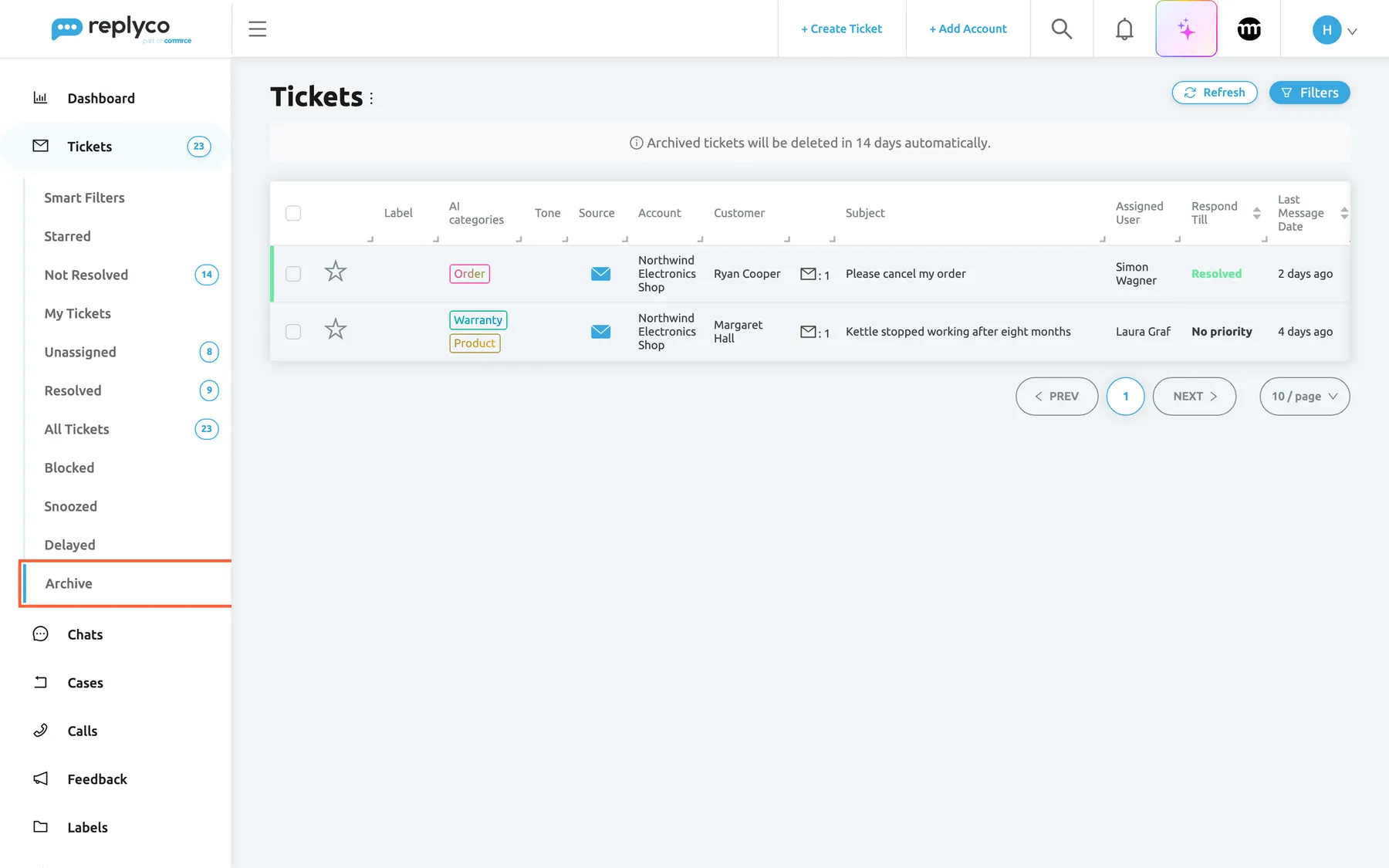
What this screenshot shows
- Screen
- Archive (/tickets/archive)
- Highlighted
- menuitem “Archive”, sidebar-left, selected. shows the archived tickets
- Also visible
- Tickets menu expanded, Archive selected without a counter; note: Archived tickets will be deleted in 14 days automatically.; two archived tickets, one resolved and one open; Refresh and Filters buttons
- Purpose
- the Archive list as it opens
| Region | What it shows | What you do there |
|---|---|---|
| Archive, in the sidebar under Tickets | The last view of the menu, without a counter | Open the list |
| Heading, top left | Tickets and the ⋮ menu for columns and export | Choose columns, export the page |
| Buttons, top right | Refresh and Filters | Reload the list; search and filter the archive |
| Retention note, under the heading | Archived tickets will be deleted in 14 days automatically., with your company’s number of days | Know when archived tickets are deleted |
| Bulk action bar, top centre | Appears when rows are ticked; Restore in place of Archive, and Delete forever at the end | Restore or delete tickets, or act on them |
| The table | One row per archived ticket, open or resolved | Open, tick, sort, right-click |
| Paging, bottom right | Page numbers and the page size | Move through pages |
The Archive list is the same screen as every ticket list, with the same columns, colours, filters and paging, explained in Ticket lists. Its own parts are the retention note, Restore in place of Archive and the Delete forever icon. The view has no counter, so the sidebar does not tell you how many tickets are archived.
The rows keep the status they had: a resolved ticket shows a green stripe and Resolved, an open one its deadline or No priority. Archiving is not resolving; for how the two differ, see Resolve, snooze or archive a ticket.
Archive tickets
Section titled “Archive tickets”You archive tickets from the other lists and from the ticket itself; the Archive list is where they arrive.
| Where | How | Replyco asks first? |
|---|---|---|
| Any ticket list | Tick the rows and select Archive in the bulk action bar | No |
| Any ticket list | Right-click a row, then Archive | No |
| Inside a ticket | The Archive icon in the ticket’s header | Yes: Are you sure?, or You have a draft message. Are you sure you want to continue? when you have an unsent draft |
| Inside a ticket, with keyboard shortcuts | Ctrl + Alt + A, when Enable Ticket Details Shortcuts is on in your Account Settings | No |
| When you reply | Tick Archive after Reply under the editor before you send; it starts ticked when Archive Tickets After Reply is on in your Account Settings | No |
| Automatically | A rule with the action Archive Ticket, see Rules for incoming tickets | No |
After archiving from a list, Replyco confirms with Ticket archived. or Tickets archived. and the tickets leave the list. How the bulk bar and the right-click menu work is described in Ticket lists, and the ticket header in The ticket screen.
What archiving changes. The ticket leaves every view, All Tickets and the label lists included, and appears in Archive. Its status, assignee, labels, priority and conversation stay as they are. For Gmail accounts, Replyco also archives the conversation in Gmail, taking it out of the inbox, and for eBay accounts on eBay’s current messaging connection it archives the conversation on eBay. On other channels, archiving only changes Replyco.
Example. eBay sends a notification about a listing that has ended. Nobody needs to answer it, so an agent right-clicks the ticket in Not Resolved and selects Archive. The ticket disappears from the list, and 14 days later Replyco deletes it unless someone restored it. If such notifications arrive every day, a rule with Archive Ticket does the same as they arrive.
How long archived tickets are kept
Section titled “How long archived tickets are kept”The note above the list reads Archived tickets will be deleted in 14 days automatically., with your company’s number of days; 14 is the default. The count starts when the ticket is archived. When the days have passed, Replyco deletes the ticket at its next daily clean-up, within about a day, with its messages and notes, and it can no longer be opened, found or restored. Restoring a ticket stops the count; archiving it again starts a new one.
The number of days is set for your company; it is not a setting on this screen or in your account settings. The note always shows the value that applies.
Plan retention applies as well. Independently of the archive, Replyco removes tickets that have not changed for longer than your plan’s Historical / Retention Period, archived or not. See What each plan includes.
When a ticket leaves the archive by itself
Section titled “When a ticket leaves the archive by itself”When a new message arrives in an archived ticket, Replyco takes the ticket out of the archive: it is open again, unread, no longer snoozed, and back in Not Resolved, All Tickets and its other views, with its assignee and labels. The same happens when a reply you sent from that ticket fails to go out. A customer who writes again is never lost in the archive.
A ticket of a blocked customer is the exception to where it reappears: it stays in Blocked. See Blocked tickets.
Search the archive
Section titled “Search the archive”-
Open TicketsArchive and select Filters.
-
Type in Search and press Enter, or choose values in the filters.
The search and filters work exactly as in every ticket list and look only at archived tickets. They are explained in Ticket lists.
What stays searchable. Until it is deleted, an archived ticket keeps everything that makes it findable: the customer’s name and email address, the subject, every message, the order and tracking numbers. Two searches find it: the search of the Archive list, and the search in the top bar, which looks through all tickets, archived, snoozed and blocked ones included. See Search. The search in any other list, All Tickets included, leaves archived tickets out. Once a ticket has been deleted, no search finds it.
An archived ticket whose customer is blocked appears only in Blocked, not in the Archive list. The search in the top bar finds it.
Restore tickets
Section titled “Restore tickets”-
Open TicketsArchive and tick the tickets you want back.
-
Select Restore, the third icon in the bulk action bar, in the place where other lists show Archive.
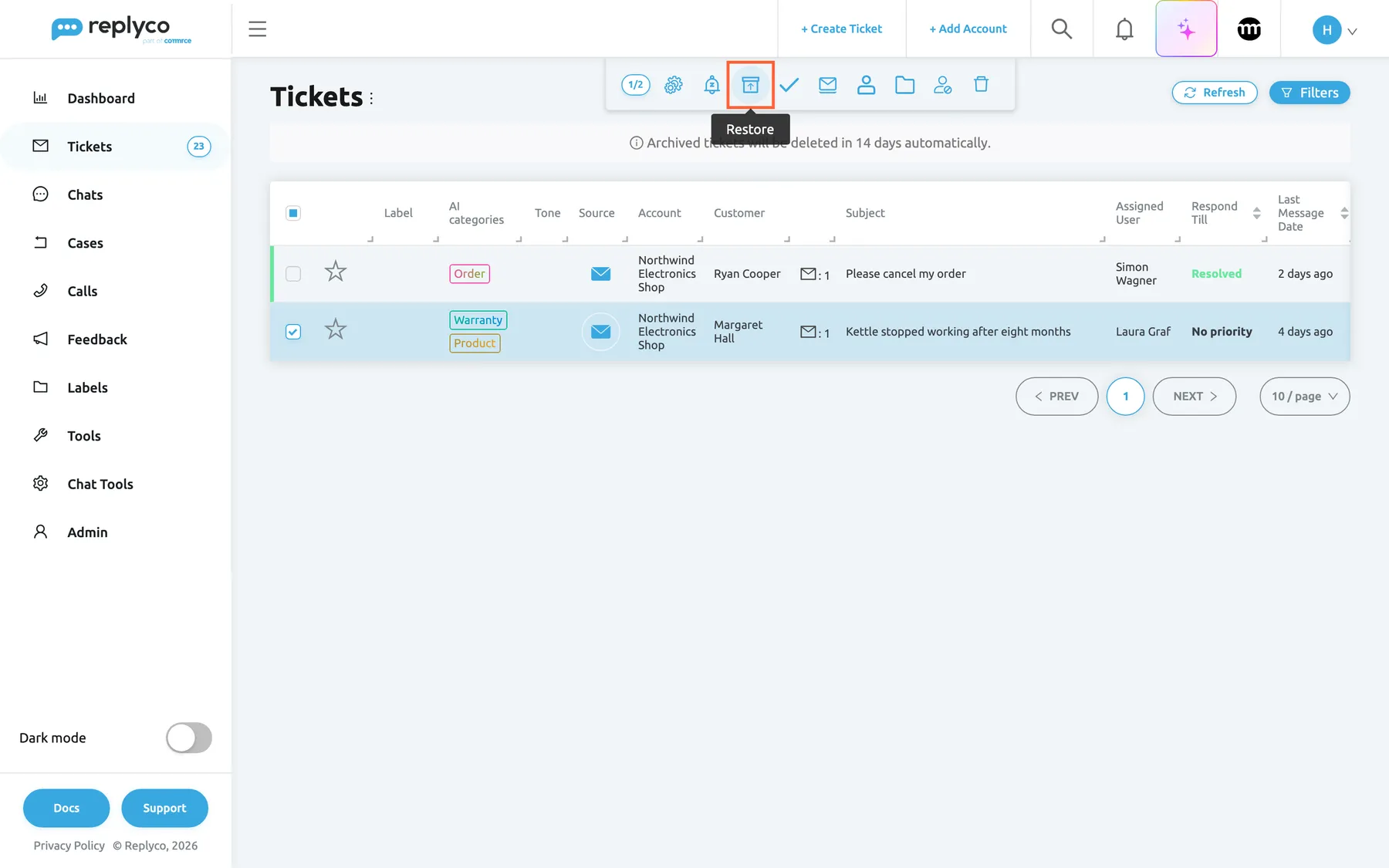
On the Archive list the Archive icon becomes Restore; it returns the ticked tickets to your lists. What this screenshot shows
- Screen
- Archive (/tickets/archive)
- Highlighted
- button “Restore”, top-center, hovered. takes the selected tickets out of the archive
- Also visible
- one row ticked; counter 1/2; bulk icons including Restore, Block Customer and Delete forever; the retention note under the heading
- Purpose
- restore archived tickets
-
Replyco confirms with Ticket restored. or Tickets restored., and the list reloads without them.
To restore a single ticket, right-click its row and select Restore, or open it and select Restore in the ticket’s header, which asks Are you sure? first.
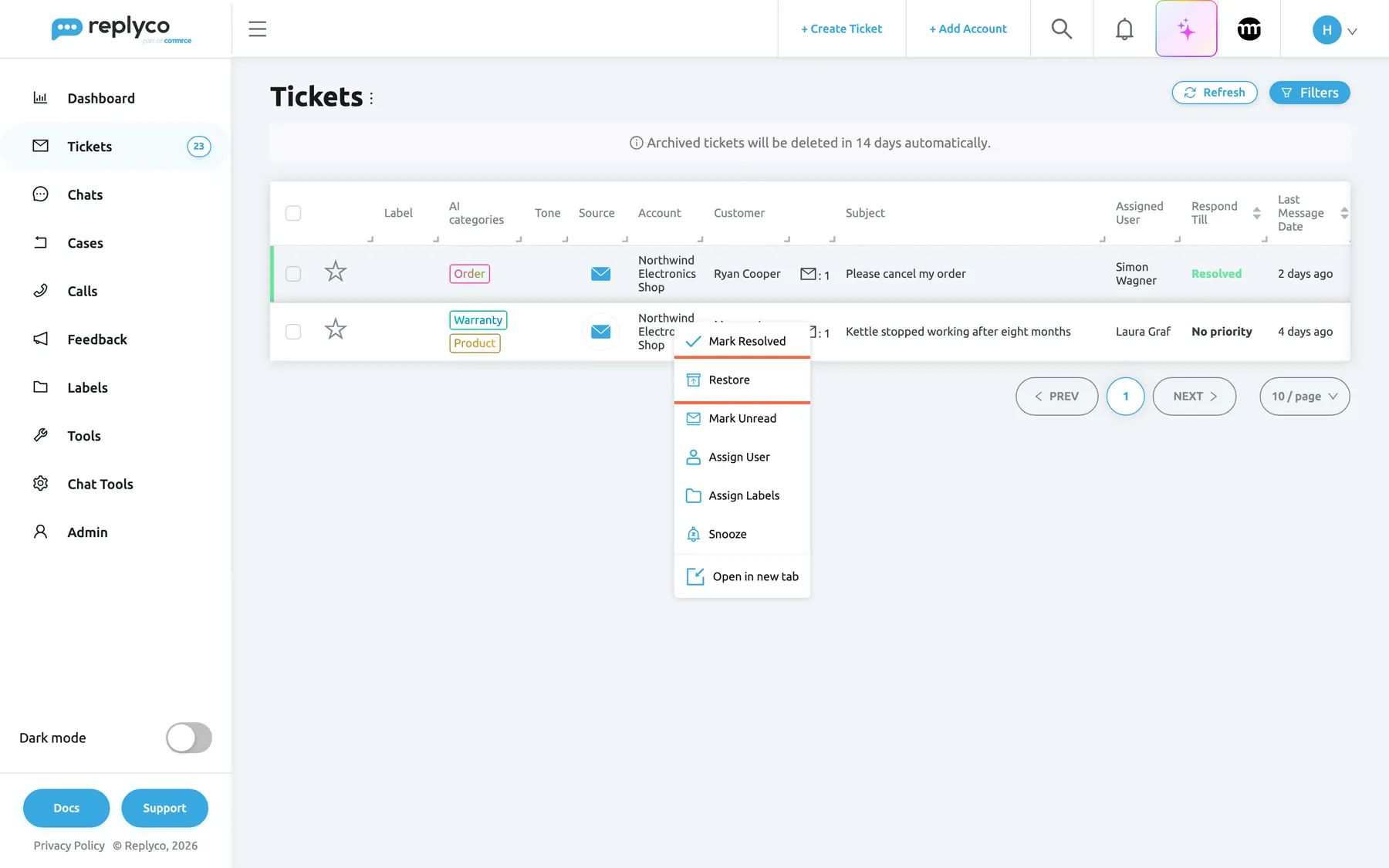
What this screenshot shows
- Screen
- Archive (/tickets/archive)
- Highlighted
- menuitem “Restore”, table-row-menu, enabled. takes the ticket out of the archive
- Also visible
- context menu: Mark Resolved, Restore, Mark Unread, Assign User, Assign Labels, Snooze, Open in new tab
- Purpose
- restore one archived ticket
A restored ticket goes back to the views its status puts it in: an open ticket to Not Resolved, a resolved one to Resolved, both to All Tickets and their label lists. For Gmail accounts the conversation returns to the Gmail inbox, and where Replyco archived an eBay conversation on eBay, it is active there again.
Delete archived tickets for good
Section titled “Delete archived tickets for good”-
Open TicketsArchive and tick the tickets to delete.
-
Select Delete forever, the bin at the end of the bulk action bar.
Replyco asks Are you sure you want to delete forever? Deleted tickets cannot be restored.
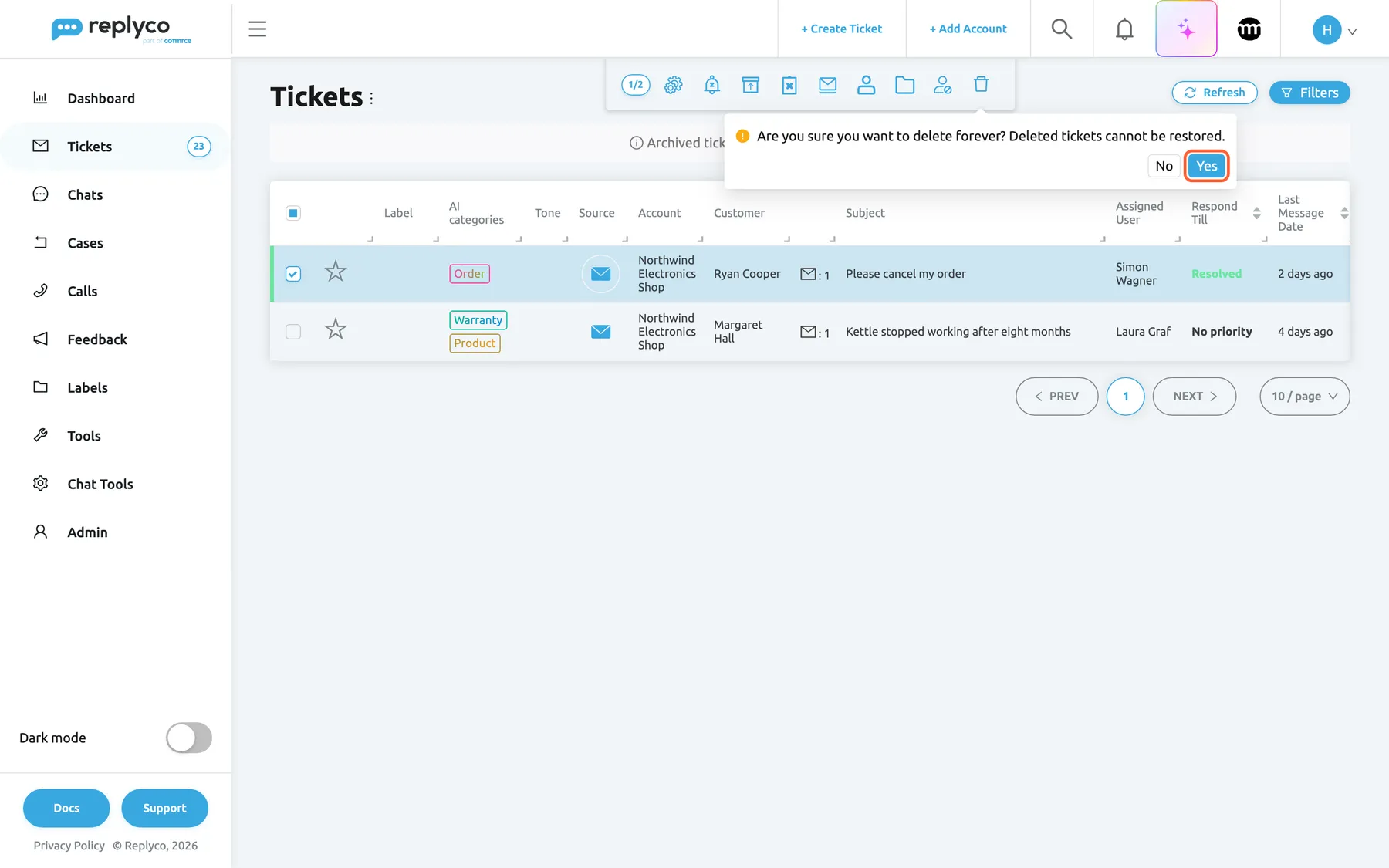
Delete forever, only on the Archive list, removes the ticked tickets for good after one confirmation. What this screenshot shows
- Screen
- Archive (/tickets/archive)
- Highlighted
- button “Yes”, top-center, enabled. deletes the selected tickets permanently
- Also visible
- one resolved row ticked; confirmation: Are you sure you want to delete forever? Deleted tickets cannot be restored.; buttons No and Yes
- Purpose
- delete archived tickets permanently
-
Select Yes. Replyco confirms with Ticket deleted. or Tickets deleted., and the tickets are gone.
Delete forever exists only on the Archive list, so a ticket has to be archived before it can be deleted. There is no way back: Replyco removes the ticket, its messages, notes and attachments from the app at once, and no search or list shows it afterwards. Nothing is deleted on the marketplace, in the shop or in your mailbox.
Every control, explained
Section titled “Every control, explained”The Archive list shares its heading, filters, columns, paging and most of its bulk and right-click actions with every ticket list; those are explained in Ticket lists. The controls below are the ones that differ.
Archive in the sidebar
Section titled “Archive in the sidebar”The sidebar, under Tickets, the last view of the menu.
Opens the list of archived tickets whose customers are not blocked, newest message first. It has no counter. It is shown only when an admin has given your user this ticket list.
Archived tickets are out of the way on purpose; one place still lets you check what was archived and bring something back.
The retention note
Section titled “The retention note”Under the heading of the Archive list, above the table.
Reads Archived tickets will be deleted in 14 days automatically. with your company’s number of days. It is information only; the number cannot be changed here.
It is the one reminder that the archive empties itself.
Restore
Section titled “Restore”The third icon of the bulk action bar on the Archive list, where other lists show Archive; also the second entry of the right-click menu on an archived row.
Takes the ticked tickets, or the right-clicked one, out of the archive without a confirmation, confirms with Ticket restored. or Tickets restored. and reloads the list. Status, assignee and labels stay as they were. Where the conversation was archived in Gmail or on eBay, it is restored there as well.
Archiving by mistake, or a question that comes back, should cost one click to undo.
Delete forever
Section titled “Delete forever”The last icon of the bulk action bar, a bin, on the Archive list only.
Asks Are you sure you want to delete forever? Deleted tickets cannot be restored.; Yes deletes the ticked tickets at once and confirms with Ticket deleted. or Tickets deleted.; No cancels. Deleted tickets cannot be restored.
Some conversations should not wait for the automatic deletion, for example a message sent to the wrong company or containing personal data you were asked to remove.
Restore in the ticket
Section titled “Restore in the ticket”The ticket’s header, in the place of Archive, when you open an archived ticket. With Enable Ticket Details Shortcuts on, Ctrl + Alt + A does the same.
The icon asks Are you sure? and restores the ticket; the shortcut restores it without asking. The icon then reads Archive again.
When you open an archived ticket from the search, you can bring it back without returning to the list.
Who sees what
Section titled “Who sees what”| Part of the screen | What decides whether you see it |
|---|---|
| Archive in the sidebar | Your user’s ticket lists, set by an admin on Access Rights in AdminUsers |
| Archived tickets of an account, or with a label | Your user’s accounts and labels, set in the same place |
| Restore and Delete forever | Everyone who can open the Archive list |
| The retention note | Everyone who can open the Archive list |
Every plan includes archiving. See User permissions and roles.
What you need to know
Section titled “What you need to know”| Topic | Fact |
|---|---|
| Automatic deletion | After your company’s number of days in the archive, 14 by default, counted from the moment of archiving |
| Plan retention | Tickets unchanged for longer than your plan’s Historical / Retention Period are removed, archived or not |
| Status | Archiving keeps the status; open tickets stay open |
| Coming back | A new message, or a reply that fails to send, takes the ticket out of the archive |
| Channels | Gmail conversations, and eBay conversations on eBay’s current messaging connection, are archived and restored on the channel too; other channels are not touched |
| Counter | None for the Archive view |
| Search | The Archive list’s own search and the search in the top bar find archived tickets; other lists do not |
| Blocked customers | Their archived tickets are in Blocked, not in the Archive list |
| Deleting | Delete forever on the Archive list only; cannot be undone |
| Shared by everyone | Archiving is company-wide: a ticket archived by one user is archived for all |
| Reports | The Overview dashboard counts archived tickets in Archived Tickets; see Overview dashboard |
Frequently asked questions
Section titled “Frequently asked questions”Archiving
Section titled “Archiving”What is the difference between archiving and resolving a ticket?
Section titled “What is the difference between archiving and resolving a ticket?”Resolving changes the ticket’s status to resolved; the ticket stays in Resolved and All Tickets. Archiving hides the ticket from every list except Archive and keeps its status, and Replyco deletes archived tickets automatically after the days shown on the Archive list. See Resolve, snooze or archive a ticket.
Does the customer or the marketplace notice when I archive a ticket?
Section titled “Does the customer or the marketplace notice when I archive a ticket?”The customer is not told. For Gmail accounts, Replyco also archives the conversation in Gmail, which takes it out of your inbox, and for eBay accounts on eBay’s current messaging connection it archives the conversation on eBay. On every other channel, archiving changes nothing outside Replyco.
Can tickets be archived automatically?
Section titled “Can tickets be archived automatically?”Yes, in two ways. A rule with the action Archive Ticket archives matching tickets as they arrive; see Rules for incoming tickets. And Archive after Reply, ticked under the editor, archives the ticket when you send your reply; Archive Tickets After Reply in your Account Settings ticks it for you by default.
What happens when the customer replies to an archived ticket?
Section titled “What happens when the customer replies to an archived ticket?”Replyco takes the ticket out of the archive as soon as the message arrives. The ticket is open again, unread and back in Not Resolved and All Tickets, with its assignee and labels, so the new message is not missed. A blocked customer’s ticket goes to Blocked instead.
Keeping and deleting
Section titled “Keeping and deleting”How long are archived tickets kept?
Section titled “How long are archived tickets kept?”As many days as the note above the Archive list says, 14 by default, counted from the moment each ticket was archived. Then, at its next daily clean-up and within about a day, Replyco deletes the ticket with its messages and notes. Restoring a ticket stops the count, and archiving it again starts a new one.
Can I change how many days archived tickets are kept?
Section titled “Can I change how many days archived tickets are kept?”Not in the app. The number of days is set for your company and there is no setting for it on the Archive list or in the settings screens. The note above the Archive list always shows the number that applies to your company.
Can I get a deleted ticket back?
Section titled “Can I get a deleted ticket back?”No. A ticket deleted with Delete forever, or deleted automatically after its days in the archive, cannot be opened, found or restored in Replyco. The confirmation says so before you delete. Restore tickets you want to keep before their days in the archive run out.
Why was a ticket deleted that nobody archived?
Section titled “Why was a ticket deleted that nobody archived?”Every plan has a Historical / Retention Period: tickets that have not changed for longer than that are removed whether they are archived or not. The archive’s countdown only applies on top of that, to archived tickets. See What each plan includes.
Who can delete tickets forever?
Section titled “Who can delete tickets forever?”Everyone who can open the Archive list, where Delete forever sits in the bulk action bar. An admin decides which users see the Archive list, on the Access Rights of each user in AdminUsers.
Finding and restoring
Section titled “Finding and restoring”How do I find an archived ticket?
Section titled “How do I find an archived ticket?”Open TicketsArchive, select Filters and search by customer, subject, message text or order number. The search in the top bar finds archived tickets too, together with every other ticket. The search of other lists, such as All Tickets, leaves archived tickets out.
Why is an archived ticket not in the Archive list?
Section titled “Why is an archived ticket not in the Archive list?”Two reasons. Its customer may be blocked, and then it is in Blocked, where the search in the top bar also finds it. Or its days in the archive have run out and it was deleted.
How do I restore several tickets at once?
Section titled “How do I restore several tickets at once?”On TicketsArchive, tick the tickets, or tick the box in the table heading for the whole page, and select Restore in the bulk action bar. Replyco restores them without a confirmation and each ticket returns to the views its status puts it in.
Where does a restored ticket go?
Section titled “Where does a restored ticket go?”To the views its status puts it in: an open ticket to Not Resolved, a resolved one to Resolved, both to All Tickets and to the lists of their labels. Its assignee, labels and priority are unchanged.
Troubleshooting
Section titled “Troubleshooting”| Symptom | What to check |
|---|---|
| A ticket is missing from every list | Open Archive; if it is not there, open Blocked; then search for it with the search in the top bar |
| An archived ticket is back in Not Resolved | Expected: the customer wrote again, or a reply from that ticket failed to send |
| An archived ticket is not in the Archive list | Its customer is blocked (see Blocked), or its days in the archive have run out; then your filter tags |
| Delete forever is not in the bulk bar | It is on the Archive list only; tick at least one row there |
| The Archive view is not in the sidebar | Your user’s ticket lists on Access Rights in AdminUsers |
| A restored ticket went to Resolved, not Not Resolved | Expected: it was resolved before it was archived; select Mark Unresolved to open it |
Related
Section titled “Related”- Ticket lists · The ticket screen · Blocked tickets
- Resolve, snooze or archive a ticket
- Rules for incoming tickets · Account Settings
- Search · Overview dashboard
- Message tone analysis · AI drafts · AI categories · AI summaries · Translations
- Ticket priorities and SLA · Ticket merging
- User permissions and roles · What each plan includes
- Troubleshooting tickets