

When Replyco is slow or unavailable
This page helps you decide whether a problem is on Replyco’s side or on yours when Replyco is slow, does not load, signs you out, or brings in messages late. The first thing to check is the top of the screen: while Replyco is dealing with a service problem, every user in every company sees a yellow band above the top bar that reads Replyco is currently experiencing some performance issues. We’re aware of the problem and working to resolve it as soon as possible.. Without that band, the cause is usually the browser, the network, an account’s sync or your user’s access, and the rows below say what to check, in the order support checks it. Problems that belong to one area have their own pages: Troubleshooting tickets for missing tickets and replies, and Fix a blocked or silent account for an account that stopped syncing.
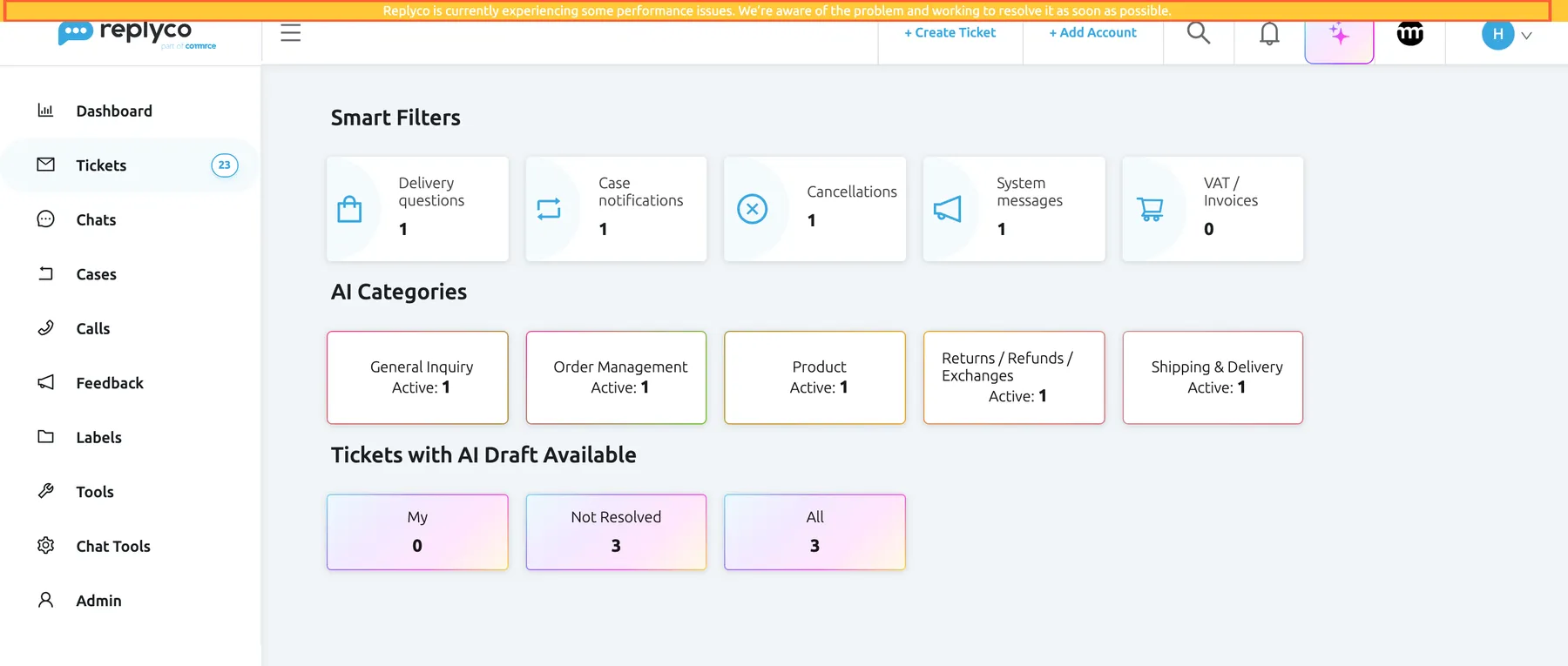
What this screenshot shows
- Screen
- Smart Filters (/)
- Highlighted
- text “Replyco is currently experiencing some performance issues. We’re aware of the problem and working to resolve it as soon as possible.”, top-band, shown. none; it cannot be closed
- Also visible
- top bar with + Create Ticket, + Add Account, search, bell and avatar; sidebar menu; Smart Filters start screen
- Purpose
- the notice Replyco shows to every user during a service problem
Symptoms
Section titled “Symptoms”Replyco is down or slow
Section titled “Replyco is down or slow”| Symptom | What to check, in order | Fix |
|---|---|---|
| A yellow band above the top bar reads Replyco is currently experiencing some performance issues. We’re aware of the problem and working to resolve it as soon as possible. | Nothing on your side. Replyco shows the band to everyone while it works on a service problem, and it has no cross to close it. Replyco checks for the band each time it loads. | Reload the page later to see whether the band has gone. If messages from one account are still missing after it has gone, see Fix a blocked or silent account. |
| Screens load slowly or stay empty, and there is no yellow band | Open Replyco in a private window of the same browser and sign in. A private window starts without the data Replyco keeps in your browser and usually without extensions. Then ask a colleague whether Replyco is slow for them too. | If the private window works, the cause is in your usual browser; see the rows under The browser or the device. If it fails in the private window and for colleagues as well, contact support as described in Still stuck. |
| A red Error message appears at the top right when you open or save something | The text of the message: when Replyco’s server gives a reason, the message shows it, shortened when it is long. Try the action once more. | If the same action fails again, copy the text of the message and send it to support with the time. If every action fails, look for the yellow band. |
| A page with the Replyco logo reads “Something went wrong” and asks you to contact support | Which screen you opened and what you selected just before. Replyco shows this page in place of the whole window when a screen cannot be shown. | Reload the page. If it appears again, go back with the browser’s back button and open another screen, then send support the address from the browser’s address bar, the time and a screenshot. |
The browser or the device
Section titled “The browser or the device”| Symptom | What to check, in order | Fix |
|---|---|---|
| Replyco works in a private window but not in your usual window | The data Replyco keeps in your browser, and your browser extensions. Replyco keeps your sign-in, the filters of each ticket view and whether the sidebar is collapsed in the browser. | Clear the site data for Replyco in your browser’s settings, then sign in again; the saved filters and the collapsed sidebar go back to their defaults. Or switch off extensions for Replyco one at a time and reload. |
| Before Replyco opens, a full-screen page reads We see you're using a browser other than Chrome to access Replyco. For the best possible experience, we recommend downloading the latest version | Your browser. Replyco shows this page in every browser except Chrome and Firefox. | Open Replyco in Chrome, or close the page with the cross at the top right and confirm Proceed anyway?. The browser remembers the choice and does not ask again. |
| On a phone or tablet, Replyco’s address shows only In order to access Replyco app via mobile, please download our mobile app. It is available for both iOS and Android devices. Download the app in the App Store or Google Play. | The device. The web version of Replyco is for computers; on phones and tablets it points to the mobile app. | Install the Replyco app from the App Store or Google Play, or use a computer. |
| Support opens nothing, or the card field on the Payment tab of AdminBilling stays empty | Extensions that block ads, trackers or scripts, and company network filters. The support chat comes from Replyco’s support service and the card field from your payment provider, both from outside Replyco’s own address, and blockers often stop them. | Allow Replyco in the extension, or pause it, and reload the page. On a company network, ask your IT team to allow those services. |
| Chats do not update, the chat reply box stays grey, or colleagues’ names do not appear on a ticket they have open | Your connection to Replyco’s live service. Chats, notes, and the names of colleagues who have a ticket open reach your browser over a live connection (WebSocket), which some company networks, VPNs and firewalls block. Replyco reconnects by itself after a short drop. | Reload the page. If it keeps happening only on one network, ask your IT team to allow WebSocket connections to Replyco. See Chat list and conversations. |
| A chat reply shows Failed to send message. Please check your connection. | Your internet connection, and whether other screens still load. | When the connection is back, reload the page and send the reply again. |
Messages arrive late or not at all
Section titled “Messages arrive late or not at all”| Symptom | What to check, in order | Fix |
|---|---|---|
| A message is in the marketplace or mailbox but not yet in Replyco | Replyco fetches new messages for each account about every five minutes, so a few minutes’ delay is normal. A mailbox connected by forwarding adds the time your mailbox takes to forward. | Wait for the next sync. A ticket list you have open does not reload by itself: when the banner New tickets have arrived. Click refresh button to update the list. appears, refresh the list. See Ticket lists. |
| The time under Last Messages Sync on AdminAccounts stops moving for one account | Open the account. Blocked with a reason means it needs your action; Account sync is queued. means it waits for its turn; Account Sync is in progress. means it is syncing now. | Fix a block as described in Fix a blocked or silent account. For a queued account, wait ten minutes; if the time still does not move, contact support. |
| No account brings in new messages | A red band at the top reading URGENT: Account synchronization has been suspended due to a Declined Subscription Payment. To reactivate, please update payment settings under the, or a trial that ended without a plan. In both cases Replyco pauses syncing for the whole company. | Update the card in Billing: Payment, or choose a plan in Subscribe to a plan. Syncing resumes within a few minutes. |
| Messages from the time Replyco was unavailable are not there yet | The time under Last Messages Sync for the account. Each account’s next sync continues from its last sync. | Wait for the next sync after the yellow band has gone; the messages arrive as new tickets or in their tickets. |
| Your replies stay Processing | The account’s status, a yellow bar asking you to verify your company’s email address, and your billing. Replyco sends only through accounts that sync. | See Troubleshooting tickets. The waiting replies go out on the next sending run. |
Sign-in and access
Section titled “Sign-in and access”| Symptom | What to check, in order | Fix |
|---|---|---|
| Your session has expired. and the sign-in screen | Your sign-in has ended: it was not renewed in time, your password was changed, or the browser’s site data was cleared. | Sign in again. For everything that ends a session, see Sign in. |
| Your session has been ended as your account was used to log in on another device. If this wasn’t you, please contact Replyco Support immediately for further assistance. | Whether an administrator blocked your user, or, on a plan billed per user, whether your user signed in on another computer. | Sign in again, or ask an administrator; if neither was you or your administrator, change your password. See Sign in. |
| A yellow You don't have enough rights message when you select something | Your user’s permissions: the action needs a permission your user does not have. Companies on an older plan may also not have every feature. | Ask an administrator to check your user in AdminUsers; see User permissions and roles and What each plan includes. |
| After sign-in only the subscription and Help screens open | The trial ended without a plan. | An administrator chooses a plan; see Subscribe to a plan. |
Still stuck
Section titled “Still stuck”Contact support with Support in the user menu at the top right or at the foot of the sidebar; see Help and support. If you cannot sign in, the support chat is not available; write to the address Replyco names in its own messages: help@replyco.com in the English interface, support@replyco.io in the German one. Include:
- the time the problem started, and your time zone;
- whether the yellow band was shown, whether a private window works, and whether colleagues see the same;
- the browser and whether you are on a company network or VPN;
- the address from the browser’s address bar, and the full text of any message;
- a screenshot of the whole browser window;
- for late messages, the account’s name as it appears on AdminAccounts and the time of a message that is missing.
Support can see each account’s sync history and the channel’s last answer, can put an account at the front of the sync queue, and can look up your user’s sign-ins, your company’s plan and features, and your user’s permissions.
Related: Help and support · Replyco FAQ · Fix a blocked or silent account · Troubleshooting tickets · Sign in · The Replyco screen