

Resolve, snooze or archive a ticket
Every ticket in Replyco has a status, open or resolved, and can in addition wait somewhere outside your working lists: snoozed until a time, archived, or with the tickets of a blocked customer. Deleted is the end of a ticket. Together these decide which list under Tickets shows the ticket, whether its deadlines count against you, and whether your rules run on it. A new message in the conversation brings a ticket back from resolved, snoozed and archived, so a customer who writes again is never lost. This page explains the states and what moves a ticket between them; the buttons themselves are described in The ticket screen and Ticket lists.
Availability: every plan includes everything on this page. Deadlines exist only for tickets with a priority; see Ticket priorities and SLA.
How it works
Section titled “How it works”The states
Section titled “The states”| State | What it means | How a ticket gets there | Where you find it |
|---|---|---|---|
| New | Open, unread, and nobody has replied yet | A customer writes and Replyco creates the ticket | Not Resolved, All Tickets, and My Tickets or Unassigned; the filter New in Additional Filter shows only these |
| Open | Not resolved | Any new message; Mark as Unresolved | The same lists as New |
| Responded | Open, and your team’s reply is the latest message | You reply without resolving; an auto-response does not count | The same lists; Respond Till reads Responded |
| Resolved | Finished for your team | Resolve, Resolve after Reply, or a rule | Resolved, All Tickets, and My Tickets or Unassigned |
| Snoozed | Hidden until a time you chose; open or resolved underneath | Snooze in the ticket or the list | Snoozed only |
| Archived | Out of every working list; open or resolved underneath | Archive, Archive after Reply, or a rule | Archive only |
| Blocked | The customer is blocked; the ticket keeps its status | Blocking the customer | Blocked only, even when also archived or snoozed |
| Deleted | Gone from Replyco | Delete forever in the archive, the archive’s automatic deletion, a merge, or your plan’s data retention | Nowhere; no list or search finds it |
A ticket is always open or resolved; snoozed, archived and blocked are places where it waits on top of that. An archived ticket that was open stays open, and it goes back to Not Resolved when you restore it. The search in the top bar looks through every ticket, archived, snoozed and blocked ones included; see Search.
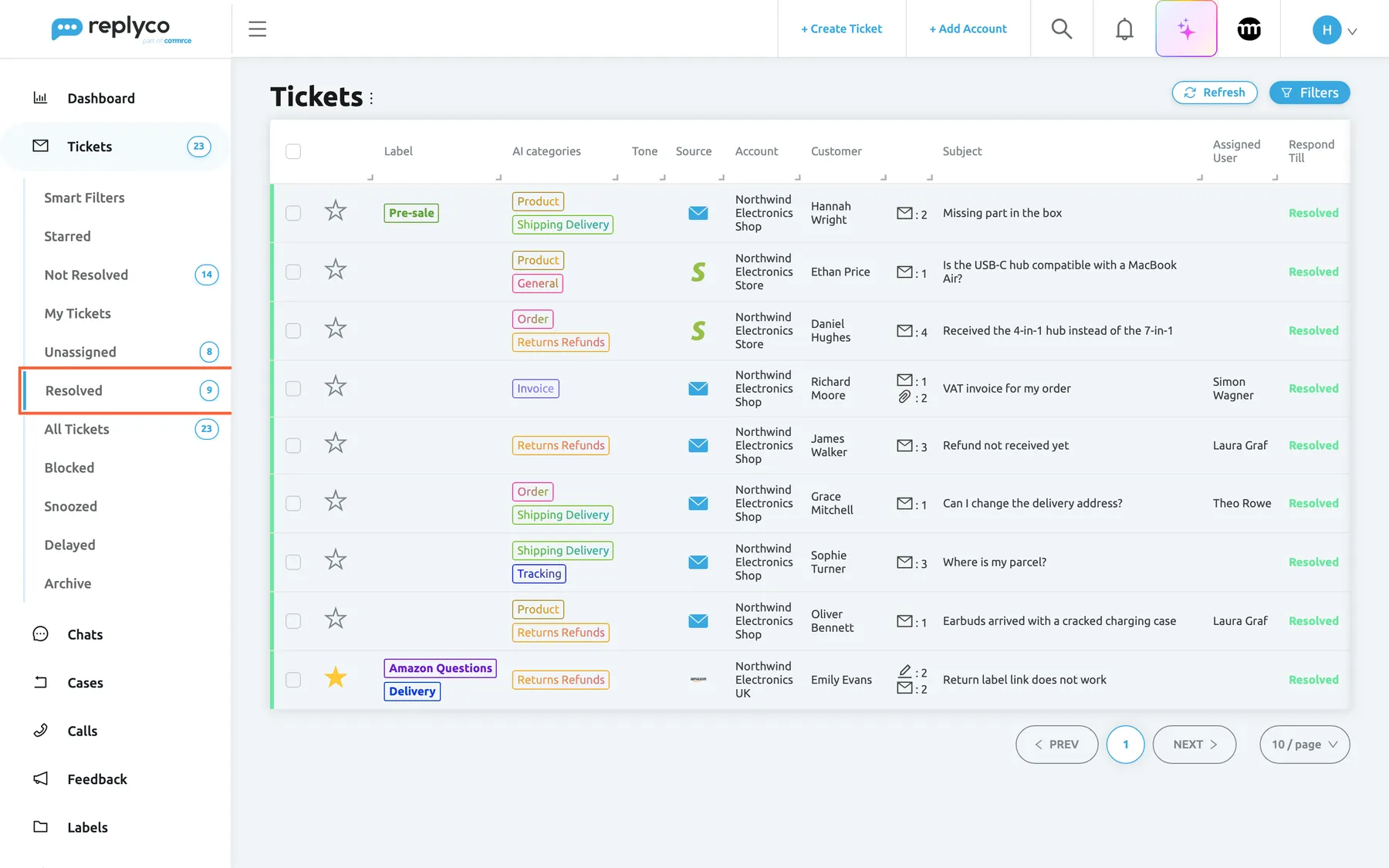
What this screenshot shows
- Screen
- Resolved (/tickets/resolved)
- Highlighted
- menuitem “Resolved”, sidebar-left, selected. shows the resolved tickets
- Also visible
- views: Not Resolved 14, Unassigned 8, Resolved 9, All Tickets 23, Blocked, Snoozed, Delayed, Archive; nine rows with a green stripe and Resolved in Respond Till
- Purpose
- which list shows a ticket in each state
What moves a ticket
Section titled “What moves a ticket”| Event | What changes |
|---|---|
| A new message arrives in the conversation | The ticket is open and unread again; it leaves the archive and its snooze ends. A blocked customer’s ticket reopens but stays in Blocked. |
| A reply typed outside Replyco, for example on eBay | Replyco imports it into the conversation like any other new message: the ticket is open and unread again, and it leaves the archive. Resolve or archive it again if the conversation is finished. |
| You send a reply | A snooze ends and auto-responses still waiting in the ticket are cancelled. The status does not change unless you tick Resolve after Reply; Archive after Reply archives the ticket. With Unassign a ticket upon resolution on in your Account Settings, resolving with the reply also removes the assignee. |
| A reply fails to send | The ticket is open again and leaves the archive, so the failed reply is seen. |
| You resolve the ticket | Status resolved. Auto-responses still waiting are cancelled. Your settings Unassign a ticket upon resolution and Automatically Mark Ticket as Read After Resolving apply. Mark as Unresolved opens it again. |
| You snooze the ticket | It waits in Snoozed until the time you picked, then returns to its lists. Stop snoozing ends the snooze at once. |
| You archive the ticket | It moves to Archive with its status. Replyco deletes archived tickets after your company’s number of days, 14 by default. Restore brings it back. See Archived tickets. |
| A rule matches a new customer message | Update Ticket Status can resolve the ticket and Archive Ticket can archive it. Rules run after the message has reopened the ticket. See Rules for incoming tickets. |
| You block or unblock the customer | Every ticket of the customer moves to Blocked, or back to the lists its state puts it in. See Blocked tickets. |
| You merge tickets | The oldest ticket stays; the others are deleted. See Assign, label and merge tickets. |
Deadlines, rules and notifications in each state
Section titled “Deadlines, rules and notifications in each state”| State | Deadlines | Rules and auto-responses | Notifications |
|---|---|---|---|
| New and open | The respond-by time of the ticket’s priority runs and is set again with each new customer message | Run on every new customer message | A new ticket notifies every user who has New Ticket switched on; a new message notifies the assignee through New Ticket Message |
| Responded | Respond Till reads Responded until the customer writes again | Run when the customer writes again | As for open tickets |
| Resolved | Respond Till reads Resolved; resolved tickets never count as due or overdue in the deadline filters | Run when the customer writes again, after the ticket has reopened | The assignee is notified of the new message |
| Snoozed | Keep running; snoozing does not pause them | Run on a new customer message, which ends the snooze | Snoozing notifies the other users who have Ticket Snoozed switched on; when the time is up, the assignee gets the notice The snooze time for the ticket has expired at the bell, in your company’s interface language |
| Archived | Keep running; archiving does not resolve the ticket | Run on a new customer message, which takes the ticket out of the archive | As for open tickets |
| Blocked | Updated as for any ticket | Do not run; no auto-responses are sent | See Blocked tickets |
| Deleted | None | None | None |
The respond-by and resolve-by times, and how working hours count, are explained in Ticket priorities and SLA. Which notifications you receive, and on which channels, you choose in Notifications.
Example
Section titled “Example”Sophie Turner, a customer of Northwind Electronics, asks about her Power Bank 20,000 mAh. Her ticket #32534, Where is my parcel?, comes in on the Northwind Electronics Store account with the priority Standard (24 hours).
| When | What happens | State | Where the ticket is |
|---|---|---|---|
| 7 March, 11:02 | Sophie writes that the tracking has not changed for four days | New | Not Resolved, Unassigned; the 24-hour respond-by time starts |
| 7 March, 11:06 | She adds Any update on this, please? | New | Same lists; the respond-by time is set again from her new message |
| 7 March, 22:54 | Theo Rowe replies that the parcel is held at the courier’s regional depot, without ticking Resolve after Reply | Responded | Not Resolved and Theo’s My Tickets, because the company assigns tickets to whoever replies first |
| 7 March, 22:55 | Theo snoozes the ticket with Tomorrow to 8am to check the tracking again | Snoozed | Snoozed only |
| 8 March, 08:00 | The snooze time is up | Responded | Back in Not Resolved, with red text above the subject; Theo gets the notice The snooze time for the ticket has expired with the ticket’s subject |
| 8 March, 08:10 | The tracking shows the parcel delivered; Theo selects Resolve | Resolved | Resolved, green stripe |
| 9 March, 16:20 | Sophie writes It arrived, thank you! | Open, unread | Not Resolved; Theo is notified of the new message |
| 9 March, 16:25 | Theo replies Glad to hear it with Resolve after Reply and Archive after Reply ticked | Resolved and archived | Archive; the archive’s countdown starts |
If Sophie writes again a week later, the ticket leaves the archive, opens and appears in Not Resolved with its whole history.
What it does not do
Section titled “What it does not do”- It changes nothing on the marketplace. Resolving or snoozing a ticket is a status inside Replyco only; Amazon, eBay and the other marketplaces keep their own view of whether a message was answered. On Amazon tickets whose message carries Amazon’s link to close the case, Resolve Case opens that link; see The ticket screen. Archiving is mirrored only for Gmail and for eBay’s current messaging connection; see Archived tickets.
- The customer is not told. No state sends anything to the customer; only a reply does.
- Snoozing and archiving do not pause deadlines. A snoozed or archived ticket can come back overdue. Resolve a ticket when it is finished.
- Archiving is not keeping. Archived tickets are deleted after the number of days shown above the archive list. Keep conversations you may need, such as disputes or warranty cases, resolved in your lists.
- Blocking is not a ticket state. It belongs to the customer and moves all of their tickets; see Blocked tickets.
- A reply scheduled for later is not a state of the ticket. Such tickets also appear in Delayed; see Delayed sending.
- This page does not explain the deadline calculation or merging. See Ticket priorities and SLA and Ticket merging.
Where you see it
Section titled “Where you see it”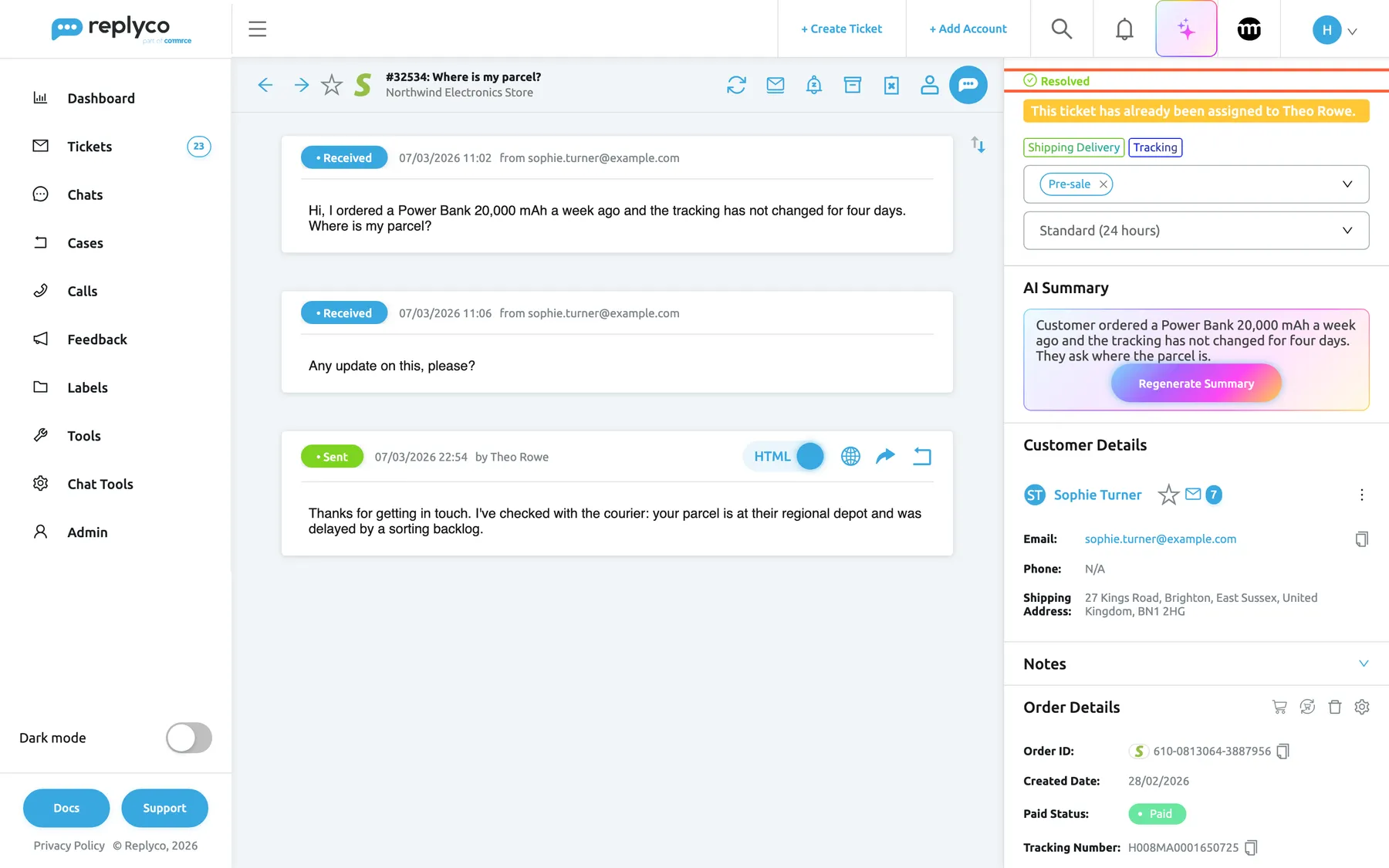
What this screenshot shows
- Screen
- Resolved (/ticket/:threadId)
- Highlighted
- status “Resolved”, right-panel-top, shown. none
- Also visible
- assignee line Theo Rowe; customer messages and a Sent reply; header icon Mark as Unresolved
- Purpose
- how a resolved ticket looks
| Surface | What it shows | More |
|---|---|---|
| The views under Tickets and their counters | Which tickets are in each state | Ticket lists |
| The stripe at the left of a row and Respond Till | Green and Resolved for resolved tickets, Responded after your reply, the countdown while a deadline runs | Ticket lists |
| Additional Filter in the filters | New, Not Resolved and Resolved narrow a list by state | Ticket lists |
| The top of the ticket’s right panel | A green Resolved line, a red line for a blocked customer, the snooze time | The ticket screen |
| The ticket’s header | Resolve or Mark as Unresolved, Archive or Restore, Snooze | The ticket screen |
| The ticket’s history, with Load user logs in the ticket on | Who resolved, snoozed or archived the ticket, and when | The ticket screen |
| The note above the archive list | How many days archived tickets are kept | Archived tickets |