

eBay
eBay keeps buyer questions, orders, feedback and returns in separate corners of Seller Hub, and a buyer who asks about a missing parcel may also have opened a return about it. Connect your eBay seller account to Replyco and the messages become tickets with the order beside them, your replies go back to the buyer through eBay, and feedback and eBay cases arrive in their own lists. This guide covers both ways Replyco connects to eBay, what each one brings in, the settings that exist only for eBay, and the rules eBay puts on your replies.
What it does
Section titled “What it does”Selling on eBay means answering buyers inside eBay’s messaging, within eBay’s rules: plain text only, a length limit, images as the only attachments, and no phone numbers, email addresses or outside links. A team that works in Seller Hub and in a helpdesk at the same time loses track of which buyer was answered where, and a reply that breaks eBay’s rules only fails once you have written it.
With an eBay account connected, Replyco collects the account’s buyer messages about every five minutes, groups them into tickets, links each ticket to its eBay order, and sends your replies back through eBay. From there:
- You choose how Replyco connects: the classic connection, or eBay v2, the newer one that follows eBay’s own conversations. See the two eBay connections.
- Messages, orders, feedback and eBay cases arrive by themselves, each on its own rhythm. See how Replyco decides.
- Three settings exist only for eBay: one decides whether eBay’s own notices share a ticket, one imports eBay returns and inquiries, and one converts attachments for eBay. See every setting, explained.
- The reply editor counts characters against eBay’s limit, and Replyco checks attachments and contact details before eBay sees them. See eBay in your tickets.
- An eBay order in a ticket can be cancelled, refunded or returned without opening Seller Hub. See the eBay order actions.
Every reply that cannot be delivered keeps the reason on the message, and every account block keeps its reason in the account’s details, so you can always see why something did not reach the buyer.
Before you start
Section titled “Before you start”| Requirement | Details |
|---|---|
| Plan | Every plan includes eBay, eBay cases, the eBay order actions in tickets and order sync. Companies on an older plan may not have the order actions or order sync; during a trial every feature is on. See What each plan includes. |
| The Admin permission | Connecting, re-login and deleting an account are done under AdminAccounts, which only users with the Admin permission reach. The eBay settings on AdminCompany Settings need the Admin permission with Edit rights. See User permissions and roles. |
| An eBay seller login | The eBay user whose messages you want. Replyco names the account after that eBay user, and each eBay user is connected once. |
| A free account on your plan | Each connected account counts towards your plan’s limit. At the limit, Replyco refuses with “You reached your current plan maximum integrations count. Contact support for more info.” See Billing. |
| The eBay v2 tile, only for eBay v2 | The eBay v2 tile appears only for companies that have Replyco’s beta features. Without them, the classic eBay tile is the one offered. |
| Cost | Nothing per message. Replyco works with your eBay login; eBay’s own limits on its interfaces apply. |
Understanding the two eBay connections
Section titled “Understanding the two eBay connections”Replyco offers two tiles for eBay under Add Account: eBay, the classic connection, and eBay v2, marked BETA. Both sign in to eBay the same way and bring in messages, orders, feedback and cases. They differ in how they read messages from eBay, which decides how tickets are formed:
| Classic (eBay) | eBay v2 (eBay v2) | |
|---|---|---|
| Who can add it | Every company | Companies with Replyco’s beta features |
| How messages are read | eBay’s message folders, including your sent messages | eBay’s conversations: one per buyer and listing, plus eBay’s own conversations |
| Which ticket a message joins | The buyer’s ticket for the same order number, otherwise for the same item | The ticket of the same eBay conversation |
| Archiving a ticket | Archives the ticket in Replyco | Also archives the conversation on eBay; restoring the ticket makes it active on eBay again |
A buyer who writes Where is my Desk Lamp Fold? Order 14-11562-80417 reaches you on either connection. On the classic one the message joins the buyer’s ticket for that order; on eBay v2 it joins the ticket of the conversation it was written in.
How Replyco decides
Section titled “How Replyco decides”- Messages every five minutes. Replyco asks eBay for new messages about every five minutes for each account that is not blocked, starting a little before the last sync so nothing between two rounds is missed. A message Replyco already has is never imported twice.
- Orders, feedback and cases on their own rhythm. Orders are fetched every few minutes, feedback about every ten minutes, and new eBay cases every 25 minutes when Enable eBay Cases is on. An order Replyco already has is refreshed when a new message arrives on its ticket, or when you select Sync Order from Market in Order Details.
- Classic: order first, then item. A message that contains an eBay order number joins that buyer’s ticket for the order. Otherwise, if merging tickets from the same customer is on for the account, it joins the buyer’s latest ticket within the day limit. A notice from eBay itself opens its own ticket unless Merge eBay Notifications is ticked. Everything else joins the buyer’s ticket for the same item.
- eBay v2: the conversation. A message joins the ticket of its eBay conversation. If there is none and merging tickets from the same customer is on, it joins the buyer’s latest ticket within the day limit.
- Your own replies from eBay come in too. A reply you write on eBay itself appears in the ticket as your message, and it reopens the ticket, takes it out of the archive and marks it unread, so your team sees what was answered outside Replyco. A reply you sent from Replyco is recognised and not added a second time.
- eBay decides whether a message can be answered. eBay marks each message as answerable or not; eBay’s own notices usually are not. A ticket without an answerable message shows no Respond icon.
- Read and unread go both ways. Marking a ticket read or unread in Replyco marks its messages the same way on eBay.
- A new message reopens the ticket. A resolved, snoozed or archived ticket comes back to your lists when the buyer writes again.
What does not get imported
Section titled “What does not get imported”- Your whole eBay history. The first import reaches back a limited number of days from the moment you connect, and later rounds only look at recent messages.
- Messages with no text, and bounced-mail notices.
- eBay v2 conversations you archived on eBay.
- Anything from an account that is blocked or waiting for a new login. Once you fix it, the next rounds catch up within the sync window. See Fix a blocked or silent account.
- Orders on plans without order sync, and feedback on plans without feedback.
Setting it up in six steps
Section titled “Setting it up in six steps”-
Open the account picker. Select + Add Account in the top bar. The Add Account page shows one tile per marketplace. To learn the whole page, see Add Account.
-
Choose the connection. Select the eBay tile for the classic connection, or eBay v2 if your company has it and you want the newer one. A dialog opens with the step AUTHORIZE.
-
Authorize. Select Authorize. eBay opens in a new browser tab, and the dialog in the Replyco tab moves on to its last step, FINISH. Carry on in the new tab: the account is saved once you choose your shop country there.
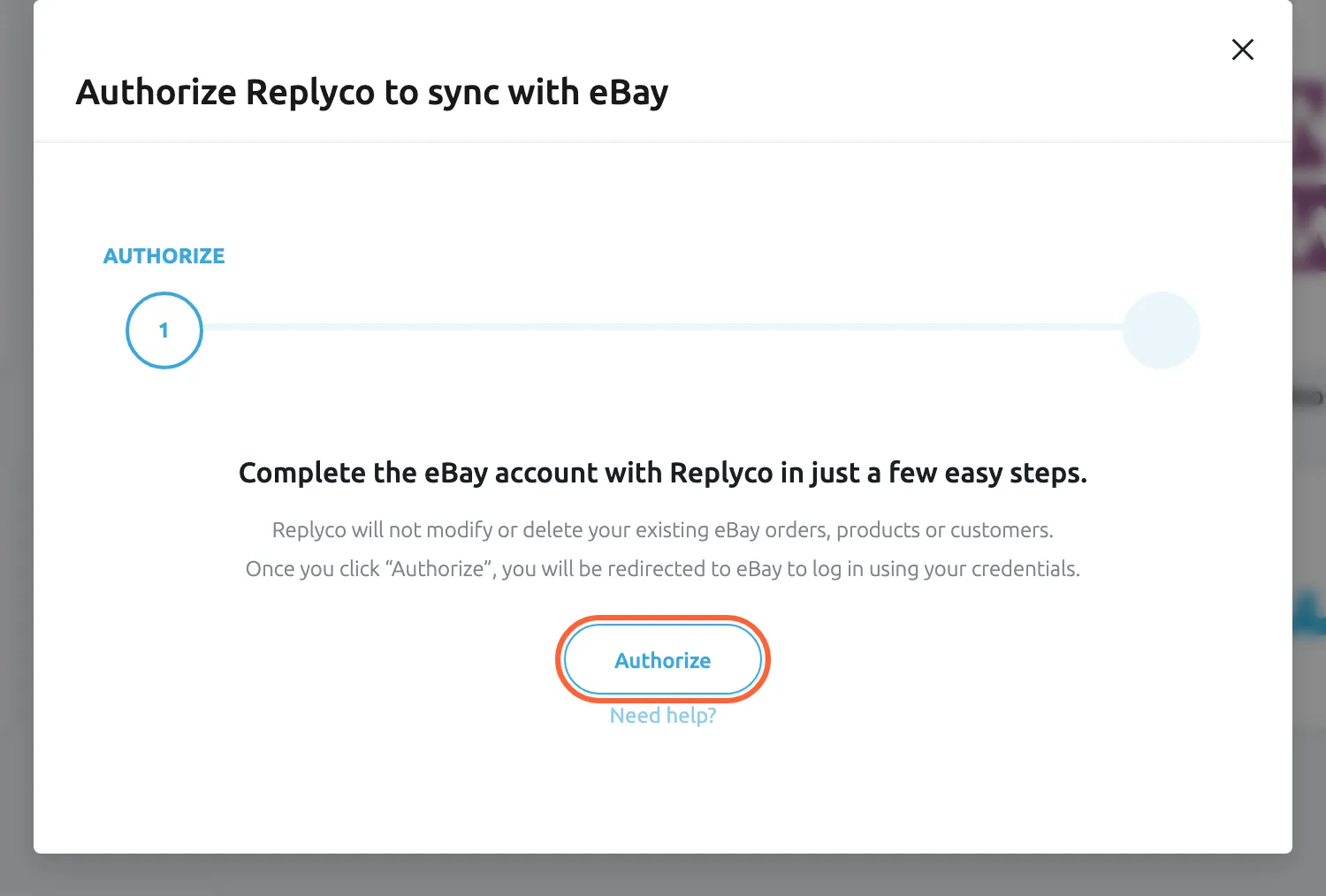
Authorize opens eBay in a new tab; sign in there with the eBay account you want to connect. What this screenshot shows
- Screen
- Add Account (/integrations/add)
- Highlighted
- button “Authorize”, dialog, enabled. opens eBay sign-in and consent in a new browser tab
- Also visible
- step AUTHORIZE of AUTHORIZE and FINISH; the promise not to change eBay orders, products or customers; Need help? link
- Purpose
- hand over to eBay for sign-in
-
Sign in on eBay. Sign in with the eBay seller user you want to connect and approve Replyco’s access. If your browser is still signed in to another eBay user, sign out first or use a private window, because eBay approves the user it already knows.
eBay then shows Grant application access: Replyco. Select Agree to let eBay link your eBay account with Replyco.
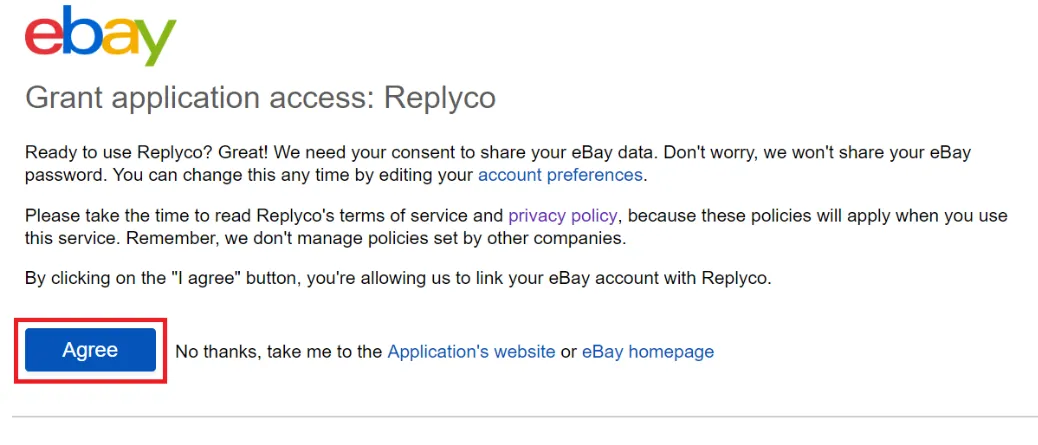
Select Agree to let eBay link your seller account with Replyco. What this screenshot shows
- Screen
- ()
- Highlighted
- “”, , .
- Also visible
- consent text; terms of service and privacy policy links; Agree button; No thanks links
- Purpose
-
Choose your shop country. eBay sends you back to Replyco, which asks Please choose a Shop Country to continue Pick the country in Select Shop Country. The account is saved the moment you pick it, Replyco shows Account successfully saved. and opens your start screen.
-
Check the eBay settings (optional). Decide whether eBay’s own notices should share a ticket, whether to import eBay cases, and whether you want PDFs converted for eBay. Each is explained under every setting, explained.
Every setting, explained
Section titled “Every setting, explained”eBay has one choice you make while connecting and four settings of its own, on four different screens, in the order you usually meet them.
Shop country, chosen when you connect
Section titled “Shop country, chosen when you connect”The page eBay returns you to after you approved Replyco, with the eBay logo and Select Shop Country. It is shown once, when you add the account.
The countries are US, UK, Germany, Italy, France, Spain, Australia, Canada, Netherlands, Poland, Singapore, Austria, Switzerland, Hong Kong and Ireland, named in the language of your interface. There is no confirm button: picking a country saves the account with it. Replyco uses the country to open the right eBay site from a ticket and to address eBay’s returns and cancellations for your region. A re-login keeps the country and does not ask again.
eBay runs a site per country. Links from a ticket to a listing or order should open the site your buyers use.
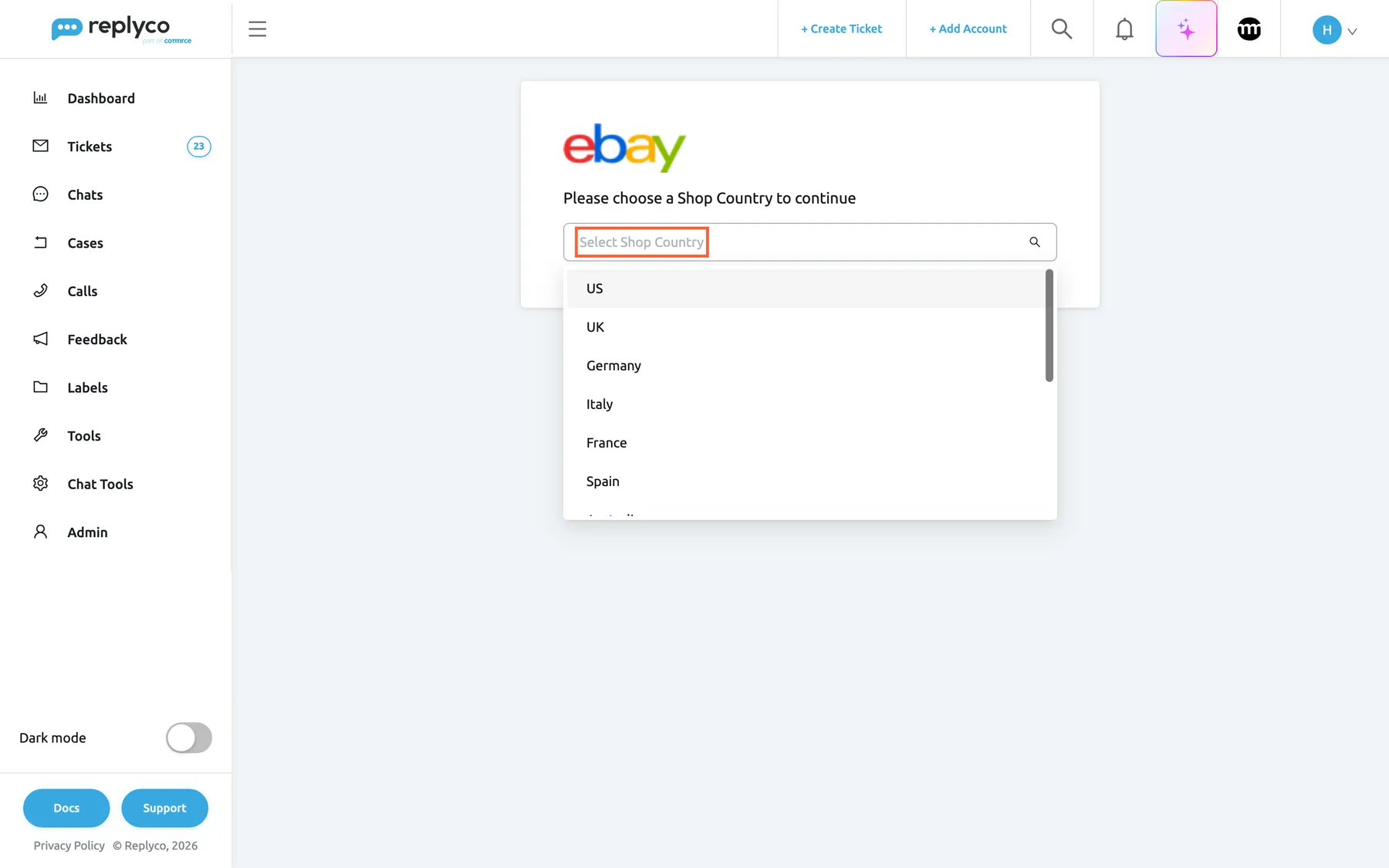
What this screenshot shows
- Screen
- Please choose a Shop Country to continue (/integrations/ebay/success)
- Highlighted
- combobox “Select Shop Country”, page-card, open. saves the eBay account with the chosen country
- Also visible
- eBay logo; country list US, UK, Germany, Italy, France, Spain
- Purpose
- finish connecting eBay
Merge eBay Notifications, eBay’s own notices per item
Section titled “Merge eBay Notifications, eBay’s own notices per item”AdminCompany Settings › Specific Account Settings, select the eBay account, open Ticket Merge Settings; the first check box, shown for eBay accounts. Saved with Save Changes, which appears once something changed. To learn the rest of this tab, see Specific Account Settings. AdminCompany Settings needs the Admin permission with Edit rights.
Off by default. It concerns messages that come from eBay itself, not from a buyer. Off: each of eBay’s notices opens a ticket of its own. On: eBay’s notices about the same item join one ticket, however far apart they arrive. Buyer messages are not affected; they join the buyer’s ticket as usual. It acts on messages Replyco collects after you saved it. How this box works with merging tickets from the same customer is explained in Ticket merging.
eBay can send several notices about one listing. Keeping them in one ticket per item leaves your queue to buyers.
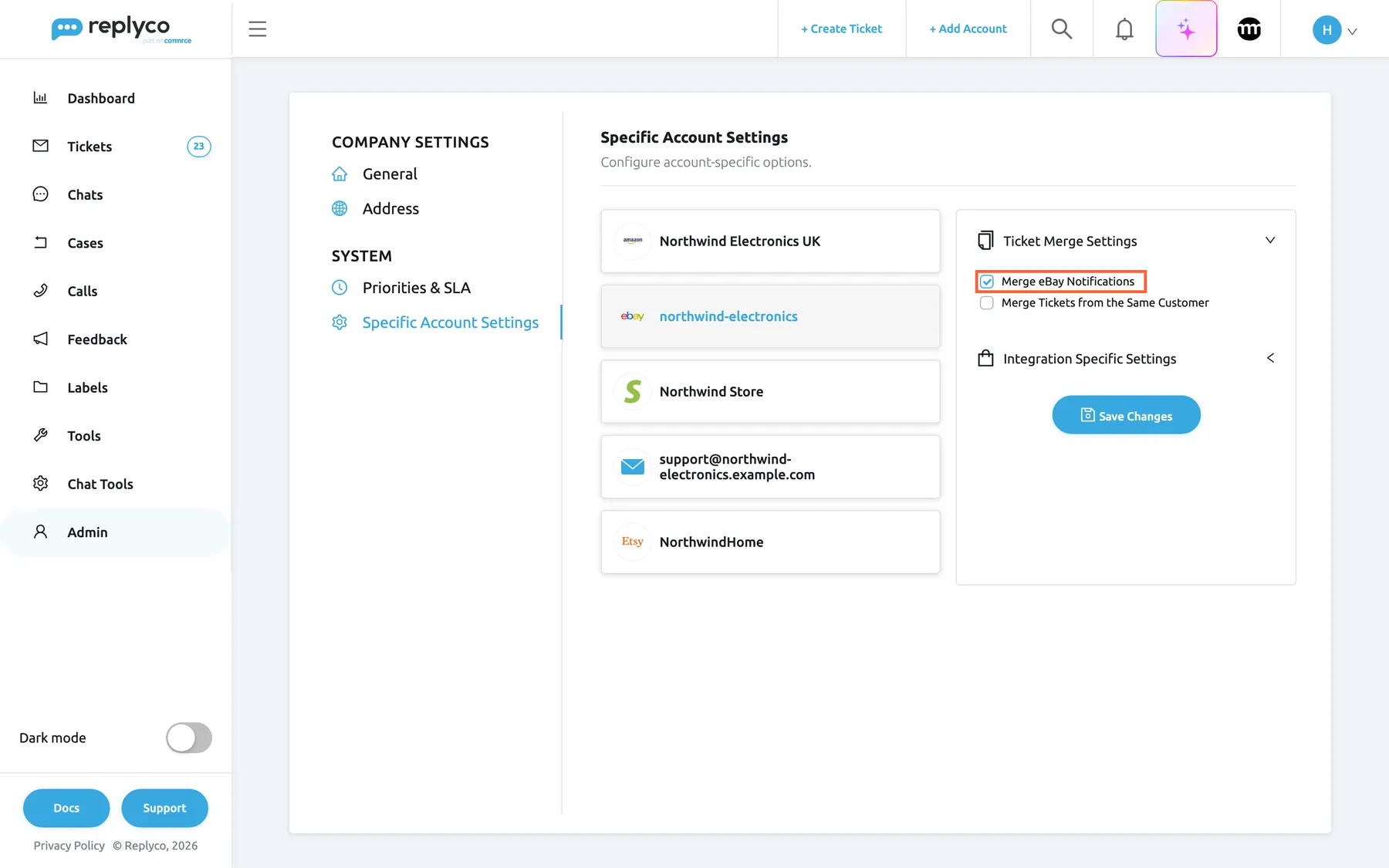
What this screenshot shows
- Screen
- Specific Account Settings (/company?tab=accountSpecificConfiguration)
- Highlighted
- checkbox “Merge eBay Notifications”, ticket-merge-settings, checked. lets eBay's own messages about one item share a ticket
- Also visible
- eBay account northwind-electronics selected; Merge Tickets from the Same Customer clear; Save Changes button
- Purpose
- the eBay notification merge switch
Enable eBay Cases, eBay returns and inquiries
Section titled “Enable eBay Cases, eBay returns and inquiries”AdminCompany Settings › General, the last switch in the General card, shown once an eBay account is connected. Change it, then select Save at the top right. See Company Settings. AdminCompany Settings needs the Admin permission with Edit rights.
On: Replyco imports eBay returns and item-not-received inquiries of every eBay account of the company into Cases, and shows Cases in the sidebar. Off: nothing new is imported and the menu is hidden; cases already imported stay. eBay cases are part of every plan. The actions, return labels and deadlines of a case are explained in eBay cases.
Buyers write before and after they open a return. With cases imported, the ticket shows that a return is already running.
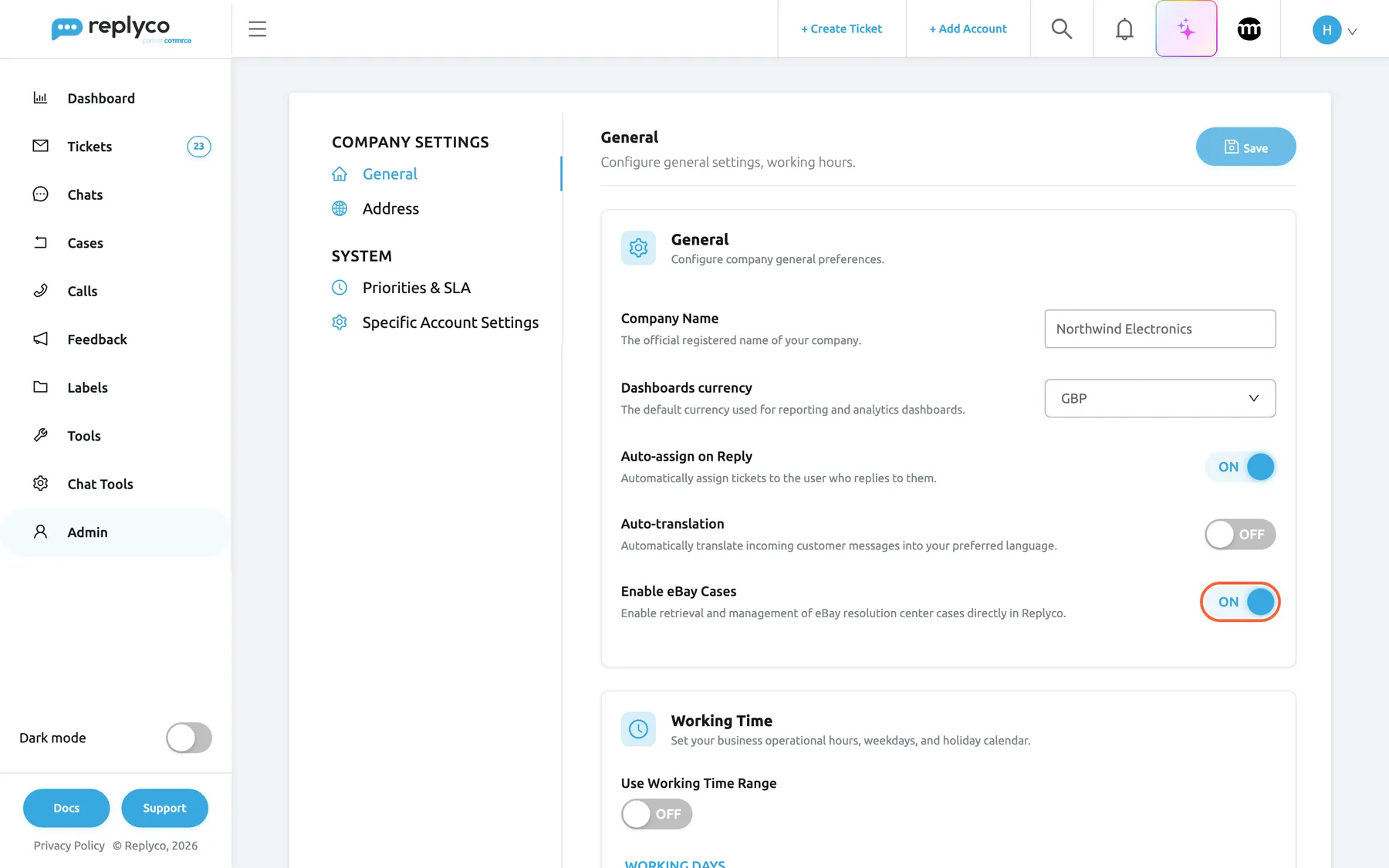
What this screenshot shows
- Screen
- General (/company?tab=companyGeneral)
- Highlighted
- switch “Enable eBay Cases”, general-card, on. switches the eBay case import on or off once the tab is saved
- Also visible
- Company Name Northwind Electronics, dashboards currency GBP; Auto-assign on Reply and Auto-translation switches; Save button at the top right
- Purpose
- the company switch for eBay cases
Enable attachment converter for eBay, attachments eBay accepts
Section titled “Enable attachment converter for eBay, attachments eBay accepts”Account Settings › Settings, the last switch in the Others card. Change it, then select Save, which appears at the bottom once something changed. It is a personal setting: each user switches it on for their own replies. See Account Settings.
Off by default. On: Add Attachment on an eBay ticket also accepts PDF files, and when the reply is sent Replyco turns each PDF into one PNG image per page, named after the file with _page_1, _page_2 and so on. Other images that are not PNG are converted to PNG and made smaller until each is at most 12 MB; PNG images go as they are. Off: files are sent unchanged, and a PDF is refused with One or more attachments are not supported by the selected accounts.
eBay carries images. A customer asking for an invoice or a manual in PDF can still get it, as pictures of its pages.
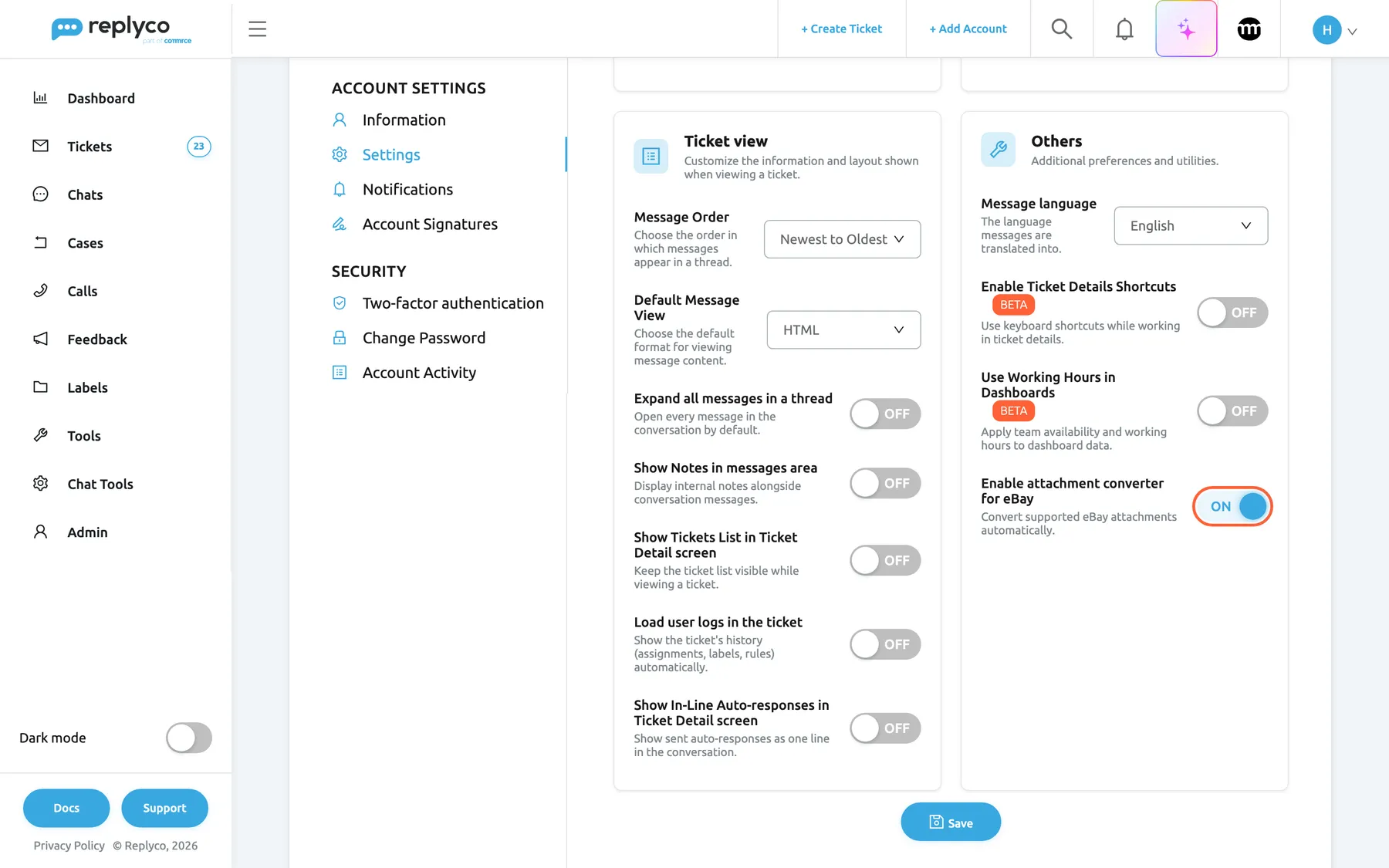
What this screenshot shows
- Screen
- Settings (/user-settings?tab=settings)
- Highlighted
- switch “Enable attachment converter for eBay”, others-card, on-unsaved. lets PDF attachments through on eBay tickets and converts attachments for eBay once saved
- Also visible
- Others card; Message language, two BETA switches; Save button
- Purpose
- the per-user attachment converter
| Do | Don’t |
|---|---|
| Switch it on if you send invoices, manuals or labels as PDF to eBay buyers | Expect the buyer to receive a PDF; they receive one image per page |
| Keep PDFs short: a two-page invoice becomes two images | Attach a 20-page manual; eBay takes five files per message |
| Tell colleagues to switch it on for themselves | Assume it is on for the team because it is on for you |
Cancel, refund and return in the ticket, the order actions
Section titled “Cancel, refund and return in the ticket, the order actions”The ticket screen of an eBay ticket, the ⋮ menu of Order Details: Cancel Order, Refund Order and Return Order. Every plan includes the actions; companies on an older plan may not have them, see What each plan includes. See also The ticket screen.
Each action opens a short form and sends the action to eBay for this order. Fields with a red asterisk are required; an empty one stops the form with All fields must be completed. The comment is optional and refused above 100 characters with Comment should be less than 100 symbols A successful action shows Success
- Cancel Order asks for Cancel reason. It is missing from the menu once the order already has a cancellation. eBay checks first whether the order can still be cancelled; if not, Replyco shows “Order is not eligible to be cancelled, failure reason:” followed by eBay’s reasons, or “This order has already been cancelled or has an active cancellation process.”
- Refund Order asks for Refund reason, Refund amount value and Refund amount currency, plus an optional Comment. Type the amount as it should reach the buyer, such as 12.50, and pick the order’s currency from the list of currency codes.
- Return Order asks for Shipping Carrier, Return Reason, Return Quantity (at least 1) and Type, plus an optional Comment. The lists offer eBay’s carriers, reasons and types by name, such as Royal Mail or Ordered the wrong item.
Most cancellation and refund requests arrive as a buyer message. Answering and acting in the same place saves switching to Seller Hub for every order.
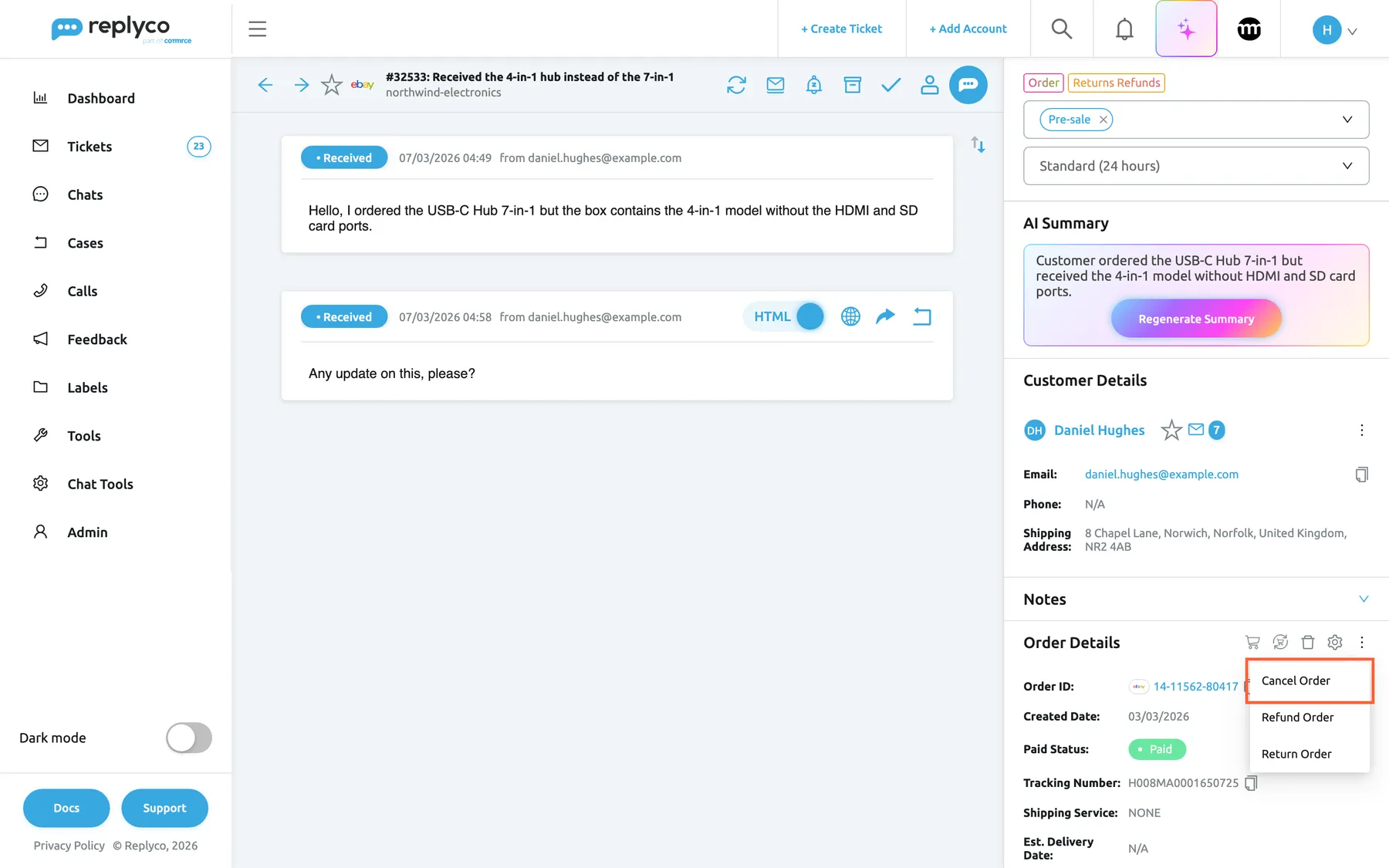
What this screenshot shows
- Screen
- Respond (/ticket/:threadId)
- Highlighted
- menuitem “Cancel Order”, right-panel-order, menu-open. opens the eBay cancellation form
- Also visible
- Order Details for 14-11562-80417; menu items Cancel Order, Refund Order, Return Order
- Purpose
- the eBay order actions in a ticket
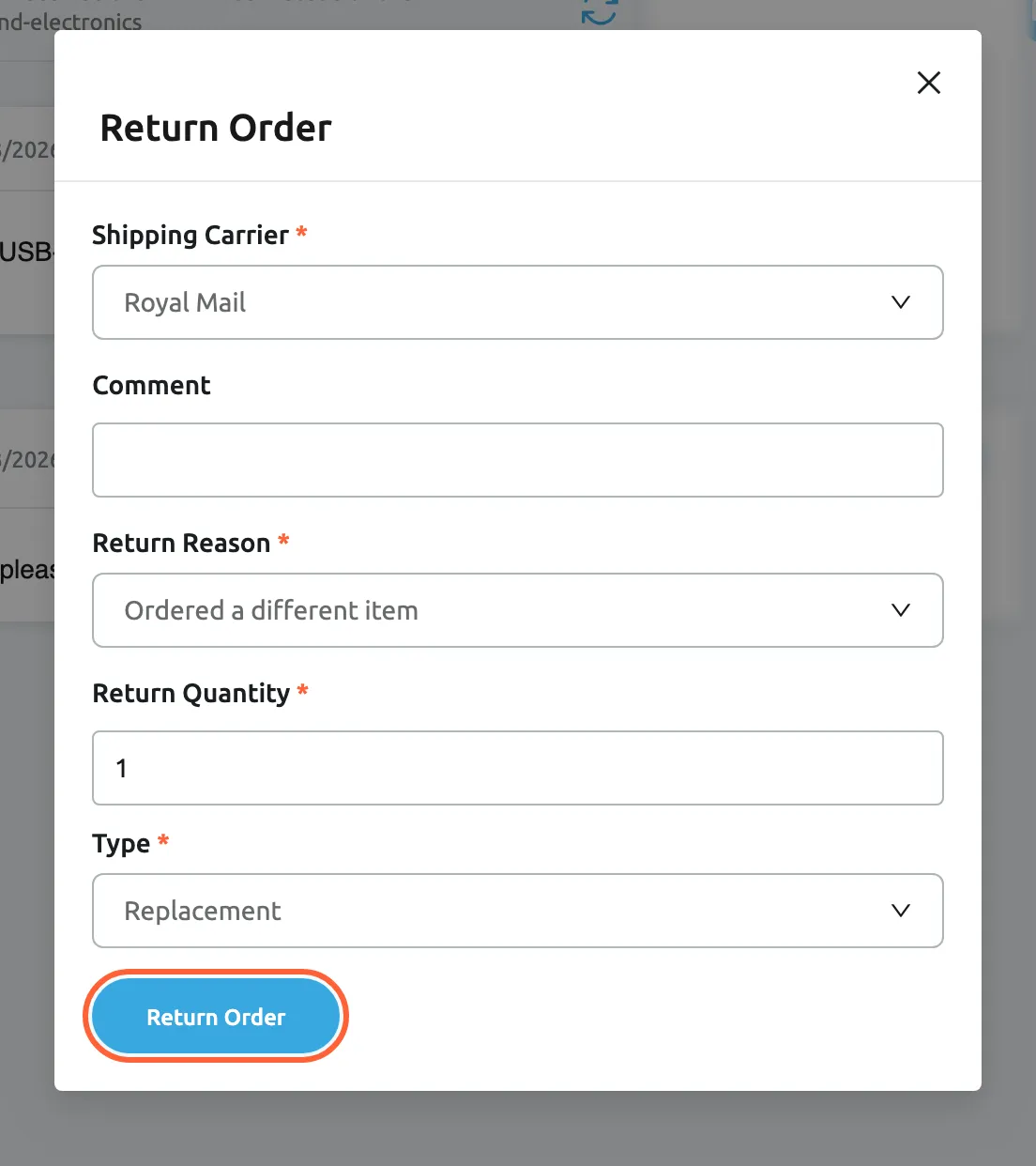
What this screenshot shows
- Screen
- Return Order (/ticket/:threadId)
- Highlighted
- button “Return Order”, dialog-bottom, enabled. sends the return to eBay for this order
- Also visible
- Shipping Carrier Royal Mail; Return Reason Ordered a different item; Return Quantity 1; Type Replacement; Comment empty
- Purpose
- return an eBay order from the ticket
How the settings combine
Section titled “How the settings combine”| Setting | On | Off |
|---|---|---|
| Merge eBay Notifications (per account) | eBay’s notices about one item share a ticket | Each notice from eBay is a ticket of its own |
| Enable eBay Cases (company) | Returns and inquiries arrive in Cases and as blocks in the ticket | No new cases; imported ones stay |
| Enable attachment converter for eBay (per user) | PDF accepted and sent as images; images converted to PNG | Images only, sent unchanged |
| Order actions (plan) | Included, as in every current plan: cancel, refund and return from the ticket | Not included, as on some older plans: the ⋮ menu has no eBay actions |
The four are independent: merging decides where eBay’s notices land, the case switch decides whether returns arrive, the converter changes only your own attachments, and the order actions act on the order whatever the other settings say.
eBay on the Accounts screens
Section titled “eBay on the Accounts screens”Once connected, an eBay account appears in three places under AdminAccounts.
Add Account, the eBay tiles
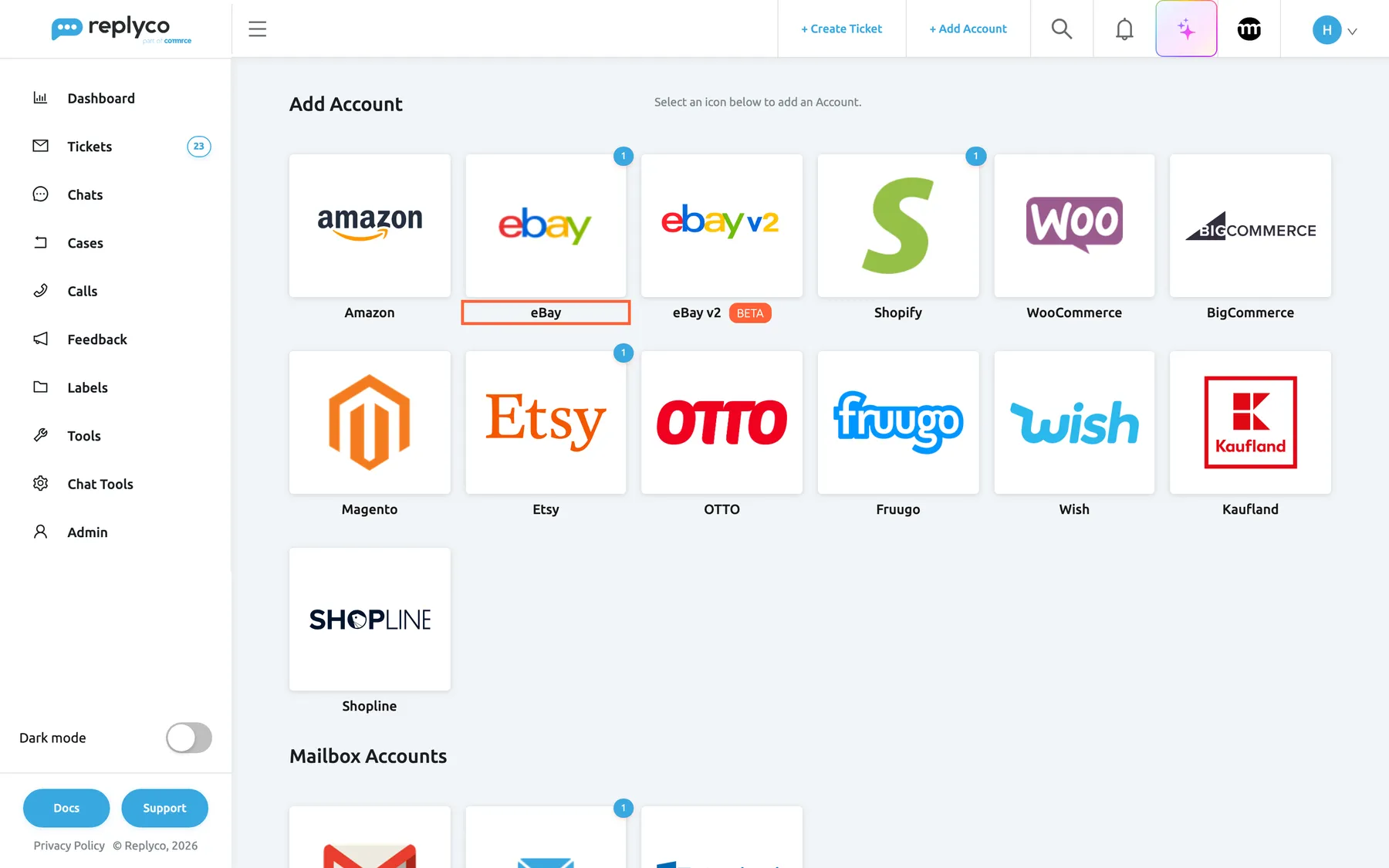
Section titled “Add Account, the eBay tiles”The eBay tile sits second in the marketplace row, eBay v2 with its BETA badge beside it. A small number on a tile counts the accounts already connected through it. To add a second eBay user, select the tile again; there is no limit per marketplace apart from your plan’s account limit.
Why: the count tells you at a glance whether an eBay account is already connected before you add another.
What this screenshot shows
- Screen
- Add Account (/integrations/add)
- Highlighted
- button “”, marketplace-tiles, enabled. opens the eBay authorisation dialog
- Also visible
- marketplace tiles, eBay v2 with a BETA badge; a count of 1 on the eBay tile; Mailbox Accounts heading
- Purpose
- start connecting eBay
The Accounts list and the account details
Section titled “The Accounts list and the account details”The list shows each eBay account with its name, which is the eBay user at first, and its Last Messages Sync, orders and Last Returns Sync times. Selecting the row opens Account Details, where you can rename the account in Account Name:, choose Receive Notifications about Blocking and delete it with Delete Account. Deleting asks Are you sure you want to delete this account? ALL TICKETS, ORDERS & CUSTOMERS WILL BE DELETED AS WELL. To learn this screen, see Accounts.
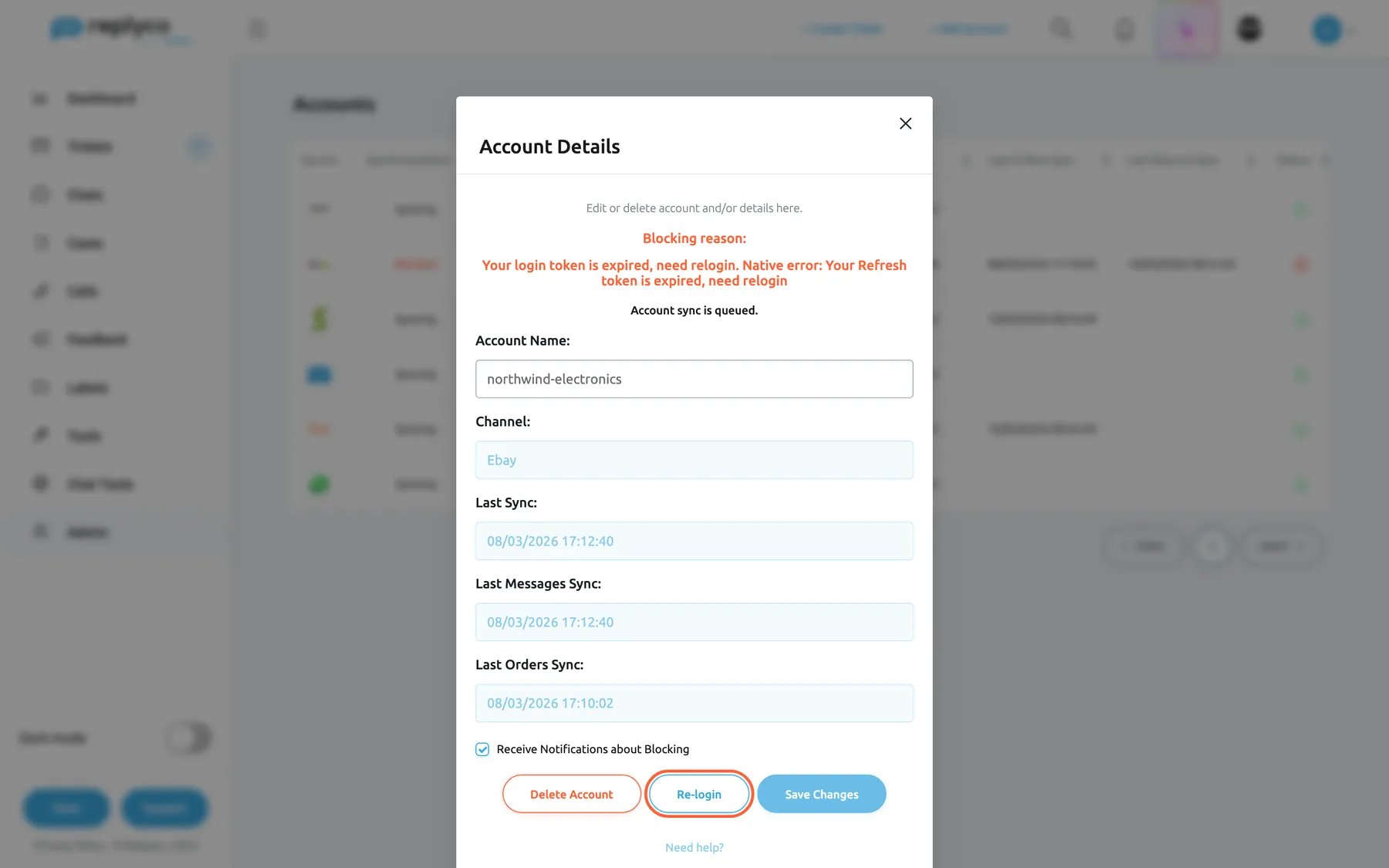
When eBay stops accepting Replyco’s access, the account shows Blocked in Synchronization, and the details show the reason after Blocking reason::
- A login that expired. The reason starts with “Your login token is expired, need relogin.” Replyco blocks the account at once when eBay’s long-lived login has run out, and after more than five failed attempts when eBay keeps refusing the login. The details offer Re-login.
- Another eBay error. The reason starts with “Error:” and names what failed, after more than five failures in a row. The details offer Unblock.
Re-login opens eBay in a new tab, like connecting. Sign in with the same eBay user; eBay sends you back, Replyco saves the new login without asking for the country again, clears the block and shows Account successfully saved. With a different eBay user Replyco refuses with “Wrong acc login”. For every other status, see Fix a blocked or silent account.
Why: a blocked account collects nothing. The reason tells you whether a new login or an unblock is the fix.
What this screenshot shows
- Screen
- Accounts (/integrations)
- Highlighted
- button “Re-login”, account-details-dialog, enabled. opens eBay in a new tab to sign in again
- Also visible
- Blocking reason: login token expired, refresh token expired; Account Name northwind-electronics, Channel Ebay; Receive Notifications about Blocking ticked
- Purpose
- fix an eBay account blocked by an expired login
eBay in your tickets
Section titled “eBay in your tickets”eBay tickets look like every other ticket, with the eBay icon before the subject and the account name under it. What is different is what eBay lets you send. For everything else on this screen, see The ticket screen, and for the reply itself, see Answer a ticket.
| What you see | Where | Meaning |
|---|---|---|
| “N/4000” under the text box, red above 4000 | Reply editor | The reply’s length against eBay’s 4000-character limit |
| Send a copy to my email address | Next to the send options | Asks eBay to email you a copy of the reply |
| Error Sending on your reply | Conversation | The reply was not delivered; hover for the reason |
| Order has an open cancellation process in red | Order Details | The buyer asked eBay to cancel this order |
| Return Case or INR Case block | Top of the right panel | An eBay case exists for this ticket’s order |
The reply editor, eBay’s limits
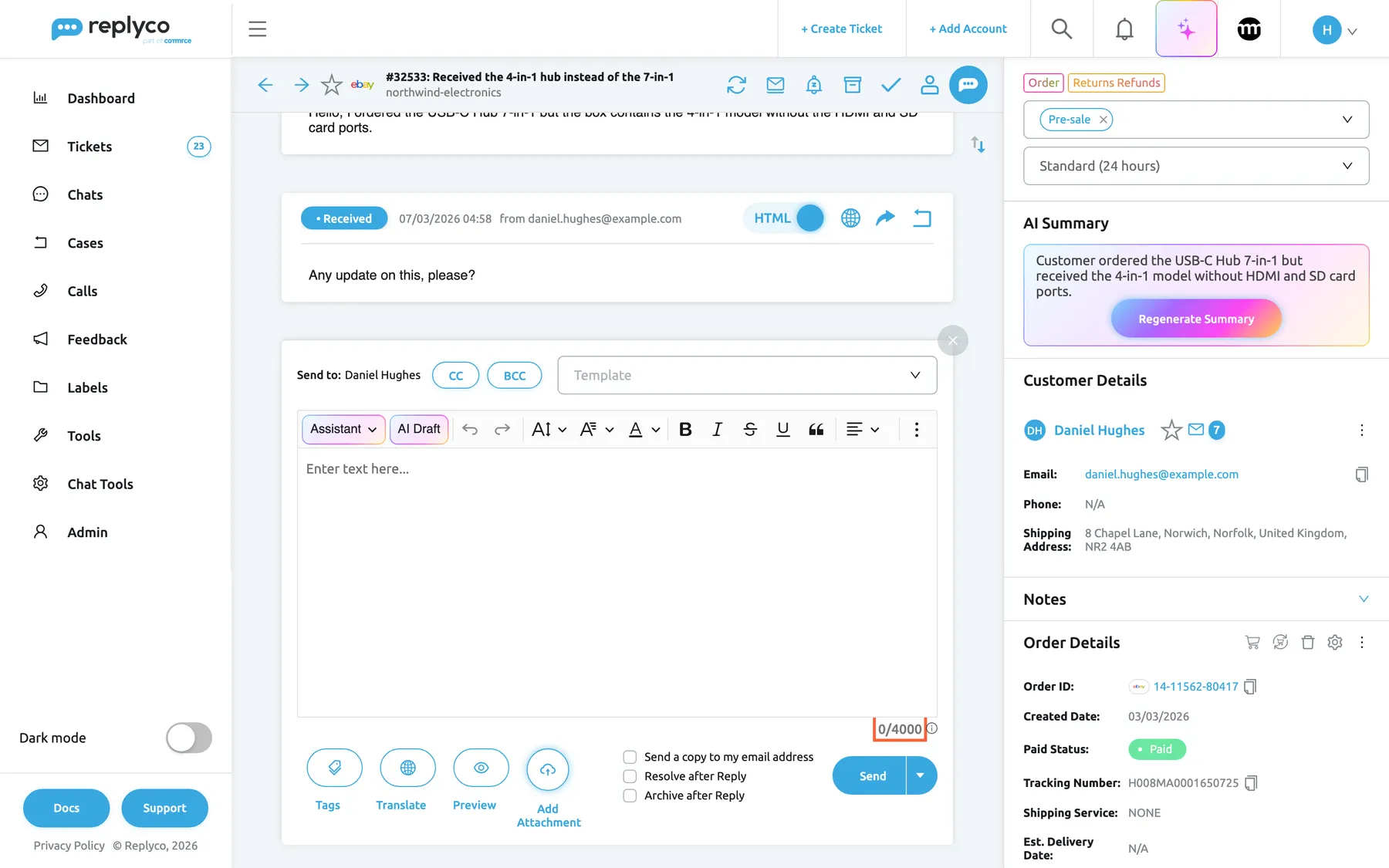
Section titled “The reply editor, eBay’s limits”eBay receives your reply as plain text: bold, colours, lists and links you format in the editor do not reach the buyer, although line breaks do. A counter under the text box shows the reply’s length as “N/4000” and turns red above 4000; above that, Send, sending later and saving the reply as a template are unavailable. Exactly 4000 characters can be sent. The counter’s tooltip says This length doesn't include HTML markup. It's an approximate value if you use tags; to see the exact length, use Preview mode; use Preview to see the exact length when your reply contains placeholders.
eBay messages go only to the buyer, so selecting CC or BCC on an eBay ticket shows This account does not allow CC/BCC functionality Tick Send a copy to my email address instead to have eBay send a copy of your reply to your own email address.
Why: eBay rejects a reply that breaks its rules only after you send it. The counter shows the problem while you write.
What this screenshot shows
- Screen
- Respond (/ticket/:threadId)
- Highlighted
- text “”, reply-editor-bottom-right, under-limit. turns red and disables Send above 4000 characters
- Also visible
- ticket #32533 on northwind-electronics; empty reply editor, counter 0/4000; Send a copy to my email address check box; Add Attachment
- Purpose
- eBay's reply length limit
Attachments on eBay replies
Section titled “Attachments on eBay replies”Replyco checks every file before eBay does:
| Check | Limit | What happens |
|---|---|---|
| File type | Images only: JPG, JPEG, PNG, GIF, BMP and TIF; PDF too with Enable attachment converter for eBay | The file is refused with One or more attachments are not supported by the selected accounts. |
| Number of files | Five per reply, template files included | The sixth file is refused with You have uploaded too many files. Ebay limit is 5 files. |
| Small image | Width or height of 500 pixels or less | A warning, Minimum image width and height is 500 pixels.; the file is still attached |
| Large image | Width plus height above 12,000 pixels, or a file above 12 MB | The file is refused with The length of the width plus height of an image must be equal to or less than 12,000 pixels. The maximum image file size is 12 MB. |
An image of 500 × 800 pixels gets the warning, one of 501 × 800 does not. An image of 6,000 × 6,000 pixels is accepted; one of 6,000 × 6,001 is refused.
Files you drag onto the reply area are counted against the five as well, and small images get the same warning. Their type is checked when you select Send: a file of the wrong type then stops the reply with One or more attachments are not supported by the selected accounts.
Replies that are not delivered
Section titled “Replies that are not delivered”Replyco does not send an eBay reply that contains a phone number, an email address or a link to anything other than eBay or a parcel carrier. Links count when they start with http://, https:// or www.; links to eBay listings, shops, profiles and help pages and to parcel carriers’ sites are allowed. The reply stays in the ticket with Error Sending and the reason “eBay does not allow sharing personal information such as phone numbers, email addresses, or external links in messages. Please remove this information and try again.”
When eBay itself refuses a reply, the reply gets the same status with eBay’s answer as the reason, and the ticket goes back to your lists. Hover the status to read it, correct the text and select Try Again. A reason that says the item was not found usually means the listing changed; check it on eBay.
- Write to support@example.com and we will swap it → not sent; write Reply here and we will arrange the swap.
- Track it at www.northwind.example/track → not sent; give the tracking number instead.
- Track it on the Evri website with H008MA0001650725 → sent.
The linked order and cancellation requests
Section titled “The linked order and cancellation requests”Order Details shows the eBay order Replyco linked to the ticket. When a buyer’s message names a cancellation request for the order, the red line Order has an open cancellation process appears; it opens Cancellation details with the reason, the state and, while eBay waits for you, Approve and Reject.
Why: a buyer who asks to cancel usually also writes. Seeing the request next to the message lets you answer both at once.
eBay cases in the ticket
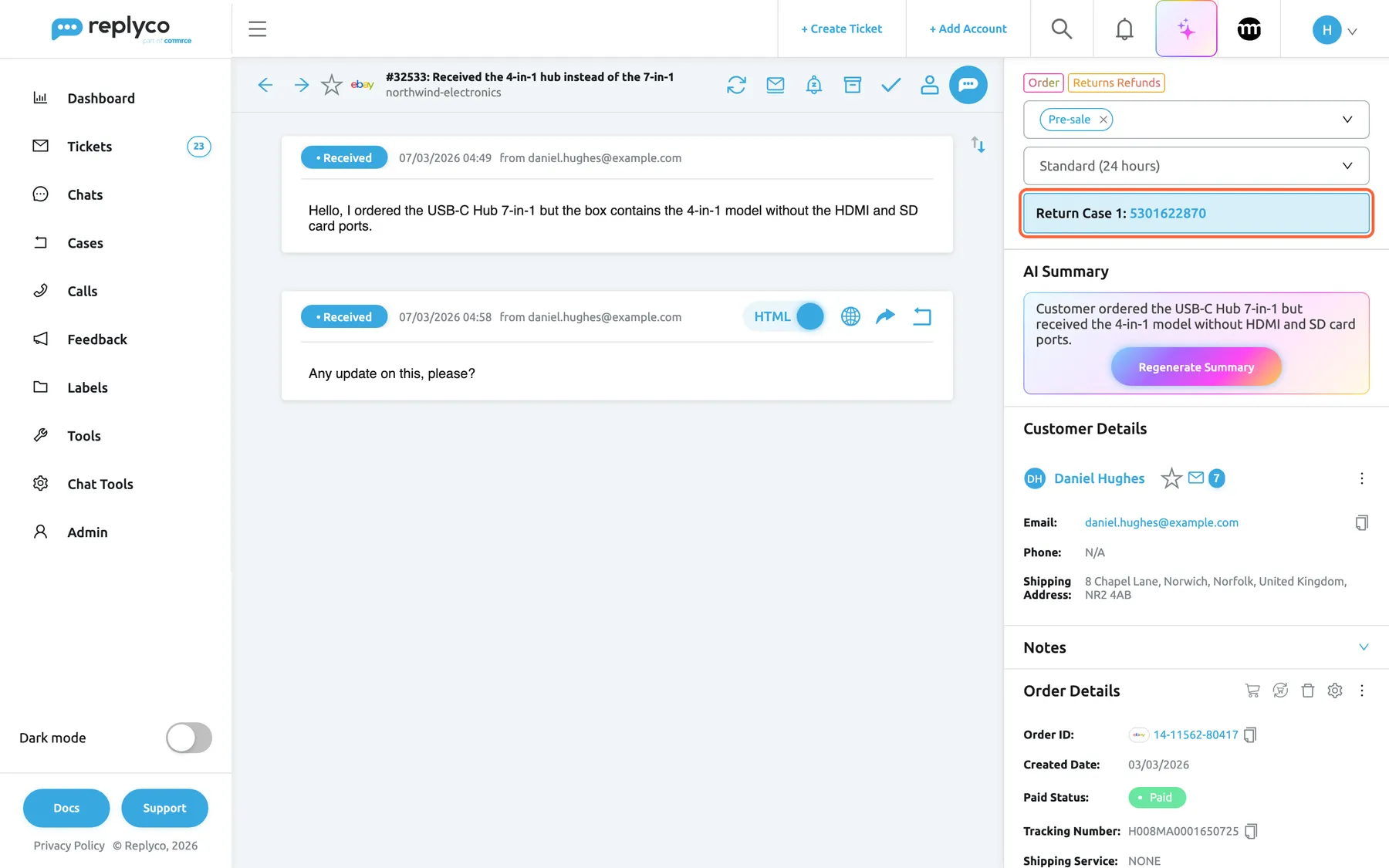
Section titled “eBay cases in the ticket”With cases imported, an eBay ticket shows one block per eBay case of its order at the top of the right panel, Return Case or INR Case, with the case number that opens the case. The block lists cases Replyco already has; it does not ask eBay. To work with the case, see eBay cases.
Why: a buyer asking any update on my return? is answered best from the case, not from memory.
What this screenshot shows
- Screen
- Respond (/ticket/:threadId)
- Highlighted
- link “Return Case”, right-panel-top, enabled. opens the case screen
- Also visible
- eBay icon and northwind-electronics in the ticket header; block Return Case 1: 5301622870; Order Details 14-11562-80417
- Purpose
- how eBay cases show in an eBay ticket
Writing to an eBay buyer first
Section titled “Writing to an eBay buyer first”+ Create Ticket can write to an eBay buyer who has an order with you. The sender is limited to the buyer’s own eBay account, and Select Order and Select Message Type are required: without both, Replyco shows Please select Order and Message Type If the order has no eBay item yet, the dialog Order is not synced with eBay offers Sync Order. See Create Ticket.
eBay cases
Section titled “eBay cases”Cases in the sidebar, once Enable eBay Cases is on. eBay cases are part of every plan. See eBay cases.
Returns and item-not-received inquiries of your eBay accounts, with eBay’s actions. New cases arrive every 25 minutes, and open cases are refreshed from eBay. Each case links to the tickets of its order, and each of those tickets shows a block for the case.
Returns have eBay deadlines. Seeing them in Replyco next to the buyer’s messages keeps them from being missed.
- A buyer writes the hub arrived without its cable: the ticket shows the Return Case block, and you answer in the case.
- A buyer asks where is my refund?: open the case from the ticket and check its state before you reply.
- A buyer quotes a return number from before you switched the import on: search for it on the eBay account to bring it in.
eBay feedback
Section titled “eBay feedback”FeedbackFeedback List. See Feedback List.
The feedback buyers leave on your eBay accounts, fetched about every ten minutes on plans with feedback. Every eBay rating is listed, positive ones included, and neutral and negative feedback also raises a notification. Sync on the list refreshes the ticked feedback from eBay. To read one feedback and answer it, see Feedback details.
Negative feedback often follows an unanswered message. Seeing both in one place lets you fix the cause.
- A red rating appears: open it, go to the linked ticket and see what the buyer asked before.
- Several ratings mention late delivery: check the carrier on those orders in Order Details.
- A buyer changed a rating on eBay: tick it and select Sync to read it again.
What you need to know
Section titled “What you need to know”| Topic | Fact |
|---|---|
| Two connections | eBay is the classic connection; eBay v2 follows eBay’s conversations and is shown with Replyco’s beta features. |
| Message rhythm | About every five minutes per account. Orders every few minutes, feedback about every ten minutes, new cases every 25 minutes. |
| History | The first import reaches back a limited number of days; older eBay messages are not imported. |
| Plain text | eBay receives replies as plain text; formatting does not reach the buyer. |
| Length | 4000 characters per reply, counted in the editor; exactly 4000 can be sent. |
| Attachments | Images only (PDF with the converter), five per reply, up to 12 MB and 12,000 pixels width plus height. |
| Contact details | Replies with a phone number, an email address or an outside link are not sent. |
| CC and BCC | Not available on eBay replies. |
| Reply possible | eBay decides per message; no Respond icon when it cannot be answered. |
| Archive | Archives the ticket in Replyco; on eBay v2 also the conversation on eBay. |
| Read state | Marking read or unread in Replyco also marks the messages on eBay. |
| Blocking | At once when eBay’s login has expired; after more than five failures otherwise. A blocked account syncs nothing. |
| Re-login | Same eBay user only; the country is kept. |
| Deleting | Deletes the account’s tickets, orders and customers in Replyco. |
| Order actions | Every plan; cancel, refund and return from the ticket. Companies on an older plan may not have them. |
| Cases | Part of every plan; switched on per company. |
Frequently asked questions
Section titled “Frequently asked questions”General
Section titled “General”What is the difference between the eBay and eBay v2 tiles?
Section titled “What is the difference between the eBay and eBay v2 tiles?”eBay is the classic connection: it reads eBay’s message folders and groups messages by order and item. eBay v2, marked BETA under Add Account, reads eBay’s conversations and keeps one ticket per conversation, and archiving a ticket also archives the conversation on eBay.
Why don’t I see the eBay v2 tile?
Section titled “Why don’t I see the eBay v2 tile?”The eBay v2 tile on Add Account is shown only to companies that have Replyco’s beta features; it does not depend on your plan. Without it, connect eBay with the classic eBay tile, which works on every plan.
Can I connect more than one eBay account?
Section titled “Can I connect more than one eBay account?”Yes. Select + Add Account and the eBay tile again for each eBay user; there is no limit per marketplace apart from your plan’s account limit. Sign out of the first eBay user in your browser first, or use a private window, so eBay does not approve the same user again.
Does connecting eBay cost anything per message?
Section titled “Does connecting eBay cost anything per message?”No. Replyco charges nothing per eBay message, order or feedback. Each connected eBay account counts towards your plan’s number of accounts, and eBay’s own limits on how often its interfaces can be called apply.
How often does Replyco check eBay for new messages?
Section titled “How often does Replyco check eBay for new messages?”About every five minutes for each eBay account that is not blocked. Orders are fetched every few minutes, feedback about every ten minutes and, with Enable eBay Cases on, new eBay cases every 25 minutes.
Who can connect an eBay account?
Section titled “Who can connect an eBay account?”Users with the Admin permission. eBay accounts are connected, logged in again and deleted under AdminAccounts, which needs that permission; ask an administrator if you do not have it.
When is the eBay account actually saved?
Section titled “When is the eBay account actually saved?”When eBay sends you back to Replyco in the new tab and you pick your country in Select Shop Country. Replyco then shows Account successfully saved. and the account appears under AdminAccounts. The dialog in your first tab only hands you over to eBay.
I came back from eBay and nothing happened. What went wrong?
Section titled “I came back from eBay and nothing happened. What went wrong?”If you cancel on eBay, or eBay sends you back without approving Replyco, Replyco returns to your start screen and saves nothing. Start again with + Add Account, select the eBay tile and approve Replyco’s access on eBay.
Adding eBay fails with “Integration with same login already exists”. What does it mean?
Section titled “Adding eBay fails with “Integration with same login already exists”. What does it mean?”That eBay user is already connected in Replyco. Use the existing account under AdminAccounts. If you meant to add another eBay user, sign out of eBay in your browser first so eBay asks for the other user’s login.
Which country should I choose after signing in on eBay?
Section titled “Which country should I choose after signing in on eBay?”The country of the eBay site your shop sells on, such as UK for ebay.co.uk. Replyco uses it to open the right eBay site from a ticket and for eBay returns and cancellations in your region. The choice saves the account at once and is not asked again.
How much eBay history does Replyco import when I connect?
Section titled “How much eBay history does Replyco import when I connect?”Only a limited number of days before the moment you connect; your older eBay messages are not imported. From then on Replyco collects new messages about every five minutes, so answer older open questions on eBay itself.
Tickets and replies
Section titled “Tickets and replies”Why is there no Respond icon on an eBay ticket?
Section titled “Why is there no Respond icon on an eBay ticket?”eBay marks each message as answerable or not, and a ticket whose messages eBay does not let you answer, such as eBay’s own notices, shows no Respond icon. Answer such a buyer on eBay itself, or wait for the buyer’s next message.
Why does my formatting disappear on eBay?
Section titled “Why does my formatting disappear on eBay?”eBay only accepts plain text in its messages, so Replyco sends your reply without bold, colours, lists or links. Line breaks are kept. Write eBay replies as short paragraphs, and check Preview before sending if you use placeholders.
How long can an eBay reply be?
Section titled “How long can an eBay reply be?”4000 characters. The counter under the text box shows “N/4000” on eBay tickets, turns red above 4000, and Send is unavailable until you shorten the reply. With placeholders the counter is approximate; Preview shows the exact length.
Why was my eBay reply not sent although it looked fine?
Section titled “Why was my eBay reply not sent although it looked fine?”Replyco does not send eBay replies with a phone number, an email address or a link other than eBay or a parcel carrier, and eBay refuses replies that break its own rules. The reply shows Error Sending; hover it for the reason, change the text and select Try Again.
Can I use CC or BCC on an eBay reply?
Section titled “Can I use CC or BCC on an eBay reply?”No. eBay messages go only to the buyer, so selecting CC or BCC on an eBay ticket shows This account does not allow CC/BCC functionality Tick Send a copy to my email address to have eBay email you a copy instead.
Why do eBay’s notices land in separate tickets?
Section titled “Why do eBay’s notices land in separate tickets?”Each notice from eBay itself opens its own ticket until you tick Merge eBay Notifications for the account under AdminCompany Settings › Specific Account Settings and select Save Changes. From then on eBay’s notices about the same item share a ticket.
Does archiving a ticket in Replyco archive it on eBay?
Section titled “Does archiving a ticket in Replyco archive it on eBay?”On eBay v2 accounts, yes: archiving the ticket also archives the conversation on eBay, and restoring it makes the conversation active again. Either way the ticket leaves your lists and comes back when the buyer writes again. See Resolve, snooze or archive a ticket.
Attachments
Section titled “Attachments”Which files can I attach to an eBay reply?
Section titled “Which files can I attach to an eBay reply?”Images only: JPG, JPEG, PNG, GIF, BMP and TIF, up to five per reply, each under 12 MB and at most 12,000 pixels width plus height. With Enable attachment converter for eBay on in your Account Settings, PDF files are accepted too and sent as images.
How do I send a PDF to an eBay buyer?
Section titled “How do I send a PDF to an eBay buyer?”Switch on Enable attachment converter for eBay under Account Settings › Settings and select Save. Replyco then turns each PDF page into a PNG image when you send, so the buyer receives pictures of the pages, not the PDF itself.
Why does Replyco say my image is too small?
Section titled “Why does Replyco say my image is too small?”Minimum image width and height is 500 pixels. appears for an image whose width or height is 500 pixels or less on an eBay ticket. It is only a warning: the image is still attached. Send a larger picture if the buyer needs to see detail.
Why can’t I attach a sixth file?
Section titled “Why can’t I attach a sixth file?”eBay takes five files per message, and Replyco counts files a template added as well. The sixth file is refused with You have uploaded too many files. Ebay limit is 5 files. Remove a file, or send the rest in a second reply.
Orders and cases
Section titled “Orders and cases”Where are Cancel, Refund and Return for an eBay order?
Section titled “Where are Cancel, Refund and Return for an eBay order?”In the ⋮ menu of Order Details on the ticket of an eBay order: Cancel Order, Refund Order and Return Order. Every plan includes them; companies on an older plan may not have them, see What each plan includes. Cancel Order is left out once the order already has a cancellation.
Do I need an add-on for eBay cases?
Section titled “Do I need an add-on for eBay cases?”No. eBay cases are part of every plan. Switch on Enable eBay Cases under AdminCompany Settings › General and select Save; returns and inquiries then arrive in Cases.
Where do I switch on eBay cases?
Section titled “Where do I switch on eBay cases?”Under AdminCompany Settings › General, with Enable eBay Cases, which appears once an eBay account is connected. Select Save at the top right; the first cases arrive within 25 minutes.
Accounts and data
Section titled “Accounts and data”Why is my eBay account blocked?
Section titled “Why is my eBay account blocked?”eBay no longer accepts Replyco’s login, usually because the long-lived eBay login expired or access was withdrawn on eBay. Open the account under AdminAccounts, read Blocking reason: and select Re-login to sign in again with the same eBay user.
Re-login says “Wrong acc login”. What should I do?
Section titled “Re-login says “Wrong acc login”. What should I do?”Replyco only accepts a re-login by the same eBay user that was connected. Sign out of eBay in your browser, select Re-login again under AdminAccounts and sign in with that eBay user.
What happens to my tickets if I delete the eBay account?
Section titled “What happens to my tickets if I delete the eBay account?”Delete Account in the account details deletes the account together with its tickets, orders and customers in Replyco, after Are you sure you want to delete this account? ALL TICKETS, ORDERS & CUSTOMERS WILL BE DELETED AS WELL. To fix a blocked account, use Re-login instead.
Can buyers see anything of Replyco?
Section titled “Can buyers see anything of Replyco?”Buyers only see the replies you send, as ordinary eBay messages from your seller account. Tickets, notes, labels and internal information stay in Replyco. Marking tickets read or unread changes the read state on your side of eBay.
Troubleshooting
Section titled “Troubleshooting”| Symptom | What to check |
|---|---|
| The eBay v2 tile is missing | Your company does not have Replyco’s beta features. Use the classic eBay tile. |
| The account is not in the list after connecting | Pick the country in the eBay tab after eBay sends you back; the account is saved then. Check that you approved access on eBay. |
| “Integration with same login already exists” or “Integration with the same name already exists” | That eBay user is already connected; use it. To add another user, sign out of eBay first. |
| “You reached your current plan maximum integrations count. Contact support for more info.” | Your plan’s account limit is reached. Delete an unused account or change your plan under AdminBilling. |
| The account shows Blocked | Read Blocking reason:. An expired login: Re-login with the same eBay user. A reason starting with “Error:”: Unblock. See Fix a blocked or silent account. |
| Re-login says “Wrong acc login” | Sign in with the eBay user that was connected; sign out of any other eBay user first. |
| No Respond icon on an eBay ticket | eBay does not let you answer these messages; reply on eBay itself. |
| Send is unavailable and the counter is red | The reply is longer than 4000 characters; shorten it. With placeholders, check Preview. |
| A reply shows Error Sending | Hover for the reason. Remove phone numbers, email addresses and outside links, or follow eBay’s reason, then Try Again. |
| One or more attachments are not supported by the selected accounts. | eBay takes images only. Convert the file, or switch on Enable attachment converter for eBay for PDFs. Also check files your template added. |
| You have uploaded too many files. Ebay limit is 5 files. | Five files per reply, template files included. |
| The length of the width plus height of an image must be equal to or less than 12,000 pixels. The maximum image file size is 12 MB. | Make the image smaller than 12 MB and at most 12,000 pixels width plus height. |
| eBay’s notices open one ticket each | Tick Merge eBay Notifications for the account and select Save Changes. |
| No eBay cases arrive | Check that Enable eBay Cases is on and saved, and that the eBay account is not blocked; new cases arrive every 25 minutes. See eBay cases. |