

Subscribe to a plan
The plan comparison is where your company chooses what it pays for Replyco. It shows the plans S, M, L and XL side by side, with what each includes, and it is where you subscribe when your trial ends, or earlier, and where you move to a larger plan later. Open it with Subscribe now at the bottom of the sidebar during the trial, or with Change Plan on AdminBilling once you have a plan. When the trial has ended without a plan, Replyco opens this screen for you.
Availability: every signed-in user can open the comparison; subscribing or changing the plan needs the Billing permission with Edit rights, see User permissions and roles. You pay on your payment provider’s page, not in Replyco. Companies billed through Shopify see the Shopify version of this screen, described in If you pay through Shopify.
What you can do here
Section titled “What you can do here”- Compare the plans. Each column shows a plan’s monthly price, the tickets it includes and the price of extra tickets, with a row per feature. Compare the plans · What each plan includes.
- Choose between ticket-based and user-based pricing. Ticket-based plans include a number of tickets a month; user-based plans charge per user with unlimited tickets. Choose ticket-based or user-based pricing.
- Subscribe. Pick a plan, check your billing details and add a coupon if you have one; you pay on the payment provider’s page. Subscribe to a plan.
- Move to a larger plan. Update changes the plan at once, and the difference is invoiced pro rata. Move to a larger plan.
- Continue after the trial. When the trial has ended, this screen and Help are the only screens that open until you choose a plan. When your trial has ended.
The screen at a glance
Section titled “The screen at a glance”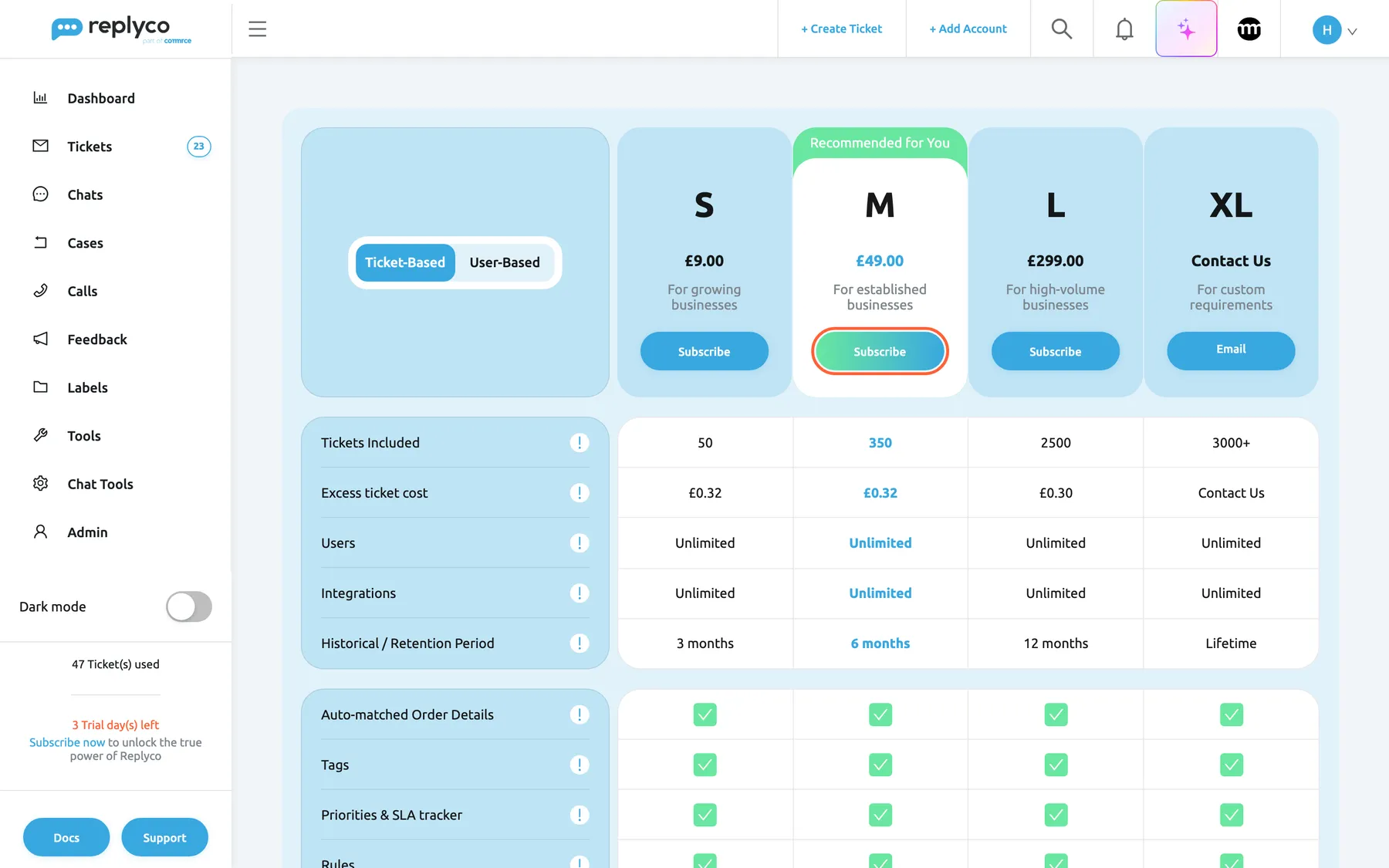
What this screenshot shows
- Screen
- Subscribe (/subscription)
- Highlighted
- button “Subscribe”, plan-headers, enabled. asks for confirmation
- Also visible
- toggle Ticket-Based selected; S £9.00, M £49.00 recommended, L £299.00, XL Contact Us; Tickets Included 50/350/2500/3000+; Excess ticket cost £0.32/£0.32/£0.30; 3 Trial day(s) left
- Purpose
- the screen at a glance
| Region | What it shows | What you do there |
|---|---|---|
| Toggles, top left | Ticket-Based and User-Based; without a plan and outside the United Kingdom and the German region, also the currencies | Choose the pricing model and the currency |
| Plan columns, top | S, M, L and XL, each with its price, a one-line description and a button; M carries Recommended for You | Subscribe to a plan or move to it |
| Main rows | Tickets Included, Excess ticket cost, Users, Integrations, Historical / Retention Period | Compare what the plans include |
| Feature rows, below | One row per feature, such as Auto-matched Order Details and Tags, ticked for every plan | See the features every plan includes |
| Sidebar, bottom | During the trial: the tickets used, 3 Trial day(s) left and Subscribe now | See how long the trial has left |
Compare the plans
Section titled “Compare the plans”Each plan column shows the plan’s name, its price and a one-line description: S For growing businesses, M For established businesses, L For high-volume businesses and XL For custom requirements. XL has no price; its Email button opens an email to Replyco so you can agree the terms.
On the ticket-based plans the main rows read:
| Row | S | M | L | XL |
|---|---|---|---|---|
| Monthly price | £9.00 | £49.00 | £299.00 | By agreement |
| Tickets Included | 50 | 350 | 2,500 | 3,000 and more |
| Excess ticket cost | £0.32 | £0.32 | £0.30 | By agreement |
Prices are the same figures in euros and dollars, before VAT. A ticket counts once, when its first reply goes out; see Billing: Usage. Hover the exclamation mark beside a row to read what it means. The price of extra tickets is what decides the right plan: at 500 answered conversations a month, S costs £9.00 plus 450 × £0.32 = £153.00 before VAT, while M costs £49.00 plus 150 × £0.32 = £97.00.
The feature rows below list Replyco’s features. Every plan includes every feature, so each row is ticked in every column, and during the trial every feature is switched on; the plans differ in price, tickets and accounts. The full list is in What each plan includes. Each plan also includes a number of connected accounts; an account beyond that number is blocked, see Stay within your plan’s number of accounts.
Choose ticket-based or user-based pricing
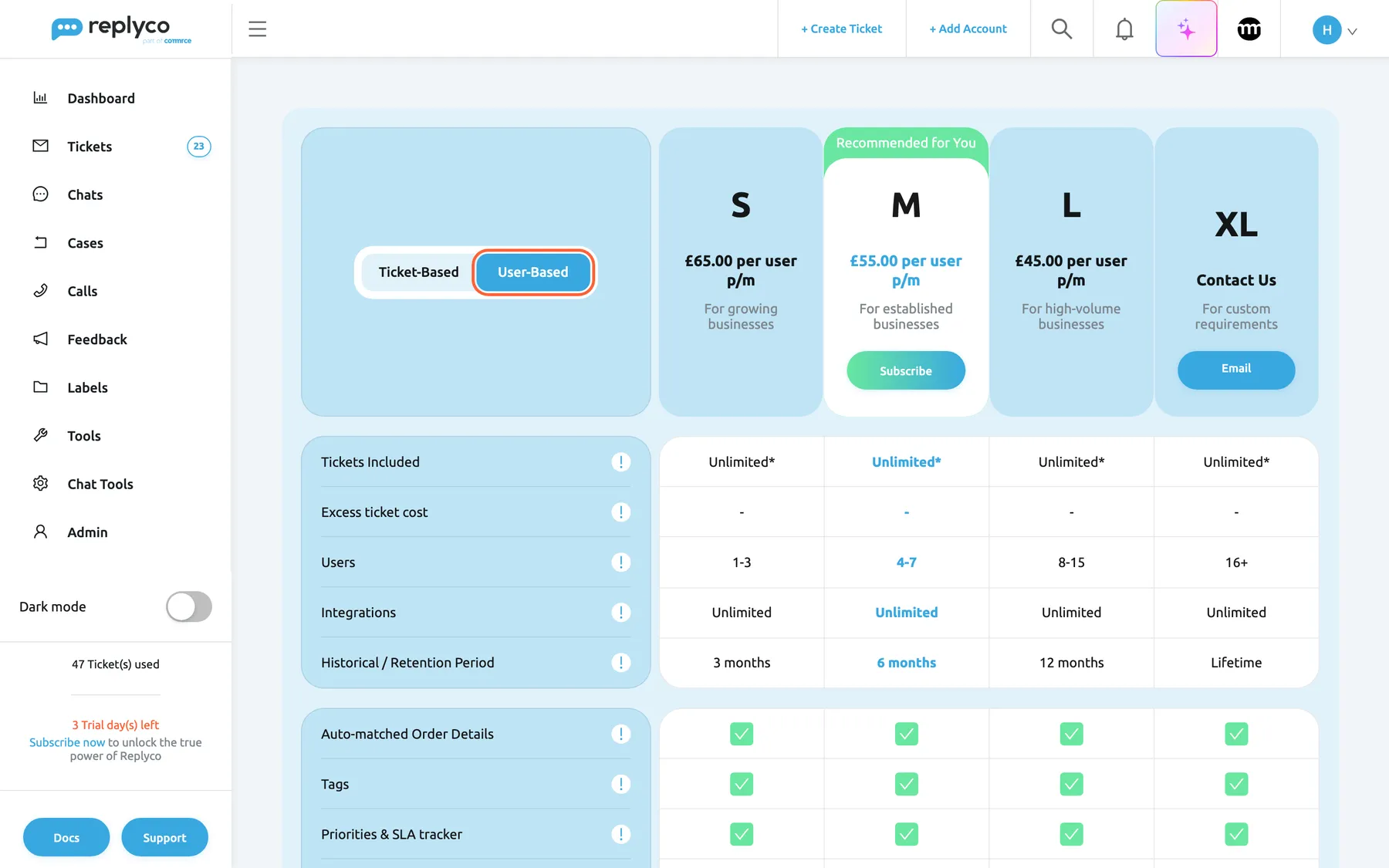
Section titled “Choose ticket-based or user-based pricing”The toggle at the top left switches the comparison between the two pricing models. Ticket-Based is selected when the screen opens.
What this screenshot shows
- Screen
- Subscribe (/subscription)
- Highlighted
- option “User-Based”, period-toggle, selected. shows per-user prices
- Also visible
- S £65.00, M £55.00, L £45.00 per user p/m; only M has Subscribe (4-7 users); Tickets Included Unlimited*
- Purpose
- user-based pricing
- Ticket-Based: a usage-based plan, with a fixed monthly price, a ticket allowance, and extra tickets at the plan’s price.
- User-Based: a price per user per month, £65.00 on S (1 to 3 users), £55.00 on M (4 to 7), £45.00 on L (8 to 15), and XL on request (16 and more). Tickets Included reads Unlimited with an asterisk: tickets are unlimited under the fair use policy. User-based plans include every feature.
In the user-based view only the plan whose range fits your current number of users has a button, because the price is counted per user. Northwind has seven users, so only M can be chosen. Inviting or removing users later changes the price straight away; see Users.
Subscribe to a plan
Section titled “Subscribe to a plan”-
In the column of the plan you want, select Subscribe and confirm with Yes. The Subscribe dialog opens with the plan and its price.
-
Check the details. Full Name starts with your name, and the country and address start with your billing address from AdminCompany Settings. Enter the Postal Code, and a Coupon if you have one.
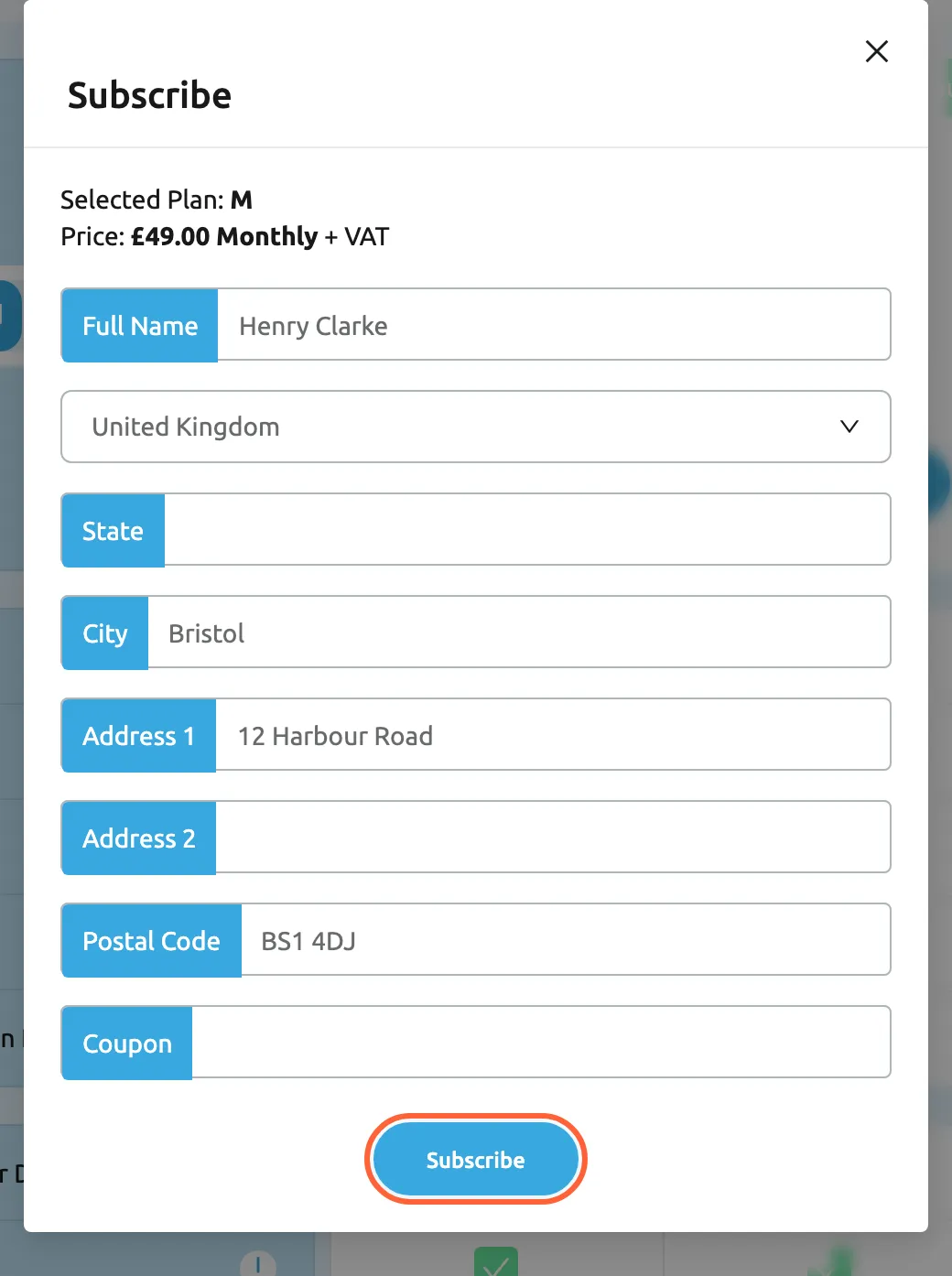
Check your billing details, add the postal code and a coupon if you have one, then select Subscribe. What this screenshot shows
- Screen
- Subscribe (/subscription)
- Highlighted
- button “Subscribe”, dialog-bottom, enabled. asks to confirm
- Also visible
- Selected Plan M, Price £49.00 Monthly + VAT; Full Name Henry Clarke, United Kingdom, Bristol, 12 Harbour Road, BS1 4DJ; Coupon empty
- Purpose
- the subscription form
-
Select Subscribe. Replyco asks once more.
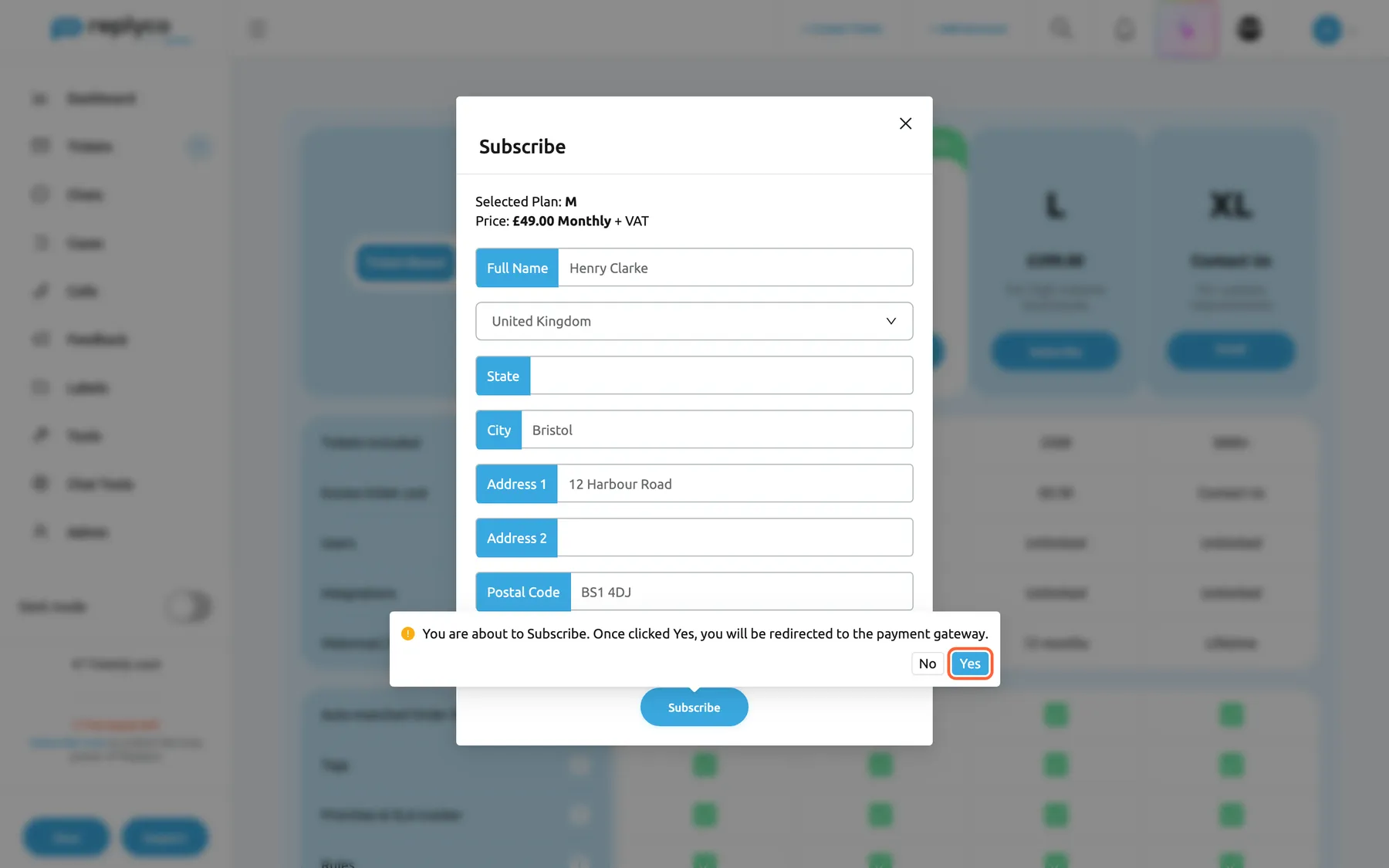
Yes hands over to the payment provider's page, where you pay; Replyco never sees your card. What this screenshot shows
- Screen
- Subscribe (/subscription)
- Highlighted
- button “Yes”, dialog-bottom, enabled. opens the payment provider's checkout page
- Also visible
- confirmation You are about to Subscribe…; No and Yes buttons
- Purpose
- the hand-over to payment
-
Select Yes. Your payment provider’s page opens in the same tab. Enter your card and confirm the payment there.
-
The provider returns you to Replyco, which activates the plan and opens the Welcome ticket.
Replyco checks two fields before it hands over: without a country it shows Please fill in Country, and without a postal code Please fill in Postal Code. The address you enter is saved as your company’s billing address and decides the tax rate: one rate for the United Kingdom, another for every other country; see Enter your address and billing address.
Once the plan is active, your trial ends, AdminBilling appears in the menu, and your first payment period starts that day. If the provider declines the first payment, the subscription is not set up; choose the plan again. If you leave the provider’s page without paying, Replyco shows Checkout was cancelled. and nothing changes; subscribe again when you are ready.
Move to a larger plan
Section titled “Move to a larger plan”-
Open this screen with Change Plan on AdminBilling.
-
In the column of the new plan, select Update.
-
Read the confirmation and select Yes.
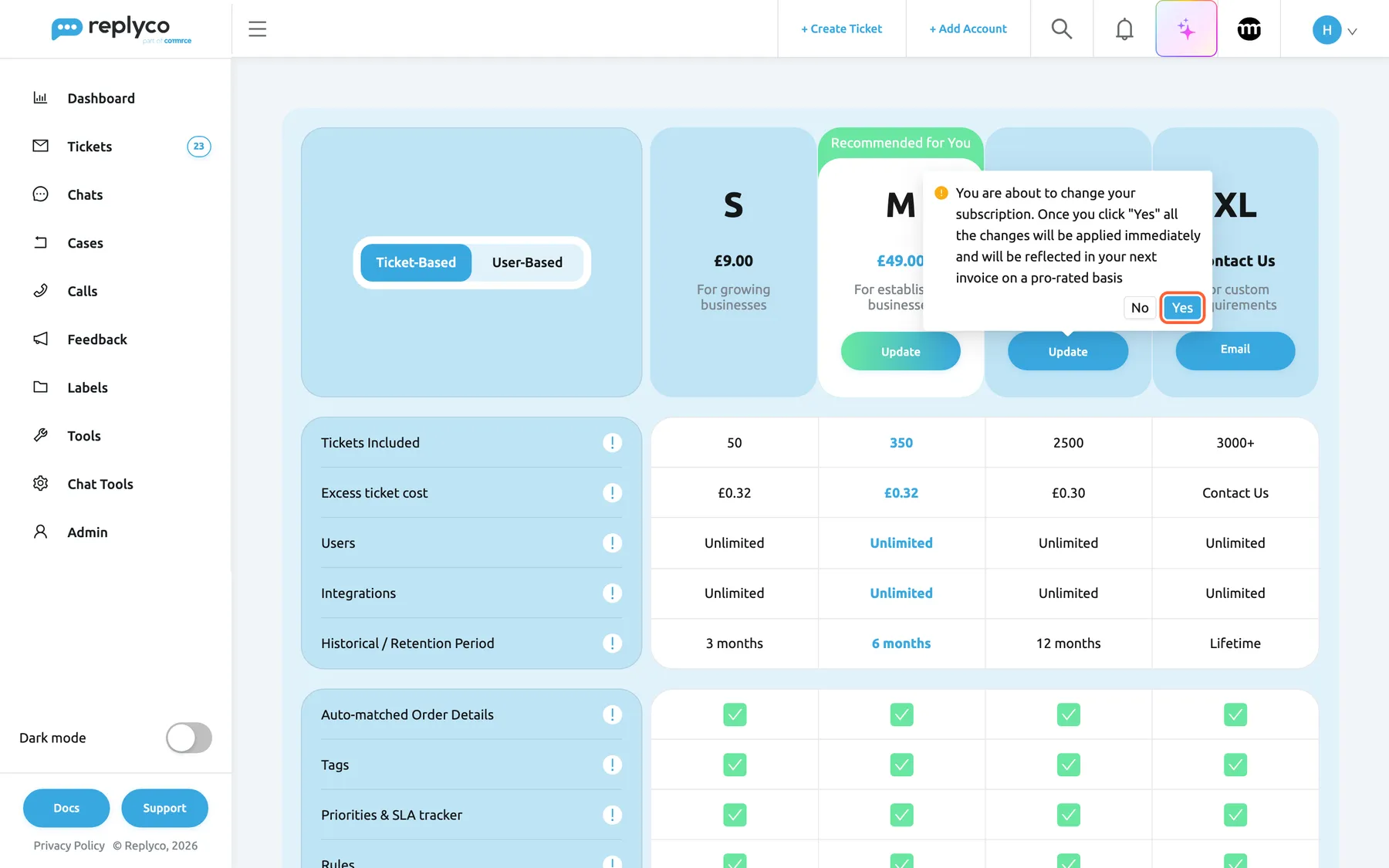
On a plan already, Update moves you to another plan at once; the difference is invoiced pro rata. What this screenshot shows
- Screen
- Subscribe (/subscription)
- Highlighted
- button “Yes”, plan-headers, enabled. changes the plan to L
- Also visible
- S without button, Update on M and L, Email on XL; confirmation You are about to change your subscription…
- Purpose
- move to a larger plan
The new plan applies at once: its ticket allowance, its number of accounts and how long tickets are kept change with it, the features stay, since every plan includes all of them, a new payment period starts that day, and your payment provider invoices the difference pro rata. AdminBilling shows the new plan straight away.
The comparison offers your current plan and the larger ones; smaller plans have no button. On an annual plan no plan has a button, and on a user-based plan the price follows the number of users, so the user-based columns have no button either.
When your trial has ended
Section titled “When your trial has ended”The trial lasts 7 days, or 30 days for companies in the German region, and it never turns into a paid plan by itself; see Sign up. When it ends without a plan:
- signing in still works, but Replyco opens only this screen and the Help screen;
- new messages from your accounts are no longer collected;
- the sidebar shows Trial Expired instead of the days left.
Choose a plan as described in Subscribe to a plan, and everything opens again. A company that never subscribes is removed some weeks after the trial ends, with an email beforehand; see Cancel your subscription for the timeline.
If you pay through Shopify
Section titled “If you pay through Shopify”Companies billed through Shopify see a different version of the comparison:
- the comparison shows the user-based plans only, priced in US dollars, without XL and without the pricing toggle;
- during the trial the screen explains Click Subscribe to activate your plan. You’ll be redirected to your Shopify account to process payment.;
- a company without a plan sees Start 7 days trial on the plan that fits its number of users; Shopify then asks you to approve the charge and returns you to Replyco;
- AdminBilling is not in the menu; after the trial, Manage Your Subscription at the bottom of the sidebar opens this screen.
Every control, explained
Section titled “Every control, explained”The plan comparison, top to bottom.
Ticket-Based and User-Based
Section titled “Ticket-Based and User-Based”The toggle at the top left. Not shown with Shopify billing.
Switches every column between the ticket-based and the user-based model. Starts at Ticket-Based. Nothing is saved; it only changes the comparison.
The two models suit different teams: a small team with many conversations pays less per user, a large team with few conversations less per ticket.
Currency toggle
Section titled “Currency toggle”Under the pricing toggle, only for a company without a plan whose browser time zone is outside the United Kingdom and the German region.
$ USD, £ GBP and € EUR. The prices keep their figures and change their currency. A company with a plan always sees its plan’s currency; companies in the United Kingdom see pounds and in the German region euros.
You subscribe in the currency your company pays in.
Plan columns and their buttons
Section titled “Plan columns and their buttons”Across the top, one column per plan.
The plan, its price (per user per month in the user-based view), its description and one button: Subscribe for a company without a plan, Update for your current plan and larger ones, Email on XL. Each Subscribe and Update asks for confirmation first. M carries the green band Recommended for You.
One click from comparison to decision, with a confirmation before anything changes.
Comparison rows
Section titled “Comparison rows”Below the plan columns, each with an exclamation mark that explains the row on hover.
Tickets Included, Excess ticket cost, Users, Integrations and Historical / Retention Period, then one row per feature, ticked for every plan. Read-only.
Everything you need to choose a plan, on one screen.
The Subscribe dialog
Section titled “The Subscribe dialog”Opens after you confirm Subscribe in a plan column.
| Field | What to enter | Why |
|---|---|---|
| Selected Plan, Price | Shown, not editable: the plan and its price plus VAT | Check before you pay |
| Full Name | Your name, filled in | The name for the payment |
| Country | Your billing country, filled in from your address; required | Decides the tax rate |
| State, City, Address 1, Address 2 | Your billing address, filled in from your address | Printed on your invoices |
| Postal Code | Your postal code; required | Completes the address |
| Coupon | A discount code, if you have one | Applies the discount to your subscription |
Subscribe asks You are about to Subscribe. Once clicked Yes, you will be redirected to the payment gateway. and, with Yes, opens the payment provider’s page. The cross closes the dialog without subscribing.
Your billing details are right before the first invoice is raised.
Who sees what
Section titled “Who sees what”| Part | Shown when |
|---|---|
| The screen | Every signed-in user; the only screen besides Help once the trial has ended without a plan |
| Subscribe now in the sidebar | During the trial |
| Subscribe buttons | Your company has no plan yet |
| Update buttons | Your current plan and larger ones; not on annual or user-based plans |
| A button in the user-based view | Only on the plan whose user range fits your number of users |
| Currency toggle | No plan yet, and a browser time zone outside the United Kingdom and the German region |
| comrce column instead of XL | Companies in the German region, ticket-based view; that plan needs the coupon code from comrce |
| Shopify version | Companies billed through Shopify |
What you need to know
Section titled “What you need to know”| Topic | Fact |
|---|---|
| Plans | S, M, L and XL; every plan includes every feature; during the trial every feature is on. |
| Ticket-based prices | £9.00, £49.00 and £299.00 a month with 50, 350 and 2,500 tickets; XL by agreement. The same figures apply in euros and dollars. |
| Extra tickets | £0.32 on S and M, £0.30 on L, each ticket over the allowance. |
| User-based prices | £65.00, £55.00 and £45.00 per user a month for 1–3, 4–7 and 8–15 users; 16 and more on request. |
| Tax | Prices are before VAT; the rate depends on your billing country. |
| Payment | On the payment provider’s page; Replyco never sees your card number. |
| Plan changes | Apply at once, start a new payment period and are invoiced pro rata; only your plan and larger ones are offered. |
| Accounts | Each plan includes a number of accounts; an account beyond it is blocked until support lifts the block. |
| After the trial | Only this screen and Help open, and new messages are not collected, until you subscribe. |
Frequently asked questions
Section titled “Frequently asked questions”Choosing a plan
Section titled “Choosing a plan”Which plan should we choose?
Section titled “Which plan should we choose?”Compare your monthly number of answered conversations with the tickets each plan includes, and add the extra tickets at the plan’s price. At 500 answered conversations a month, S with 450 extra tickets costs £153.00 before VAT, M with 150 extra tickets £97.00. The plan comparison shows both figures; see What each plan includes for the features.
What is the difference between ticket-based and user-based?
Section titled “What is the difference between ticket-based and user-based?”Ticket-based plans cost a fixed amount a month with a ticket allowance, and extra tickets cost the plan’s price each. User-based plans cost a price per user per month, include every feature and have unlimited tickets under the fair use policy. Switch with the toggle at the top left of the plan comparison.
Is Replyco AI included in every plan?
Section titled “Is Replyco AI included in every plan?”Yes. Replyco AI, with tone analysis, AI drafts, categories and summaries, is part of every plan, and so is every other feature; during the trial every feature is switched on. The full list is in What each plan includes.
Why can I only choose one plan in the user-based view?
Section titled “Why can I only choose one plan in the user-based view?”User-based plans are priced per user, so each covers a range of users: S 1 to 3, M 4 to 7, L 8 to 15, XL 16 and more. The plan comparison offers only the plan whose range fits the number of users your company has now. To change the count, see Users.
Subscribing and paying
Section titled “Subscribing and paying”Do I need a card to start the trial?
Section titled “Do I need a card to start the trial?”No. The trial starts without payment details and never turns into a paid plan by itself. You enter your card only when you subscribe, on the payment provider’s page that opens after you confirm Subscribe in the plan comparison.
Where do I enter a discount code?
Section titled “Where do I enter a discount code?”In the Coupon field of the Subscribe dialog, which opens when you choose Subscribe under a plan and confirm. A code can only be added when you subscribe; for a code on an existing plan, contact support through Help and support.
Replyco says Please fill in Postal Code. What do I do?
Section titled “Replyco says Please fill in Postal Code. What do I do?”The Subscribe dialog needs a country and a postal code before it hands over to the payment provider. Enter your postal code in Postal Code and select Subscribe again; without a country Replyco shows Please fill in Country.
What happens after I pay?
Section titled “What happens after I pay?”The payment provider returns you to Replyco, which activates the plan and opens the Welcome ticket. Your trial ends, AdminBilling appears in the menu, and your first payment period starts that day; invoices then appear on Billing: Payment.
Changing the plan
Section titled “Changing the plan”Can we move to a smaller plan?
Section titled “Can we move to a smaller plan?”The plan comparison offers your current plan and the larger ones; smaller plans have no button there. To discuss a smaller plan, contact support through Help and support. Keep in mind that a plan with fewer accounts blocks the accounts beyond its number.
When does a larger plan take effect?
Section titled “When does a larger plan take effect?”At once. After you confirm Update with Yes, the new ticket allowance and number of accounts apply straight away, a new payment period starts that day, and the difference is invoiced pro rata. AdminBilling shows the new plan.
Why is there no button under any plan?
Section titled “Why is there no button under any plan?”Your company is on an annual plan or on a user-based plan, and the comparison offers no plan change for either: a user-based price follows the number of users. XL always shows Email instead. To change an annual plan, contact support through Help and support.
After the trial
Section titled “After the trial”Our trial ended. How do we get back in?
Section titled “Our trial ended. How do we get back in?”Sign in as usual; Replyco opens the plan comparison, the only screen besides Help. Choose a plan and subscribe, and every screen opens again and message collection resumes. The trial lasts 7 days, or 30 days in the German region.
Troubleshooting
Section titled “Troubleshooting”| Symptom | What to check |
|---|---|
| Every screen redirects to the plan comparison | The trial has ended without a plan; subscribe to continue |
| Please fill in Postal Code or Please fill in Country appears | The Postal Code field or the country is empty in the Subscribe dialog |
| A plan has no button | It is smaller than your current plan, your plan is annual or user-based, or in the user-based view the plan’s user range does not fit your number of users |
| Subscribing or changing the plan is refused | You need the Billing permission with Edit rights; ask an administrator, see User permissions and roles |
| The prices are in the wrong currency | Without a plan, pick the currency in the toggle; with a plan, the comparison uses the plan’s currency |
| The first payment was declined | The subscription was not set up; subscribe again with another card |