

eBay cases
A buyer who opens a return on eBay starts a clock: eBay expects the seller to answer by a date, and a seller who misses it can lose the case. eBay cases brings those returns and item-not-received inquiries into Replyco, next to the tickets from the same buyers, and lets your team answer them with the actions eBay offers: approve, refund, send a return label, escalate or write to the buyer.
What it does
Section titled “What it does”eBay keeps returns and item-not-received inquiries in its resolution centre, apart from buyer messages. A team that answers tickets in Replyco has to switch to Seller Hub to see that a buyer asked for a return label two days ago, and nothing in the ticket says the deadline is tomorrow.
With Enable eBay Cases switched on, Replyco asks eBay for new cases every 25 minutes and keeps each one as a record in Cases, with eBay’s own state, its history and the date to resolve it by. From there:
- Your team sees every open case in one list. Unread cases are bold and a coloured bar shows whether a case is new, in progress or closed. See the Cases list.
- Each case opens with eBay’s history and only the actions eBay allows at that moment, as buttons. Replyco sends the action to eBay and reloads the case. See actions on a return and actions on an item-not-received inquiry.
- Return labels come from a library. Store your return-label images once under Shipping Labels and pick one when a buyer needs a label. See the return-label library.
- Cases meet your tickets. An eBay ticket shows a block for each case of its order, and a case lists the tickets of its order. See eBay cases in the ticket.
- The Cases dashboard counts returns and how long they take to close. See eBay cases on the Cases dashboard.
Every case keeps eBay’s full history, with the buyer’s comments, your replies, eBay’s automatic steps and any money that moved, so you can always see what the buyer was offered and when.
Before you start
Section titled “Before you start”| Requirement | Details |
|---|---|
| Plan | The Cases feature, which every current plan includes; every feature is on during a trial. Companies on an older plan may not have it; then Cases in the sidebar shows a lock. See What each plan includes. |
| An eBay account | A connected eBay account that is not blocked and does not need a new login, under AdminAccounts. The switch Enable eBay Cases only appears once an eBay account is connected and your company has the Cases feature. See eBay. |
| The company switch | Enable eBay Cases under AdminCompany Settings › General, which only users with the Admin permission and Edit rights reach and save. See Company Settings. |
| The Cases permission | Each user who works on cases needs it; viewing is enough to read cases, editing is needed to send actions. The Admin and Moderator roles have it by default, the User role does not. See User permissions and roles. |
| The Shipping Labels permission | Only for managing the return-label library under ToolsShipping Labels. Admin and Moderator have it by default. |
| Accounts assigned to the user | The list shows cases of the eBay accounts the user may see. See Users. |
| Cost | Nothing per case. Replyco uses eBay’s Post-Order service with your account’s login; eBay’s own call limits apply. |
Understanding eBay cases
Section titled “Understanding eBay cases”A case is one eBay return or one item-not-received inquiry. eBay decides what happens to it, and Replyco shows eBay’s words for it. Every case carries three values: its type (what the buyer wants), its state (where eBay’s process is) and its status (who has to act next). They appear in the list, in the case’s General Details and on the progress line at the top of a return.
| Case | Type examples | Typical states in order | What the buyer wants |
|---|---|---|---|
| Return | Money Back, Replacement, Exchange | Return Requested › Return Label Pending › Item Ready to Ship › Item Shipped › Item Delivered › Refund Initiated › Closed | The Desk Lamp Fold arrived without the USB-C cable. The buyer wants to send the item back, or keep it for part of the money. |
| Item-not-received inquiry | Still want item, Full refund | Created › Tracking provided › Closed | My power bank has not arrived. The tracking has not moved for four days. The buyer wants the parcel, or the money. |
Some states end a case differently: Return Rejected after you decline, Escalated when eBay customer support takes over, and states that name a timeout, such as Return Request timeout and Refund Timeout, when a deadline passed. Hover any type, state or status in a case to read eBay’s own description of it.
How Replyco decides
Section titled “How Replyco decides”- eBay decides the actions. For a return, the buttons under Choose any available action: are exactly the actions eBay reports for the seller at that moment, in eBay’s order. Replyco adds nothing and hides nothing except the ones it cannot perform.
- Replyco decides the inquiry buttons. For an item-not-received inquiry, Replyco offers Close inquiry and Escalate inquiry while the inquiry is open; Issue a full refund when eBay has reported refund amounts and no refund has been made; and Provide shipment info until eBay has shipment tracking for it, then Send Message instead. A closed inquiry has no buttons.
- New cases every 25 minutes. For each eBay account, Replyco asks eBay for returns and inquiries created recently and saves the ones it does not have yet, open or closed.
- Open cases refresh every 12 hours. Replyco asks eBay again for open cases that were not refreshed for 12 hours. A case also refreshes when someone opens it and after every action sent from Replyco.
- Changes make a case unread. A new case arrives unread, and whenever a refresh brings a change from eBay, the case turns unread again. Opening a case marks it read.
- Classic eBay tickets can add cases. When a message on a classic eBay account names a return or request number, Replyco fetches that case at once, without waiting for the 25-minute round.
What does not get imported
Section titled “What does not get imported”- Order cancellations. A buyer’s cancellation request shows on the order in the ticket as Order has an open cancellation process, with Approve and Reject. See The ticket screen.
- Cases of eBay accounts that are blocked, need a new login or have syncing paused. They are fetched again once the account works. See Fix a blocked or silent account.
- Cases whose eBay order Replyco cannot find. Replyco needs the order to link the case to a buyer and a product.
- Cases created long before you switched the import on. Each round only looks at recent cases; to fetch an older one, search for its number in the marketplace (see the Cases list).
- Anything from marketplaces other than eBay.
Setting it up in five steps
Section titled “Setting it up in five steps”-
Check the eBay account. Under AdminAccounts, the eBay account must be connected and syncing. If it is blocked or asks for a new login, fix that first; see Fix a blocked or silent account.
-
Switch the import on. Go to AdminCompany Settings, stay on General, switch on Enable eBay Cases in the General card and select Save. Cases appears in the sidebar for everyone with the Cases permission.
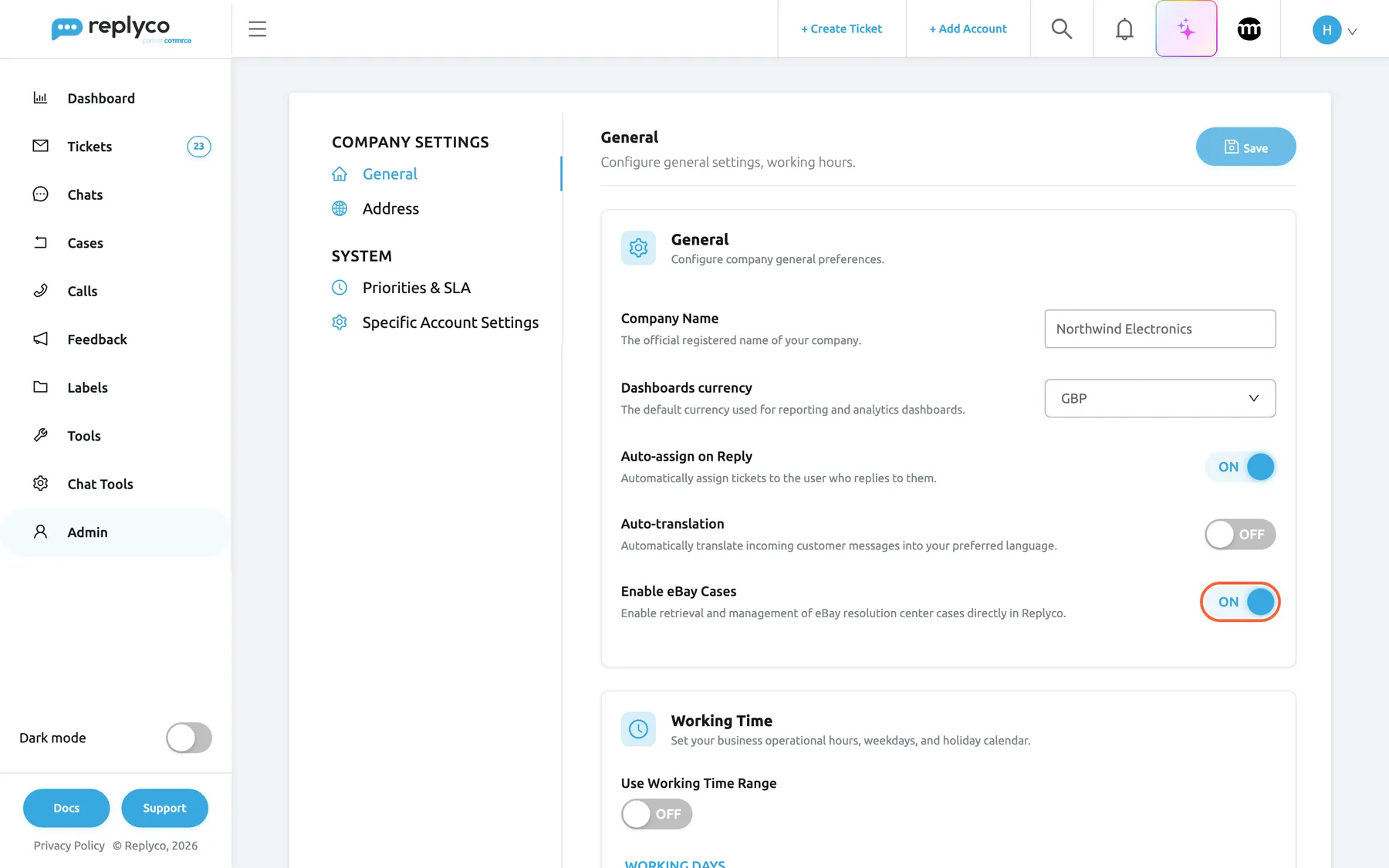
Enable eBay Cases on the General tab switches the import on for the whole company; select Save to apply it. What this screenshot shows
- Screen
- General (/company?tab=companyGeneral)
- Highlighted
- switch “Enable eBay Cases”, general-card, on. switches the eBay case import on or off once the tab is saved
- Also visible
- Company Name Northwind Electronics, Dashboards currency GBP; Auto-assign on Reply on, Auto-translation off; Save button at the top right
- Purpose
- the master switch of eBay cases
-
Give your team access (optional). Under AdminUsers, give the Cases permission to every user who handles returns, with editing if they should send actions. Admin and Moderator already have it.
-
Fill the return-label library (optional). If you send buyers your own return labels, open ToolsShipping Labels, select Create New, pick the label image, type a Label Name and select the tick. Repeat for each carrier or parcel size you use.
-
Wait for the first cases. Replyco looks for new cases at its next round, at most 25 minutes later. Open Cases: new cases are bold. Sync does not speed up the first import; it refreshes open cases that already exist.
Every setting, explained
Section titled “Every setting, explained”eBay cases has one company switch, two user permissions and one library, in the order you set them up.
Enable eBay Cases, the master switch
Section titled “Enable eBay Cases, the master switch”AdminCompany Settings › General, the last switch in the General card, described as Enable retrieval and management of eBay resolution center cases directly in Replyco. It is shown once an eBay account is connected and the company has the Cases feature. Change it, then select Save at the top right; saving needs the Admin permission with Edit rights.
Off by default. On: Replyco imports new eBay cases every 25 minutes and refreshes open ones every 12 hours, for every eBay account of the company, and shows Cases in the sidebar to users with the Cases permission. The first round runs within minutes of saving. Off: both rounds stop and Cases disappears from the sidebar. Nothing is deleted: cases already imported stay. When you save a changed switch, Replyco switches the Cases module on or off for the whole company in the same step. The import also needs the Cases feature, which every current plan includes; companies on an older plan may not have it.
Not every eBay seller handles returns in the same tool as messages. The switch lets a company keep returns in Seller Hub and still use Replyco for everything else.
Cases, who works on cases
Section titled “Cases, who works on cases”AdminUsers, in a user’s permissions, as view or edit. Roles set it for you: Admin and Moderator include it, User does not. See Users.
View: the user sees Cases, can open cases and search them. Edit: the user can also send actions and mark cases read or unread; with view only, Replyco refuses an action with You don't have enough rights Without the permission, the menu is hidden and the case blocks in tickets show the case number without a link. A user only sees cases of the eBay accounts assigned to them.
Refunds move money. Keeping the edit right to the people who decide refunds stops an agent from offering one by mistake.
Shipping Labels, who manages return labels
Section titled “Shipping Labels, who manages return labels”AdminUsers, in a user’s permissions. Admin and Moderator include it.
Shows Shipping Labels under Tools and allows adding and deleting labels there. The menu also needs the Cases feature and the Cases permission. Users without it can still pick a stored label in a case.
The library is shared by the whole company. Letting a few people change it keeps outdated or wrong labels out of the list agents choose from.
Shipping Labels, the return-label library
Section titled “Shipping Labels, the return-label library”ToolsShipping Labels. Create New at the top right adds a card; the tick saves it, the cross discards it. The bin icon on a card deletes that label. To learn this screen, see Shipping Labels.
Each label is an image and a name, shared by everyone in the company. The card accepts JPG, JPEG and PNG images, one per label. Replyco refuses to save a card without an image, with Please upload a file, and without a name, with Please enter a name for the shipping label. The library starts empty and shows No shipping labels found. When you send Provide Shipping Label on a return, the list under Choose Label offers these labels by name, the first one preselected, and Replyco sends the chosen label to eBay.
Most sellers use the same few prepaid return labels again and again. Storing them once saves looking for the file every time a buyer asks.
| Do | Don’t |
|---|---|
| Name the label after the carrier and the parcel: Royal Mail Tracked 48 return | Name it label1 or the file name |
| Use a clear image of the whole label, address readable | Crop off the barcode or the address |
| Keep one label per carrier and size | Keep old labels “just in case”; agents pick the first one by default |
| Upload a PDF label through Upload Label in the case | Try to store a PDF in the library; it takes images only |
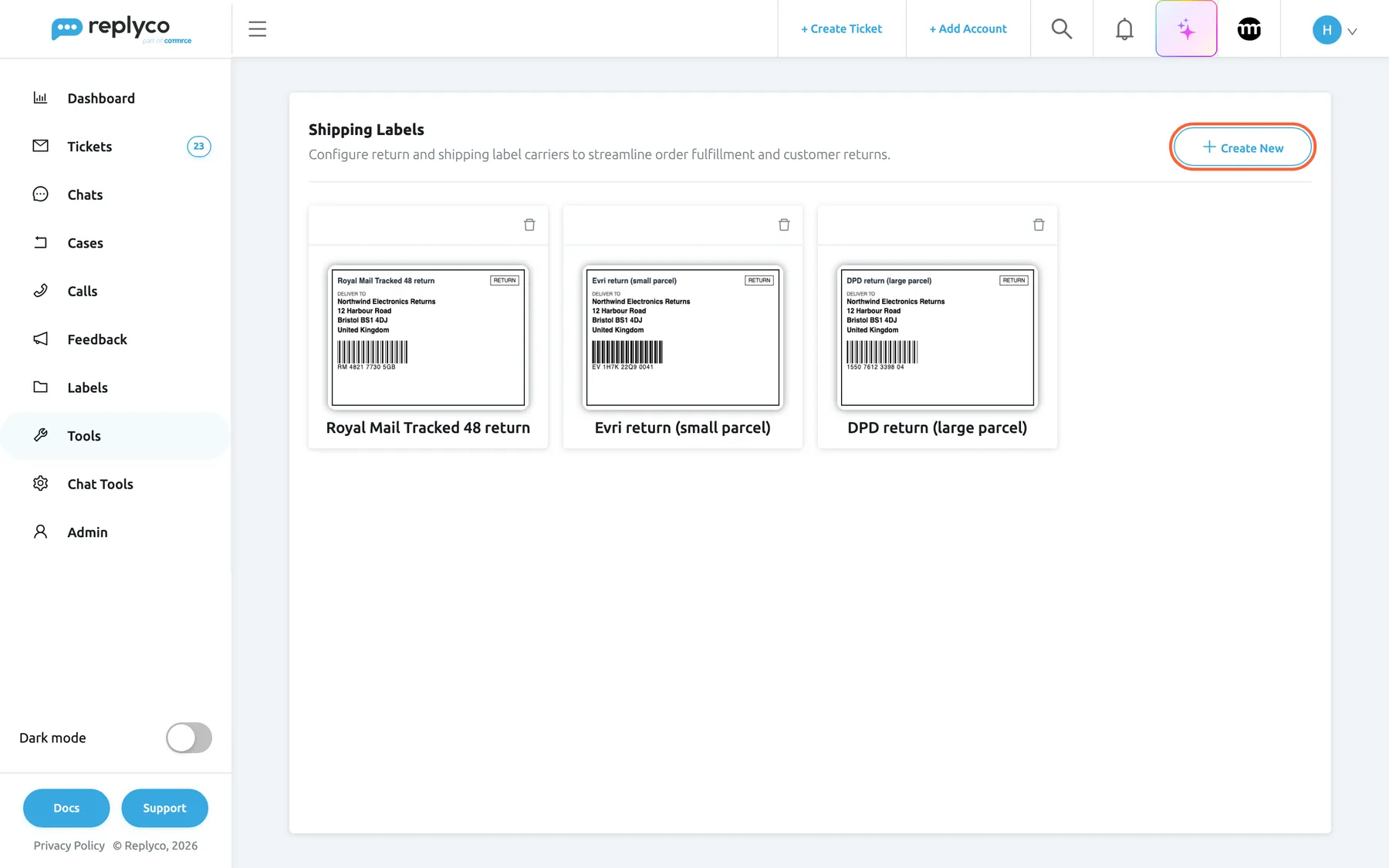
What this screenshot shows
- Screen
- Shipping Labels (/shipping-labels)
- Highlighted
- button “Create New”, header-right, enabled. adds a new label card
- Also visible
- 3 label cards with image and name; bin icon on each card
- Purpose
- the return-label library used by case actions
How the settings combine
Section titled “How the settings combine”| Cases feature | Enable eBay Cases | Cases | What the user gets |
|---|---|---|---|
| no | any | any | No import; Cases is locked |
| yes | off | yes | No import; Cases hidden |
| yes | on | no | Cases imported for the company; this user sees no menu and unlinked case blocks |
| yes | on | view | Reads cases, searches them, opens them from tickets |
| yes | on | edit | Everything, including actions and Sync |
eBay cases in Cases and on the case screen
Section titled “eBay cases in Cases and on the case screen”Once cases arrive, they show in the list, on each case’s own screen and in the notifications of anyone mentioned in a case note.
| Indicator | Where | Meaning |
|---|---|---|
| Bold row | Cases | Unread: new, or changed by eBay since someone last opened it |
| No bar | Cases | A new request: status Return Requested or Opened |
| Yellow bar | Cases | In progress: any other state that is not closed |
| Green bar | Cases | Closed |
| Ticked step | Progress line of a return | A state the return has passed; the circled number is the current state |
The Cases list
Section titled “The Cases list”Cases in the sidebar lists open cases, one row per case, with Case ID, Created Date, Type, State, Status, Notes Count, Account, Customer ID and Resolve By. The Resolve By date is eBay’s date to respond by. The filters narrow the list by account, by INR or Return & Refunds, by status and by Unread; closed cases appear only with All. The search box finds a case by its number, the buyer’s name, e-mail or eBay user ID, not by order number or item. Show Marketplace Search asks eBay itself for one case number on one account and imports it if Replyco does not have it. Edit Columns in the ⋮ menu picks your own columns. To learn every column and filter, see Case list.
Sync at the top right asks eBay again for the open cases of your eBay accounts that were not refreshed for 12 hours. Replyco answers Cases will be synced in a few minutes. Please wait. and refreshes them within minutes. It works once an hour: pressed sooner, it answers “The Sync button can be used only if Cases last sync time is more than 1 hour.” It does not import new cases, which arrive every 25 minutes anyway.
Why: sorted by the date to resolve by, the list is the order in which eBay expects your answers.
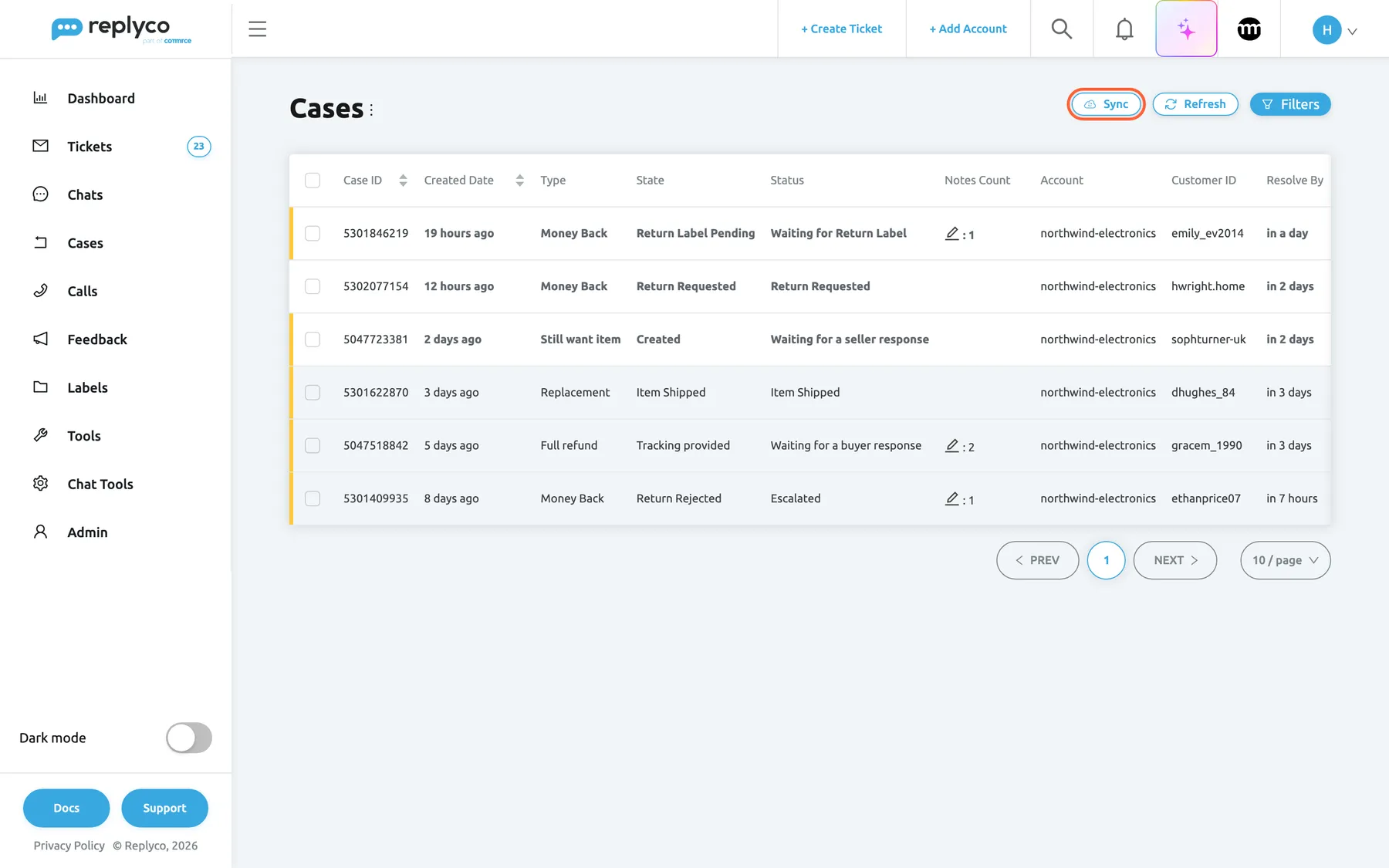
What this screenshot shows
- Screen
- Cases (/cases)
- Highlighted
- button “Sync”, header-right, enabled. asks eBay again for open cases not refreshed in the last hours
- Also visible
- 6 cases: 4 returns, 2 item-not-received inquiries; columns Case ID, Created Date, Type, State, Status, Notes Count, Account, Customer ID, Resolve By; Refresh and Filters buttons
- Purpose
- where imported cases appear
The case screen
Section titled “The case screen”Selecting a row opens the case. Replyco first fetches the latest version from eBay and shows Please wait... We are syncing most up to date details from your eBay... while it does. Then:
- The progress line (returns only) lists the states the return has passed, with the current one circled.
- The history shows eBay’s entries, oldest first: who acted (the buyer, eBay, you), what they did, when, and their comment, return address or money movement.
- Choose any available action: holds the action buttons. Hover one to read eBay’s description of it.
- The right panel shows General Details (for a return: type, reason, status, state and Response Due; the case number links to the return on eBay), the buyer’s files under Return Files, Related Tickets for the same order, Refund Details, Shipment Tracking Info, the customer, the order, the product and your notes. An inquiry adds Appeal Details.
To learn every part of this screen, see The case screen.
Why: the history is what the buyer and eBay see too. Reading it before you act tells you what the buyer was already offered.
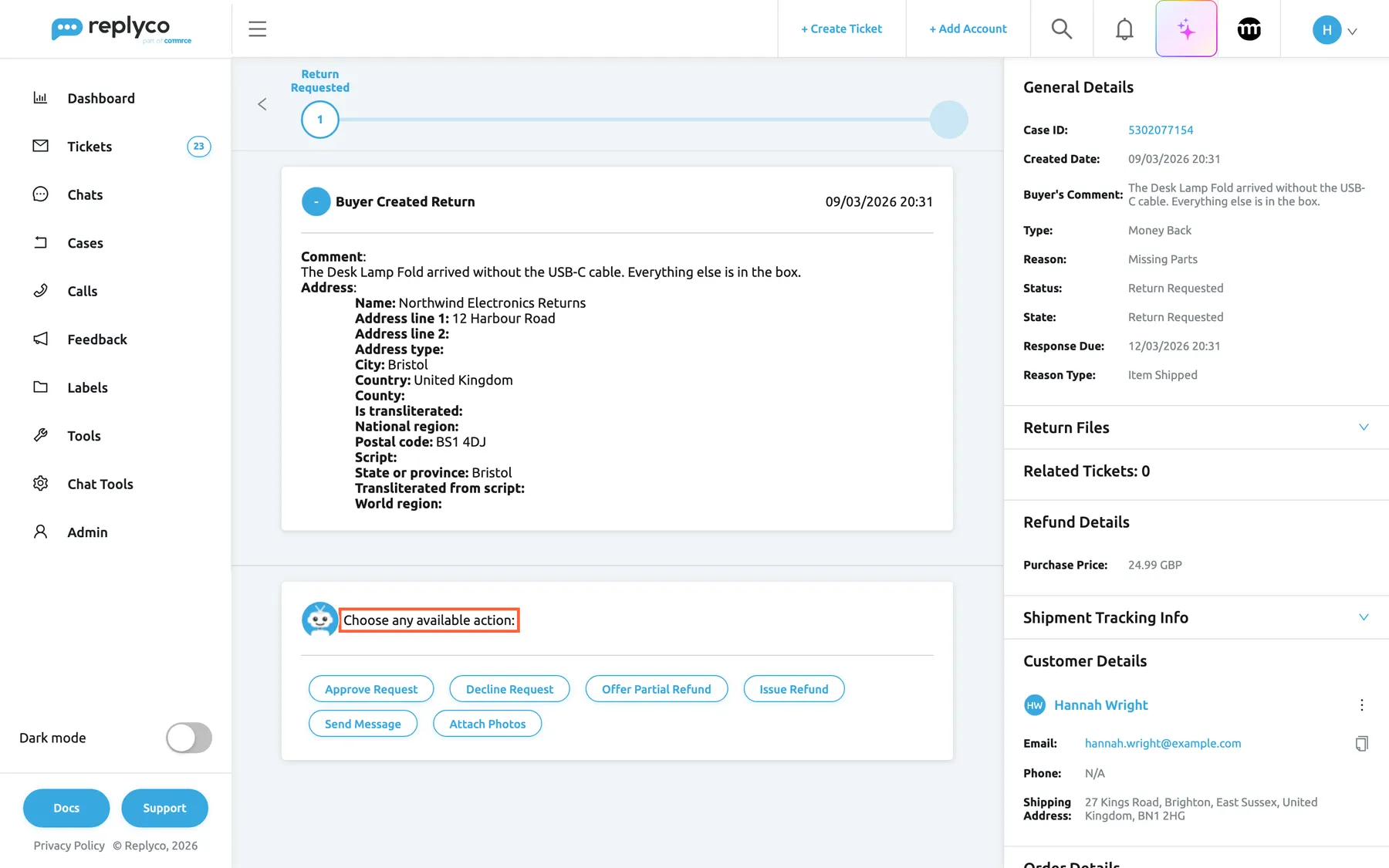
What this screenshot shows
- Screen
- Cases (/case/:caseId)
- Highlighted
- region “Choose any available action:”, actions-card, six actions. each button opens the form for that eBay action
- Also visible
- step Return Requested; history card Buyer Created Return with the buyer's comment and return address; General Details: Money Back, Missing Parts, Return Requested, Response Due; Customer Details: Hannah Wright
- Purpose
- the actions of a return request
Actions on a return
Section titled “Actions on a return”Select a button under Choose any available action:, fill the form and select OK. Fields under Required Fields must be filled; an empty one turns red and Replyco shows Please fill out all required fields A value of 0 counts as empty. Every text box offers your reply templates for the eBay account and the tags button; tags are filled in with the case’s details and your name before eBay receives the text. After OK, Replyco sends the action to eBay, shows Success, closes the form and reloads the case from eBay.
| Button | Required | Optional | What eBay does with it |
|---|---|---|---|
| Approve Request | – | Comment | Accepts the return request |
| Decline Request | – | Comment | Declines it; depending on the item’s return policy, the buyer may escalate to eBay |
| Offer Partial Refund | Partial Refund Amount and currency | Comment, Keep Original Item | Offers part of the money; the buyer accepts or declines |
| Issue Refund | Refund Line Items, filled from eBay, not editable | Comment, Relist item? | Refunds the amounts eBay lists, in full |
| Provide Shipping Label | Action, the label, Carrier | Carrier Name, Comment, Tracking Number | Gives the buyer your return label |
| Provide RMA Number | RMA Number | Comment | Gives the buyer your return authorisation number |
| Mark as Received | – | Comment | Confirms the item is back with you |
| Offer Replacement, Offer Returns | – | Comment | Offers a replacement, or a return instead |
| Mark Replacement as Shipped | Tracking Number | Carrier, Carrier Name, Carrier Used, Shipped Date, Comment | Tells the buyer the replacement is on its way |
| Provide Tracking Info | New Carrier, New Carrier Name, New Tracking Number | – | Adds tracking for the replacement |
| Escalate | Escalate Reason, Other by default | Comment | Hands the return to eBay customer support |
| Send Message | Message | – | Writes to the buyer in the return |
| Attach Photos | File, one file, with File Purpose | – | Adds a photo or document to the return |
Offer a partial refund. The amount must be above 0 and no more than the order total, in the currency chosen beside it. Tick Keep Original Item when the buyer may keep the item. Example: the Desk Lamp Fold arrived without its cable; offer 8.00 GBP towards a new cable and tick the box.
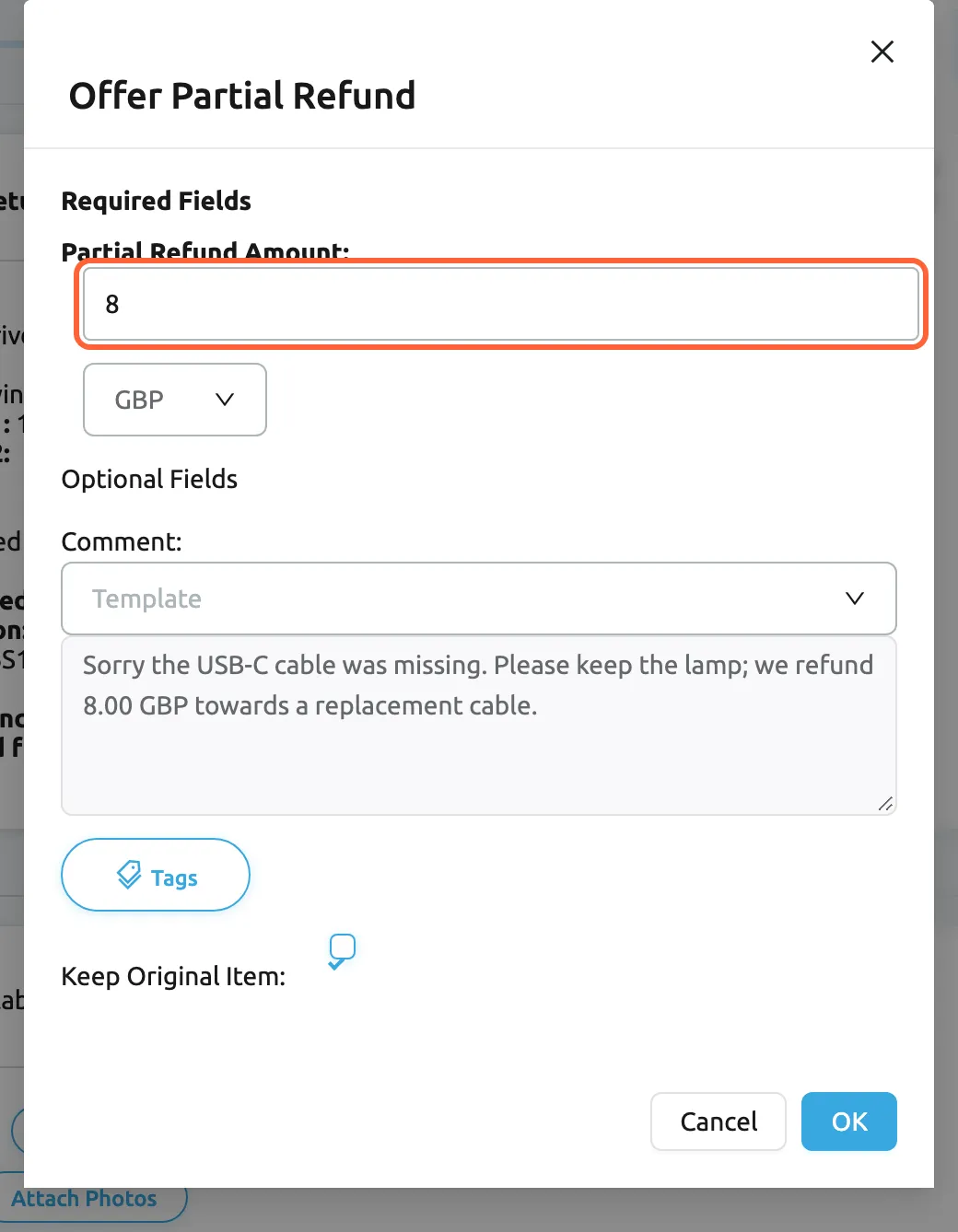
What this screenshot shows
- Screen
- Offer Partial Refund (/case/:caseId)
- Highlighted
- spinbutton “Partial Refund Amount”, dialog-required-fields, 8. the amount offered to the buyer
- Also visible
- currency GBP (de: EUR); Comment with Template list and Tags; Keep Original Item ticked; Cancel, OK
- Purpose
- offer a partial refund on a return
Send a return label. In Provide Shipping Label, leave Action on Upload Your Own Label. Under Choose Label, pick a label from your library; under Upload Label, select Add File and pick one BMP, GIF, JPG, JPEG, PNG or PDF file instead. Set Carrier to the carrier’s eBay code, such as ROYAL_MAIL; for a carrier that is not in the list, keep OTHER and type it in Carrier Name. Already Sent Label tells eBay you already gave the buyer a label another way, without uploading one. Without a label, Replyco shows Please choose or upload a label or Please upload a file A second file in the upload tab is refused with You can not upload more than one file
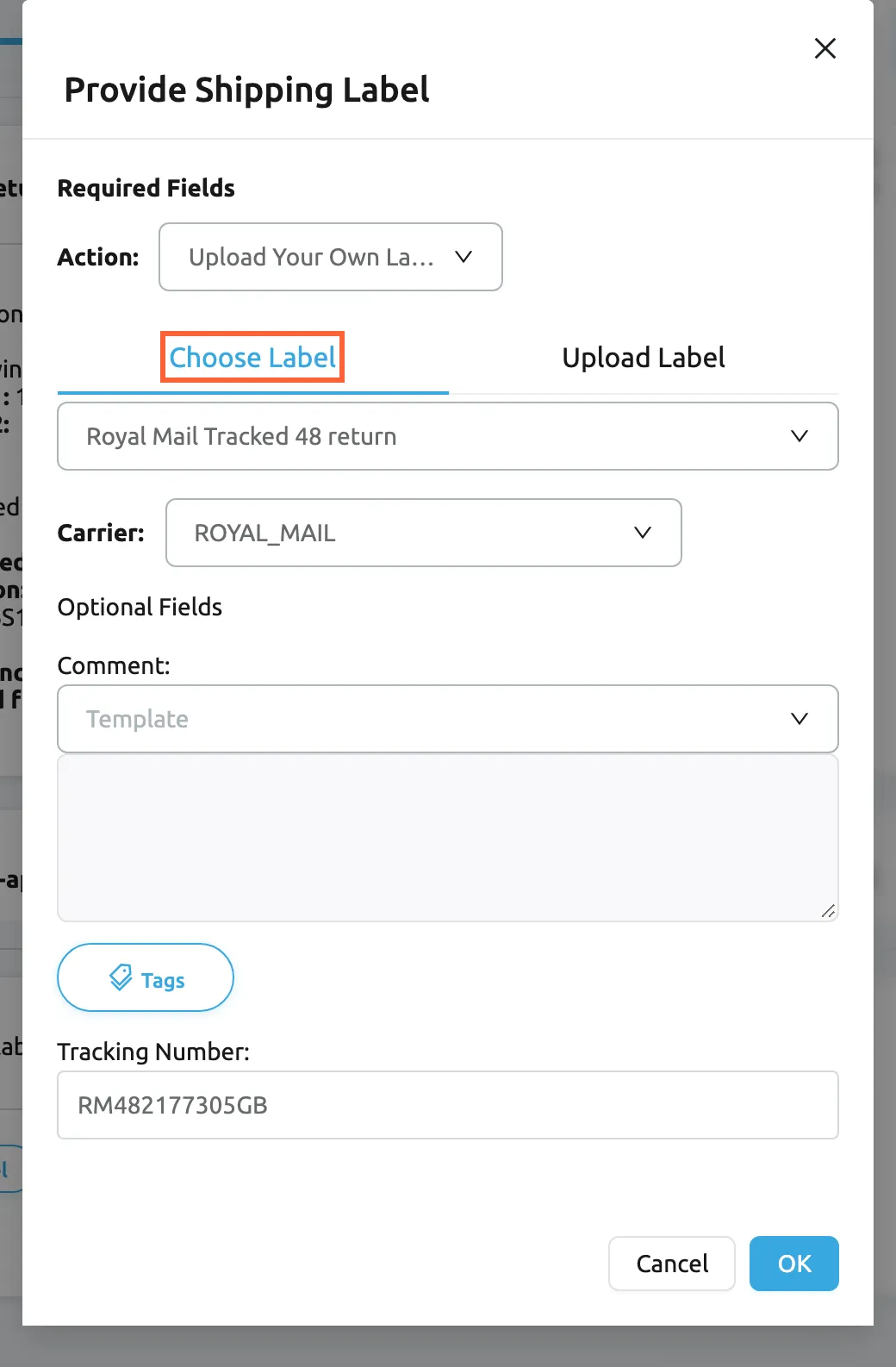
What this screenshot shows
- Screen
- Provide Shipping Label (/case/:caseId)
- Highlighted
- tab “Choose Label”, dialog-required-fields, selected. lists the labels of the Shipping Labels library
- Also visible
- Action Upload Your Own Label; label Royal Mail Tracked 48 return; Carrier ROYAL_MAIL; Comment, Tracking Number RM482177305GB; Cancel, OK
- Purpose
- send a return label from the library
Actions on an item-not-received inquiry
Section titled “Actions on an item-not-received inquiry”| Button | Shown when | Required | Optional | What eBay does with it |
|---|---|---|---|---|
| Close inquiry | The inquiry is open | – | Comment, Close reason (Other by default) | Closes the inquiry, for example after the parcel arrived |
| Escalate inquiry | The inquiry is open | Escalate Reason (Other by default) | Comment | Hands the inquiry to eBay customer support |
| Issue a full refund | eBay reported refund amounts and none was paid | – | Comment | Refunds the buyer in full |
| Provide shipment info | eBay has no tracking for the inquiry | Shipping date, Shipping carrier name, Tracking Number | Comment, Shipped with tracking (ticked) | Gives the buyer and eBay your proof of posting |
| Send Message | eBay already has tracking | Message | – | Writes to the buyer in the inquiry |
The escalation reasons are the four eBay accepts from a seller: Buyer trouble, Other, Shipped item and Trouble communication. Example: Sophie Turner’s power bank shows no tracking movement; if your tracking shows it at her local delivery office, escalate with Shipped item and quote the tracking in the comment.
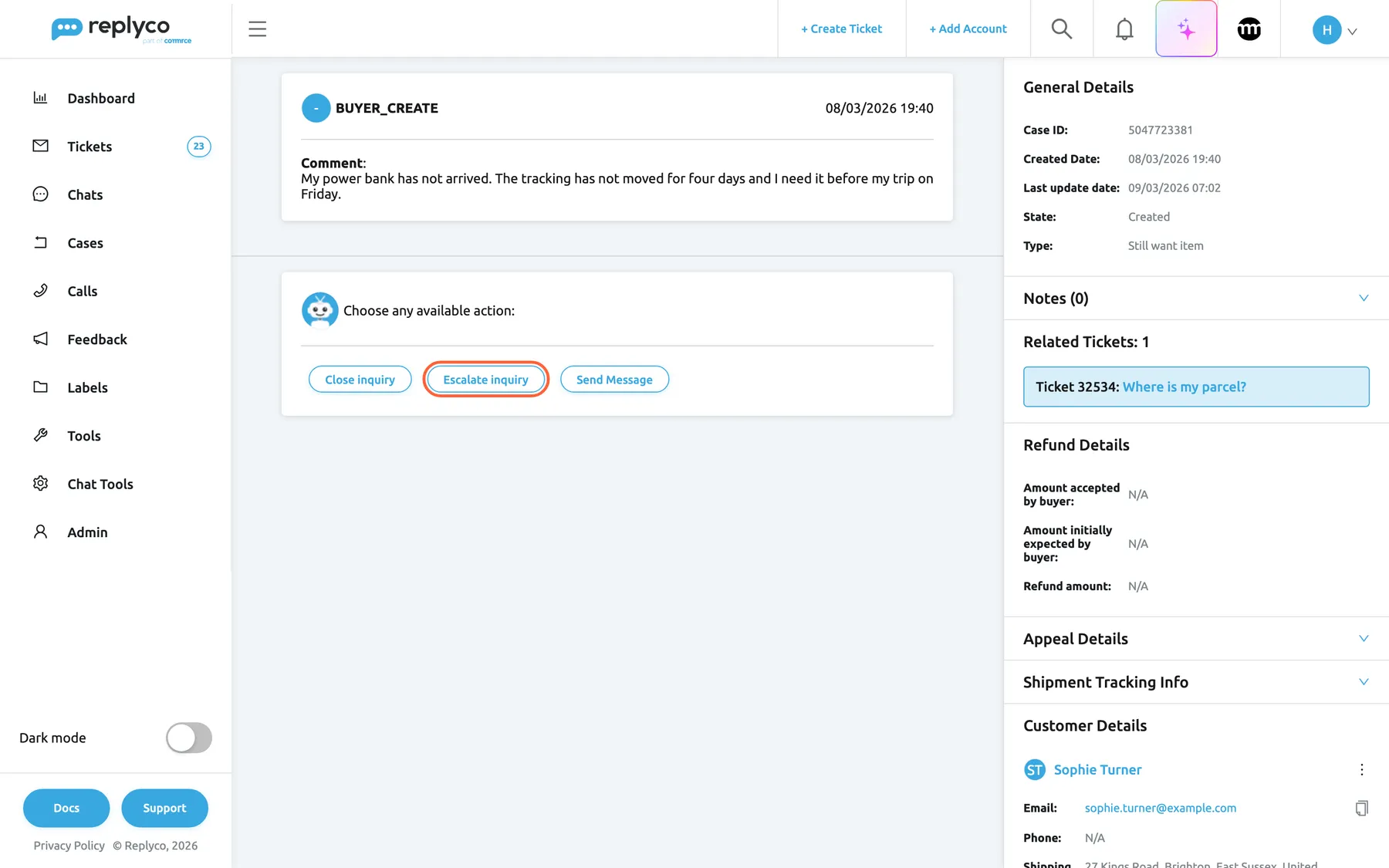
What this screenshot shows
- Screen
- Cases (/case/:caseId)
- Highlighted
- button “Escalate inquiry”, actions-card, enabled. opens the escalation form
- Also visible
- first history card with the buyer's message; actions Close inquiry, Escalate inquiry, Send Message; General Details: Created, Still want item; Related Tickets: 32534; Refund Details N/A; Customer Details: Sophie Turner
- Purpose
- the actions of an item-not-received inquiry
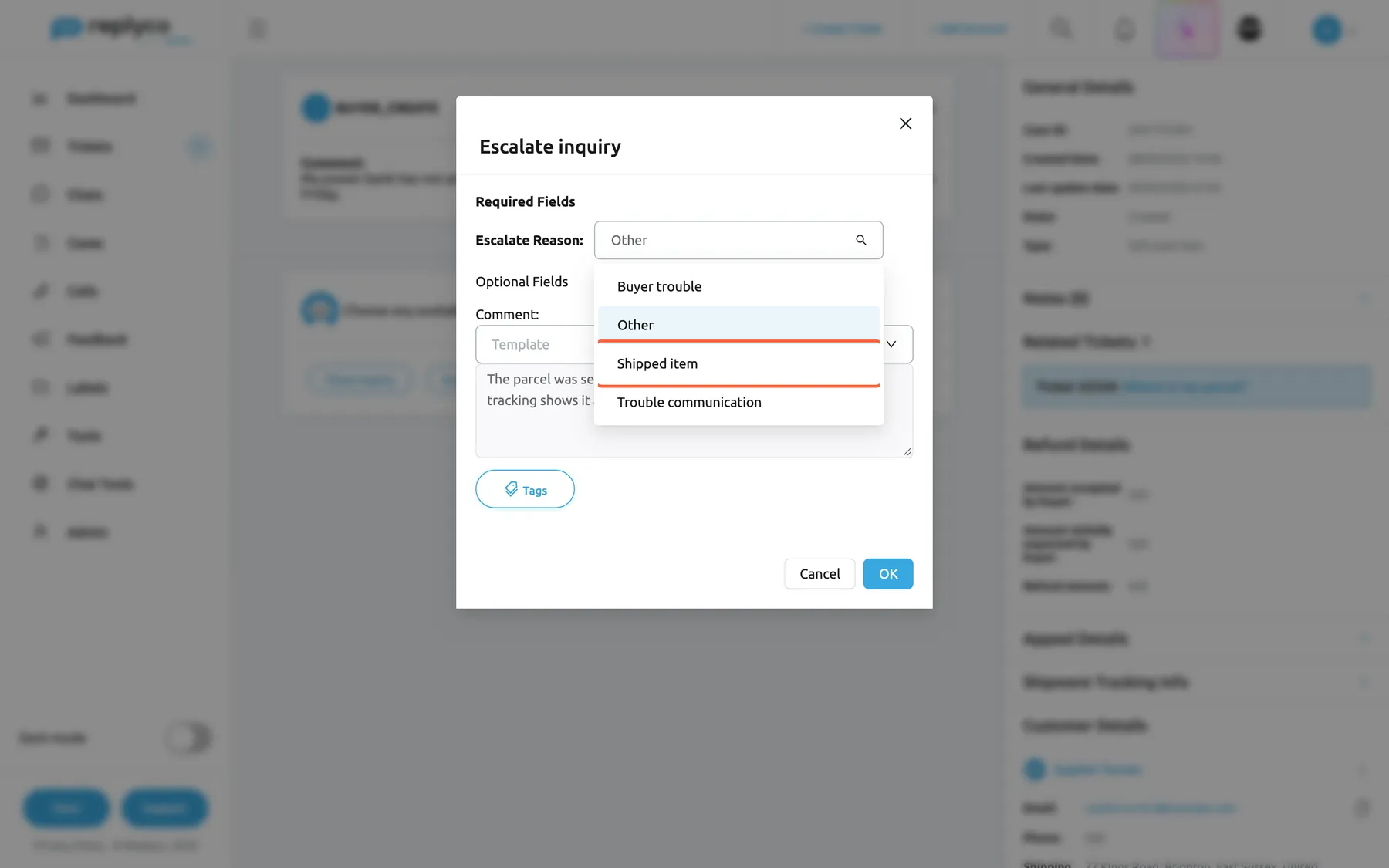
What this screenshot shows
- Screen
- Escalate inquiry (/case/:caseId)
- Highlighted
- option “Shipped item”, dialog-required-fields, list open. sets the escalation reason
- Also visible
- reasons Buyer trouble, Other, Shipped item, Trouble communication; Comment filled; Cancel, OK
- Purpose
- escalate an item-not-received inquiry
Deadlines
Section titled “Deadlines”Resolve By in the list is eBay’s date to respond by: for a return, the seller’s respond-by date; for an inquiry, the date by which eBay expects the seller to put it right. Inside a return, Response Due is eBay’s current respond-by date, updated with every refresh. Replyco does not act when a date passes: it sends no reminder, escalates nothing and changes no status by itself. eBay applies its own rules, and the result reaches Replyco at the next refresh as eBay’s state, such as Return Request timeout, or as a history entry naming the timeout.
Why: the dates belong to eBay, and only eBay can extend them or close the case. Replyco shows them so you answer in time.
Notes and mentions
Section titled “Notes and mentions”The notes block of a case works like ticket notes: your team writes internal notes and mentions colleagues with @. A mentioned colleague gets a notification in the bell at the top, which opens the case; it is written in your company’s language, German for a company that uses Replyco in German and English otherwise. Notes never reach the buyer or eBay; the list’s Notes Count column counts them. There are no other notifications for cases: no alert for a new case, a change or a date that is close.
eBay cases in the ticket
Section titled “eBay cases in the ticket”The ticket screen of an eBay ticket that has an order, at the top of the right panel under the label and priority selects: one block per case of the order, Return Case or INR Case, numbered, with the case number. See The ticket screen.
The block lists cases Replyco already has for that order; it does not ask eBay. With the Cases feature and the Cases permission, the case number opens the case; without, it is plain text. The other way round, a case’s Related Tickets lists the tickets of its order. On eBay tickets, the ⋮ menu of Order Details also offers Cancel Order, Refund Order and Return Order, which every plan includes. They act on the order, not on a case; see Cancel, refund or return an eBay order.
Buyers write before and after they open a case. Seeing the case in the ticket tells the agent that a return is already running, so the reply matches what eBay shows the buyer.
- A buyer writes any update on my return?: open the case from the ticket, check its state, and reply with the next step eBay expects.
- A ticket says the wrong hub arrived: the Return Case block shows the buyer already opened a return, so answer in the case with Provide Shipping Label instead of explaining returns in the ticket.
- A case’s Related Tickets shows two tickets from the buyer: read them before you decline a return, to see what was promised.
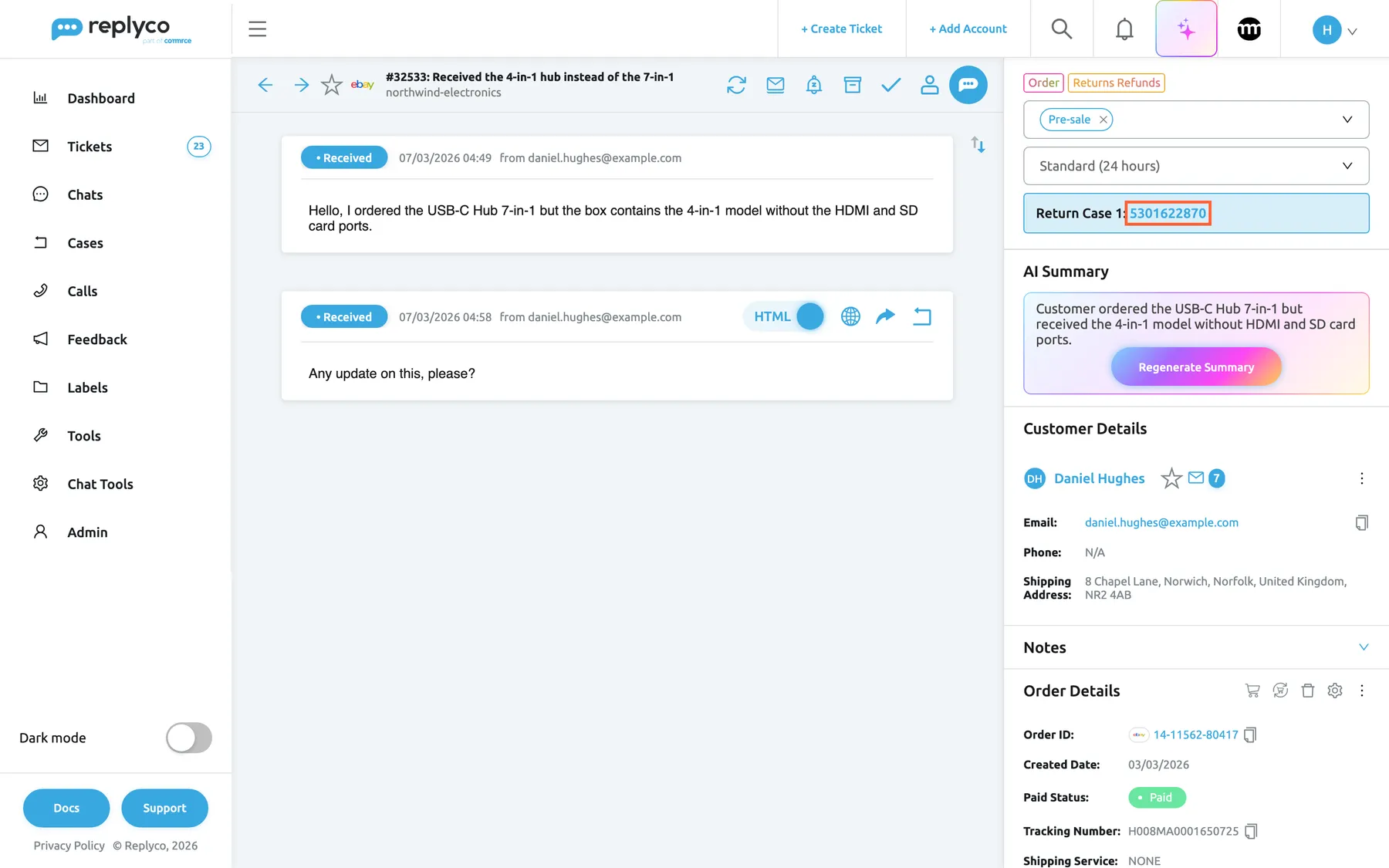
What this screenshot shows
- Screen
- Respond (/ticket/:threadId)
- Highlighted
- link “Return Case”, right-panel-top, enabled. opens the case screen
- Also visible
- ticket #32533 on northwind-electronics; block Return Case 1: 5301622870; AI Summary, Customer Details, Order Details 14-11562-80417
- Purpose
- how cases show in the ticket
eBay cases in search
Section titled “eBay cases in search”The search page, opened from the magnifier in the top bar: under the ticket and order results, Search by Cases with Search in and a list of results. It appears with the Cases feature and the Cases permission. See Search.
With Replyco selected in the account list, the search matches case numbers and the buyer’s name, e-mail and eBay user ID among cases Replyco has. With one eBay account selected, it asks eBay for that exact case number and imports the case if Replyco does not have it yet, even an old one.
A buyer quotes a return number in an e-mail; searching it finds the case even when it is closed or older than the import looks back.
- Search the buyer’s eBay user ID to see every case they opened.
- Search a return number from Seller Hub on your eBay account to import a case that arrived before you switched the import on.
- Search a buyer’s e-mail from a ticket to check whether they also opened an inquiry.
eBay cases on the Cases dashboard
Section titled “eBay cases on the Cases dashboard”DashboardCases, which needs the Cases feature, the Cases permission and the Cases dashboard in the user’s dashboards. See Cases dashboard.
The dashboard counts eBay returns only; inquiries are not included. New Cases counts returns created in the period, Cases By Status splits them by state, and Average Resolve Time measures how long closed returns took from creation to their first closed state. Cases In Progress counts every return Replyco has stored, whatever the period.
The number of returns per week and the time they take show whether a product or a carrier causes trouble, before the seller rating does.
- Compare New Cases week by week after a new supplier delivery.
- Watch Average Resolve Time after you add return labels to the library; sending labels from Replyco should shorten it.
- Look at the share of Return Label Pending in Cases By Status: a large one means buyers wait for your label.
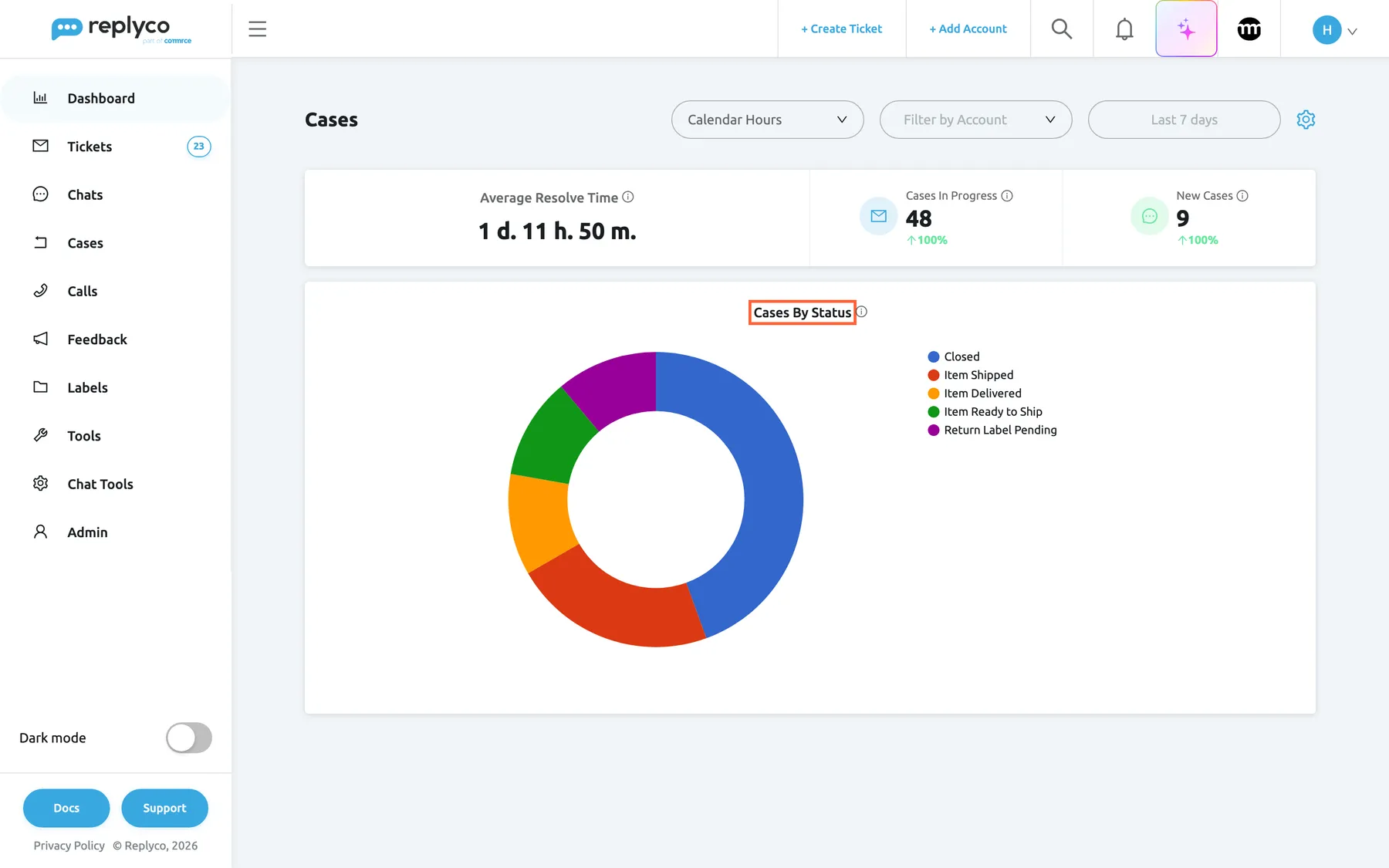
What this screenshot shows
- Screen
- Cases (/dashboard/cases)
- Highlighted
- heading “Cases By Status”, chart-title, shown. the chart of new returns by state
- Also visible
- Average Resolve Time 1 d. 11 h. 50 m.; Cases In Progress 48, New Cases 9; 5 states in the doughnut
- Purpose
- the Cases dashboard
What you need to know
Section titled “What you need to know”| Topic | Fact |
|---|---|
| Import rhythm | New cases every 25 minutes per eBay account; open cases refreshed every 12 hours; a case also refreshes when opened and after each action. |
| How far back | Each round only looks at cases eBay created recently. Older cases come in through the marketplace search by case number. |
| eBay v2 accounts | Cases of eBay v2 accounts are imported and refreshed like those of classic eBay accounts. |
| Actions | Only the actions eBay offers for a return, or Replyco’s inquiry rules, appear. |
| Deadlines | Resolve By in the list and Response Due in a return are eBay’s dates. Replyco never acts on a passed date. |
| Unread | New and changed cases are unread; opening a case marks it read. |
| Notifications | Only @mentions in case notes notify anyone; the notification is in your company’s language (German or English). |
| Labels | The library is company-wide, images only (JPG, JPEG, PNG). PDFs go through Upload Label in the case. |
| Switching off | Stops import and refresh, hides the menu, deletes nothing. |
| Deleting | Cases cannot be deleted in Replyco; they close on eBay. |
| Cancellations | Not cases; handled on the order in the ticket. |
| Language | Buyer comments and eBay’s history appear as eBay sends them. Your comments and messages go to eBay as written. |
| Cost | No Replyco quota; eBay’s API limits apply. |
Frequently asked questions
Section titled “Frequently asked questions”General
Section titled “General”What are eBay cases in Replyco?
Section titled “What are eBay cases in Replyco?”They are the returns and item-not-received inquiries your buyers open on eBay, imported into Cases in Replyco. Each case shows eBay’s history, state and dates, and offers the actions eBay allows, such as approving a return, refunding, sending a return label or escalating to eBay.
Do I need a special plan for eBay cases?
Section titled “Do I need a special plan for eBay cases?”The Cases feature is included in every current plan and on during a trial; companies on an older plan may not have it (see What each plan includes). You also need a connected eBay account, the Enable eBay Cases switch on under AdminCompany Settings, and the Cases permission for each user who works on cases.
Does a return request create a ticket?
Section titled “Does a return request create a ticket?”No. Cases and tickets are separate. A return or inquiry becomes a case in Cases; messages from the buyer still arrive as tickets. On an eBay ticket with an order, a Return Case or INR Case block links to the case of that order.
Are eBay order cancellations cases too?
Section titled “Are eBay order cancellations cases too?”No. A buyer’s cancellation request shows on the order in the ticket as Order has an open cancellation process; open it to see the details and approve or reject it. Only returns and item-not-received inquiries are imported into Cases.
Do eBay v2 accounts get cases?
Section titled “Do eBay v2 accounts get cases?”Yes, the import covers classic and v2 eBay accounts alike once the switch is on. Open cases of both kinds refresh every 12 hours, when someone opens them and after each action, and Sync refreshes them on request.
Where do I switch eBay cases on?
Section titled “Where do I switch eBay cases on?”Go to AdminCompany Settings, stay on General, switch on Enable eBay Cases and select Save. The first cases arrive at the next import round, within about 25 minutes, and Cases appears in the sidebar for users with the permission.
Why don’t I see the switch for eBay cases?
Section titled “Why don’t I see the switch for eBay cases?”Enable eBay Cases appears once an eBay account is connected under AdminAccounts and your company has the Cases feature, so connect the account first. The screen itself needs the Admin permission with Edit rights; see Company Settings.
I switched it on. Why is Cases still empty?
Section titled “I switched it on. Why is Cases still empty?”The import runs every 25 minutes and only looks at cases eBay created recently, so wait for the next round. Then check that the eBay account is not blocked or waiting for a new login under AdminAccounts, and that the account is assigned to you. Closed cases only show with the filter All.
Can I import a case that is older than the import looks back?
Section titled “Can I import a case that is older than the import looks back?”Yes. In Cases, select Show Marketplace Search, choose the eBay account and type the case number, or use Search by Cases on the search page with that account selected. Replyco asks eBay for that case and imports it.
Who can send actions on a case?
Section titled “Who can send actions on a case?”Users with the Cases permission in edit mode, set under AdminUsers. The Admin and Moderator roles have it; the User role does not. With view only, Replyco refuses an action with You don't have enough rights
Cases and their states
Section titled “Cases and their states”What is the difference between state and status?
Section titled “What is the difference between state and status?”Both come from eBay. The state, shown as State, is where eBay’s process is, such as Return Label Pending. The status says what is expected next, such as Waiting for a seller response. Hover either value in a case to read eBay’s description.
Why is a case bold again after I read it?
Section titled “Why is a case bold again after I read it?”A case turns unread whenever a refresh brings a change from eBay, such as the buyer shipping the item or eBay closing it. Open it to see the new history entry; opening marks it read again.
What do the coloured bars in the list mean?
Section titled “What do the coloured bars in the list mean?”No bar means a new request, with the status Return Requested or Opened. A yellow bar means the case is in progress in any other open state. A green bar means it is closed. Bold rows are unread.
What happens when a deadline passes?
Section titled “What happens when a deadline passes?”Replyco itself does nothing: no reminder, no escalation, no status change. eBay applies its own rules, and at the next refresh the case shows eBay’s result, such as Return Request timeout or a history entry naming the timeout. Answer before Response Due to avoid that.
Actions
Section titled “Actions”Why don’t I see the action I need on a return?
Section titled “Why don’t I see the action I need on a return?”The buttons are the actions eBay allows the seller for that return at that moment. If eBay does not offer an action, such as a partial refund after the item was shipped back, Replyco cannot send it either. Refresh the case by opening it again, or check the return in Seller Hub.
Why can’t I send a partial refund offer?
Section titled “Why can’t I send a partial refund offer?”Partial Refund Amount is required and must be above 0 and at most the order total; 0 counts as empty and Replyco shows Please fill out all required fields Enter the amount in the order’s currency and select OK.
Can I change the amount of a full refund on a return?
Section titled “Can I change the amount of a full refund on a return?”No. Issue Refund refunds the line items eBay lists under Refund Line Items, in full. To refund less, use Offer Partial Refund when eBay offers it, and let the buyer accept the offer.
Can I use my reply templates in a case?
Section titled “Can I use my reply templates in a case?”Yes. Every comment and message box in a case form offers the reply templates of the case’s eBay account and the tags button. Tags are replaced with the case’s details and your name before eBay receives the text. To write or limit templates, see Reply templates.
Why are there only four escalation reasons for an inquiry?
Section titled “Why are there only four escalation reasons for an inquiry?”Escalate inquiry offers the reasons eBay accepts from a seller: Buyer trouble, Other, Shipped item and Trouble communication. A return’s Escalate offers the seven reasons eBay accepts from a seller for returns, with Other as the default.
Return labels
Section titled “Return labels”How do I send the buyer a return label from Replyco?
Section titled “How do I send the buyer a return label from Replyco?”On a return that offers Provide Shipping Label, select it, keep Upload Your Own Label, pick a label under Choose Label or a file under Upload Label, set Carrier and select OK. Replyco uploads the label to eBay for the buyer.
Which files can I use as a return label?
Section titled “Which files can I use as a return label?”In the library under ToolsShipping Labels, JPG, JPEG and PNG images. In the case form under Upload Label, one BMP, GIF, JPG, JPEG, PNG or PDF file. Replyco passes the file to eBay unchanged.
My carrier is not in the Carrier list. What do I choose?
Section titled “My carrier is not in the Carrier list. What do I choose?”Keep Carrier on OTHER and type the carrier in Carrier Name, which appears only while OTHER is selected. The list uses eBay’s carrier codes, such as ROYAL_MAIL, DHL and UPS.
Who can add or delete labels in the library?
Section titled “Who can add or delete labels in the library?”Users with the Shipping Labels permission, who see Shipping Labels under Tools. The library is shared by the whole company, so a label deleted with the bin icon disappears for everyone.
Tickets, search and dashboard
Section titled “Tickets, search and dashboard”Why can’t I click the case block in a ticket?
Section titled “Why can’t I click the case block in a ticket?”The case number in a Return Case or INR Case block links only for users with the Cases feature and the Cases permission. Without them, the block shows the number as text. Ask an administrator for the permission under AdminUsers.
Why doesn’t the ticket show a case the buyer opened?
Section titled “Why doesn’t the ticket show a case the buyer opened?”The block lists cases Replyco already has for the ticket’s order. It appears only on eBay tickets that have an order linked, and only after the case was imported. Link the order in the ticket, or wait for the next import round.
Does the Cases dashboard include item-not-received inquiries?
Section titled “Does the Cases dashboard include item-not-received inquiries?”No. The Cases dashboard under DashboardCases counts eBay returns only: new returns, returns by state and how long closed returns took. To count item-not-received inquiries, filter the list in Cases by INR.
Sync and data
Section titled “Sync and data”What does the Sync button do?
Section titled “What does the Sync button do?”Sync in Cases asks eBay again for open cases on your eBay accounts that were not refreshed for 12 hours. It works once an hour; sooner, Replyco answers “The Sync button can be used only if Cases last sync time is more than 1 hour.” New cases arrive every 25 minutes without it.
What happens to my cases if I switch eBay cases off?
Section titled “What happens to my cases if I switch eBay cases off?”Nothing is deleted. Import and refresh stop, and Cases disappears from the sidebar. The cases imported earlier stay in Replyco, and switching Enable eBay Cases back on resumes the rounds.
Does the buyer see my notes on a case?
Section titled “Does the buyer see my notes on a case?”No. Notes on a case are internal to Replyco and never go to eBay. The buyer sees what you send through actions: comments, messages, labels, refunds and offers. Mention a colleague with @ in a note to notify them.
Troubleshooting
Section titled “Troubleshooting”| Symptom | What to check |
|---|---|
| No Enable eBay Cases switch under AdminCompany Settings | An eBay account is connected under AdminAccounts, and your company has the Cases feature, which every current plan includes. |
| Cases is missing from the sidebar | The switch was saved with Save; the user has the Cases permission; a lock on the menu means your company is on an older plan without the Cases feature; see What each plan includes. |
| Cases stays empty | In order: 25 minutes passed since saving? Is the eBay account syncing, not blocked or waiting for a login? Is the account assigned to you? Are the cases closed (use All)? Is the case older than the import looks back (use Show Marketplace Search)? |
| A case you see in Seller Hub is missing | Search its number with Show Marketplace Search and the eBay account; if it still does not come in, Replyco could not find its eBay order. |
| The case could not be synced. and an empty case | Replyco could not load the case. Open it again; if it repeats, check the eBay account’s login under AdminAccounts. |
| For some reason, we couldn't update the case from Ebay. | eBay did not answer; you see the case as last stored. Act in Seller Hub if the date is close, and open the case again later. |
| Please fill out all required fields | Fill the fields with a red border; an amount of 0 counts as empty. |
| Please choose or upload a label or Please upload a file | The library is empty and nothing is chosen, or the upload tab has no file. Add labels under ToolsShipping Labels or upload one. |
| The action you need has no button | eBay does not offer it for the case now; for an inquiry, check Replyco’s rules: refund only with eBay refund amounts, shipment info only without tracking. |
| “The Sync button can be used only if Cases last sync time is more than 1 hour.” | The cases were refreshed within the last hour; wait and try again. |
| “You don’t have accounts with cases” after Sync | No eBay account is connected under AdminAccounts. |
| Shipping Labels is missing under Tools | The user needs both the Cases and the Shipping Labels permission, and the company the Cases feature, which every current plan includes. |
| The case block in a ticket is not a link | The user lacks the Cases permission, or the company is on an older plan without the Cases feature. |