

Fallbacks
A template that says Hello #customer_first_name#, your parcel should arrive #estimated_delivery_date#. reads well until a ticket has no delivery date: then the placeholder disappears and the sentence breaks. On the Fallbacks screen you set, once for your whole company, the text Replyco uses instead when a ticket has no value for a placeholder. Open it from ToolsFallbacks.
Availability: every plan. The screen appears for users with the Fallbacks permission, which the Admin and Moderator roles include; saving needs the permission’s edit level. See User permissions and roles.
What you can do here
Section titled “What you can do here”- Give a placeholder a text for missing values. One field per placeholder; what you type there replaces the placeholder whenever the ticket has no value. One text for the whole company, used in replies, new tickets, auto-responses and eBay case messages. Set a fallback text · Snippets and placeholders.
- Check a fallback before a customer sees it. Preview under the reply editor shows the fallback in place. Check a fallback in Preview.
- Know when a fallback is used, and when it is not. Some placeholders never need one. Know when a fallback is used.
- Remove a fallback. Empty the field and the placeholder simply disappears when there is no value. Remove a fallback.
The screen at a glance
Section titled “The screen at a glance”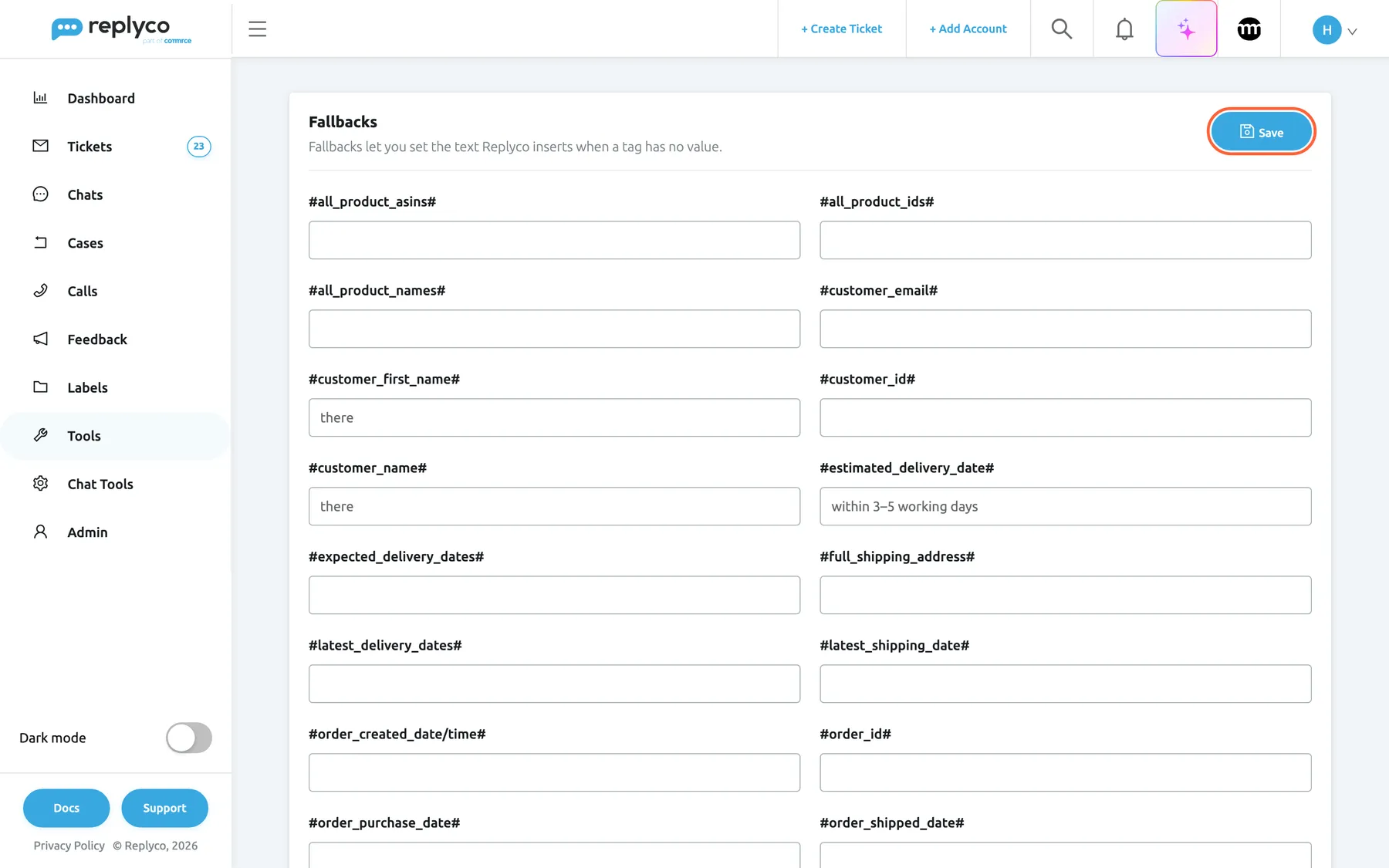
What this screenshot shows
- Screen
- Fallbacks (/fallbacks)
- Highlighted
- button “Save”, header-right, enabled. saves every fallback text
- Also visible
- one text field per placeholder, titled with the placeholder; #customer_first_name#: there (de: liebe Kundschaft); #estimated_delivery_date#: within 3–5 working days (de: innerhalb von 3–5 Werktagen); most fields empty
- Purpose
- the Fallbacks screen as it opens
| Region | What it shows | What you do there |
|---|---|---|
| Header, top | The heading Fallbacks, the description Fallbacks let you set the text Replyco inserts when a tag has no value. and Save | Save every field at once |
| Fields, two columns | One text field per placeholder, titled with the placeholder itself, in alphabetical order | Type or clear a fallback text |
Without an order-management system, the screen has 31 fields. Connecting Linnworks, ChannelAdvisor, Veeqo, Katana, Billbee or Brightpearl adds the field for that system’s order number. #marketplace# and #ticketid# have no field, because a ticket always has a channel and a number.
Set a fallback text
Section titled “Set a fallback text”- Open ToolsFallbacks.
- Find the field titled with the placeholder, for example
#estimated_delivery_date#, and type the text that should appear when the ticket has no value, for example within 3–5 working days. - Repeat for other placeholders.
- Select Save in the top right corner. Success confirms it.
Nothing is saved until you select Save, and leaving the screen discards what you typed. Save stores every field at once.
Write the fallback to fit the sentence around the placeholder. Replyco inserts the text exactly as typed, in the middle of whatever sentence the placeholder stands in. Northwind Electronics’ templates say Hello #customer_first_name#, so its fallback for #customer_first_name# is there: a customer without a name reads Hello there,. Its templates say the parcel should arrive #estimated_delivery_date#, so that fallback is within 3–5 working days, not a date.
| Placeholder | Sentence in your templates | Good fallback | Poor fallback |
|---|---|---|---|
#customer_first_name# | Hello #customer_first_name#, | there | Customer (reads Hello Customer,) |
#estimated_delivery_date# | should arrive #estimated_delivery_date# | within 3–5 working days | N/A |
#tracking_number# | Your tracking number is #tracking_number#. | (we will send it as soon as your parcel leaves our warehouse) | unknown |
#username# | Kind regards, #username# | The Northwind Electronics team | Admin |
Check a fallback in Preview
Section titled “Check a fallback in Preview”- Open a ticket whose order lacks the value, and select Respond.
- Write or pick a reply that uses the placeholder.
- Select Preview under the text box. Message Preview shows the reply as the customer will receive it, with the fallback text where the value is missing.
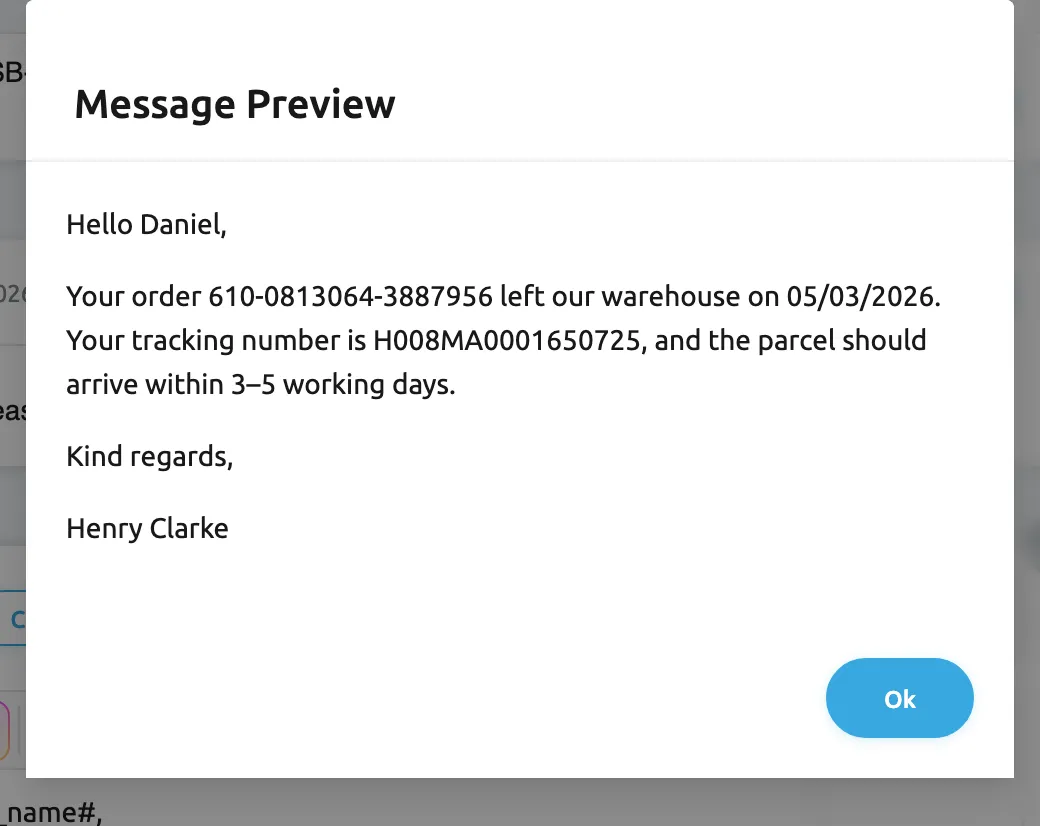
What this screenshot shows
- Screen
- Message Preview (/ticket/:threadId)
- Highlighted
- dialog “Message Preview”, dialog, open. shows the reply with placeholders and fallbacks filled in
- Also visible
- Hello Daniel (de: Hallo Felix); order 610-0813064-3887956 shipped 05/03/2026 (de: 05.03.2026); tracking number H008MA0001650725; fallback text within 3–5 working days (de: innerhalb von 3–5 Werktagen); Henry Clarke in place of #username#; Ok button
- Purpose
- see a fallback take the place of a missing value
Example: ticket #32533 from Daniel Hughes has an order with a tracking number but no delivery dates. The reply Your tracking number is #tracking_number#, and the parcel should arrive #estimated_delivery_date#. previews as Your tracking number is H008MA0001650725, and the parcel should arrive within 3–5 working days. The tracking number came from the order; the delivery estimate came from the fallback.
On Create Ticket, Preview cannot fill placeholders, because the ticket does not exist yet; the customer still receives them filled in, with fallbacks where needed. See Create Ticket.
Know when a fallback is used
Section titled “Know when a fallback is used”A placeholder takes its fallback text when the ticket has no value for it: no linked order, no customer name, a field the channel did not send. When the fallback field is empty, the placeholder becomes nothing. A few placeholders behave differently:
| Placeholder | The fallback is used when |
|---|---|
#customer_name#, #customer_email#, #customer_id# | The ticket has no customer, or the customer lacks that detail |
#customer_first_name# | The customer has no name at all. With a full name but no first name, Replyco uses the first word of the full name instead |
#order_id#, #order_status#, #tracking_number#, #payment_method#, #order_shipped_date#, #expected_delivery_dates#, #latest_delivery_dates#, #estimated_delivery_date# | The ticket has no linked order, or the order lacks that value |
#order_shipped_date/time#, #order_created_date/time#, #order_purchase_date#, #latest_shipping_date#, #order_total_price# | The ticket has no linked order |
#tracking_url# | The order has no tracking number. With a number but no tracking link, the plain number is used |
#shipping_service_name#, #shipping_address#, #full_shipping_address#, #shipping_city#, #shipping_country#, #shipping_postcode# | The order has no shipping address, or the address lacks that part |
#product_id#, #product_name#, #product_asin# | Neither the ticket nor its order has a product |
#all_product_asins#, #all_product_ids#, #all_product_names# | At least one product of the order lacks the value |
#username# | Only in auto-responses on a ticket nobody is assigned to; in replies it is always your name |
| Order numbers of Linnworks, ChannelAdvisor, Veeqo, Katana, Billbee, Brightpearl | The order has no number from that system |
#marketplace# and #ticketid# always have a value on a ticket and have no fallback. For what every placeholder produces, see Snippets and placeholders.
Remove a fallback
Section titled “Remove a fallback”Empty the field and select Save. From then on, the placeholder becomes nothing when a ticket has no value for it. Fallbacks cannot be deleted or added; every placeholder keeps its field, and an empty field means “no fallback”.
Every control, explained
Section titled “Every control, explained”Placeholder fields
Section titled “Placeholder fields”Every field is a free-text box titled with its placeholder. It has no length limit and no validation, and it is not translated: every customer gets the text as typed. Replyco inserts it where the placeholder stands in messages created after you save.
| Fields | Replace the placeholder when | Why set one |
|---|---|---|
#all_product_asins#, #all_product_ids#, #all_product_names# | A product of the order lacks the value | Lists that would otherwise come out empty |
#customer_email#, #customer_id#, #customer_name#, #customer_first_name# | The customer detail is missing | A greeting that still reads naturally, such as there |
#estimated_delivery_date#, #expected_delivery_dates#, #latest_delivery_dates# | The order has no delivery dates | A general promise such as within 3–5 working days |
#order_created_date/time#, #order_purchase_date#, #order_shipped_date#, #order_shipped_date/time#, #latest_shipping_date# | The ticket has no order (and, for #order_shipped_date#, no shipping date) | A neutral phrase such as recently |
#order_id#, #order_status#, #order_total_price#, #payment_method# | The ticket has no order, or the order lacks the value | your order reads better than a gap |
#product_asin#, #product_id#, #product_name# | No product on the ticket or its order | your item |
#shipping_address#, #full_shipping_address#, #shipping_city#, #shipping_country#, #shipping_postcode#, #shipping_service_name# | No shipping address on the order | the address in your order |
#tracking_number#, #tracking_url# | No tracking number yet | A promise to send it, rather than an empty sentence |
#username# | An auto-response on an unassigned ticket | Your team’s name as the sign-off |
| Order numbers of an order-management system | The order has no number from that system | Only shown while the system is connected |
Top right of ToolsFallbacks.
Saves every field on the screen in one step, including those you did not change, and shows Success. The button shows a spinner and is unavailable while saving. Without the edit level of Fallbacks, Replyco refuses with You don't have enough rights. Leaving the screen without saving discards your changes.
Fallbacks are company-wide and apply to every message from the moment you save, so they are changed deliberately, all together.
Who sees what
Section titled “Who sees what”| Part | What shows it |
|---|---|
| Fallbacks under Tools | The Fallbacks permission, included in the Admin and Moderator roles |
| Saving | The edit level of Fallbacks |
| Fields for order-management order numbers | A connected Linnworks, ChannelAdvisor, Veeqo, Katana, Billbee or Brightpearl account |
| The fallback texts in messages | Every customer whose ticket lacks the value |
What you need to know
Section titled “What you need to know”| Topic | Fact |
|---|---|
| Scope | One text per placeholder for the whole company, every account and every language. |
| Default | Every field is empty: a missing value becomes nothing. |
| Saving | One Save for all fields; nothing is saved automatically. |
| When it applies | To messages created after you save. Sent and scheduled messages keep their text. |
| Where it applies | Replies, new tickets, forwards, auto-responses, eBay case messages and Preview. |
| As typed | Inserted exactly as written, never translated, no formatting. |
| No field | #marketplace# and #ticketid#, which always have a value. |
Frequently asked questions
Section titled “Frequently asked questions”General
Section titled “General”What is a fallback?
Section titled “What is a fallback?”A fallback is the text Replyco puts in place of a placeholder, such as #tracking_number#, when a ticket has no value for it. You set one text per placeholder under ToolsFallbacks, and it applies to every reply, new ticket, auto-response and eBay case message of your company.
What happens to a placeholder without a fallback?
Section titled “What happens to a placeholder without a fallback?”When the ticket has no value and the placeholder’s field under ToolsFallbacks is empty, Replyco replaces the placeholder with nothing, so the customer sees a gap in the sentence. Every field is empty until someone fills it in.
Why can’t I see Fallbacks under Tools?
Section titled “Why can’t I see Fallbacks under Tools?”Fallbacks appears only for users with the Fallbacks permission, which the Admin and Moderator roles include. Ask an administrator to give it to you under AdminUsers. There is no plan requirement.
Can I have different fallbacks per account or per language?
Section titled “Can I have different fallbacks per account or per language?”No. Each placeholder has one fallback text for the whole company, and Replyco inserts it as typed for every account and every customer, without translating it. Write it in the language most of your customers read, or keep it short and neutral.
Setting fallbacks
Section titled “Setting fallbacks”I typed a fallback but the customer still got a gap. Why?
Section titled “I typed a fallback but the customer still got a gap. Why?”Check that you selected Save under ToolsFallbacks; leaving the screen discards unsaved text. A fallback also applies only to messages created after the save.
Why doesn’t #customer_first_name# use my fallback when the first name is missing?
Section titled “Why doesn’t #customer_first_name# use my fallback when the first name is missing?”When the customer has a full name but no separate first name, Replyco uses the first word of the full name, so the fallback is only used when the ticket has no customer name at all. Check the result with Preview in the reply editor.
Why is there no field for #marketplace# or #ticketid#?
Section titled “Why is there no field for #marketplace# or #ticketid#?”A ticket always has a channel and a ticket number, so these two placeholders always have a value and never need a fallback. The Fallbacks screen lists only placeholders that can be empty.
Why does the fallback for #username# never appear in my replies?
Section titled “Why does the fallback for #username# never appear in my replies?”In a reply, #username# becomes the full name of the person who sends it, so it is never empty. Its fallback is used by auto-responses on tickets that nobody is assigned to, where there is no sender to name. Set it to your team’s name, such as The Northwind Electronics team.
Checking and troubleshooting
Section titled “Checking and troubleshooting”How can I check a fallback before sending?
Section titled “How can I check a fallback before sending?”Open a ticket that lacks the value, write the reply with the placeholder, and select Preview under the text box. Message Preview shows the reply as the customer will receive it, with the fallback where the value is missing. On Create Ticket the preview cannot fill placeholders, because the ticket does not exist yet.
Does changing a fallback change messages already sent or scheduled?
Section titled “Does changing a fallback change messages already sent or scheduled?”No. Replyco fills placeholders when a message is created, including a reply scheduled for later and an auto-response waiting for its delay. Messages created before you saved keep the text they had; the new fallback applies from then on.
Troubleshooting
Section titled “Troubleshooting”| Symptom | What to check |
|---|---|
| Fallbacks is missing under Tools | You lack the Fallbacks permission; ask an administrator under AdminUsers. |
| You don't have enough rights when saving | You have the permission without its edit level. |
| The customer saw a gap where a placeholder was | Was the fallback field filled and saved? Was the message created before the save? |
The customer saw a placeholder such as #all_product_names# as written | The placeholder is misspelt; the editor shows unknown ones in red. |
| The fallback reads oddly in the sentence | It is inserted exactly as typed. Rewrite it to fit the sentence your templates put around the placeholder. |
| A fallback field for an order-management number is missing | It appears only while that system is connected under AdminAccounts. |
| Preview on Create Ticket shows placeholders as written | Expected: the ticket does not exist yet. The customer receives them filled in, with fallbacks. |
Related
Section titled “Related”- Snippets and placeholders: every placeholder, what it produces and when it is empty
- Snippets
- Templates · Reply templates
- Auto-responses for tickets
- Answer a ticket
- User permissions and roles