

Billbee
When your orders run through Billbee, the customer’s question arrives in Replyco but the answer sits in Billbee: the order number, its tags, its invoice. Connect Billbee and Replyco finds the Billbee order behind each ticket, shows its number and tags beside the conversation, fetches the invoice, and lets your team start a Billbee rule on the order with a custom trigger, without switching to Billbee.
What it does
Section titled “What it does”A customer writes “Where is my invoice?” or “Please hold my parcel”. Without Billbee in Replyco, an agent copies the order number, opens Billbee, searches for the order, and comes back to answer. Your Billbee users, in turn, cannot see which orders have an open customer conversation.
With Billbee connected, Replyco looks every order up in Billbee by its marketplace order number and saves the Billbee order number and the order’s Billbee tags with it. From there:
- Agents see the Billbee order in the ticket’s order panel and open it, refresh it or download its invoice with one click. Billbee in the ticket.
- Replyco tags the order in Billbee with Replyco open ticket while the ticket is open and Replyco resolved ticket once it is resolved, so your warehouse sees it too. Tags and ticket status.
- Agents send a custom event to the order, such as Prepare replacement, and your Billbee rules act on it. Custom triggers.
- Billbee’s seller comment on an order appears as a note beside it. Order notes from Billbee.
- Templates can insert the Billbee order number. The Billbee order number in templates.
Everything Replyco changes in Billbee is visible in Billbee itself: the two tags on the order, and the events your custom triggers start.
Before you start
Section titled “Before you start”| Requirement | Details |
|---|---|
| Admin permission | Only users with the Admin permission see + Add Account and AdminBillbee Configuration; see User permissions and roles. Agents use the Billbee actions in tickets. |
| Plan | Every plan includes Billbee. Billbee counts as one of your plan’s accounts, like a marketplace; see Billing. Replyco adds Billbee data while order sync saves the orders from your marketplaces, and looks the order up when a ticket needs it. Companies on an older plan may not have order sync, so only the lookup applies; see What each plan includes and Orders. |
| A Billbee main account | The username of the Billbee main account, and an API password for it, set in Billbee. The Billbee API must be active for the account. |
| Your marketplaces in Replyco | Billbee adds to the orders of your marketplace and shop accounts; it brings no messages of its own. Connect those first; see Add Account. |
| One Billbee account | A company connects one Billbee account. |
Understanding how Replyco finds the Billbee order
Section titled “Understanding how Replyco finds the Billbee order”Replyco does not copy your Billbee order list. It asks Billbee for one order at a time, at the moments when a ticket or an order needs it, and remembers the Billbee order number it found.
| When | What Replyco looks for in Billbee | Example |
|---|---|---|
| Order sync saves an order from a marketplace or shop | The marketplace’s order number | Shopify order 10482 is found in Billbee as order 48213377 |
| A ticket arrives without a linked order | The first order-like number in the ticket’s subject that is not a date | “Invoice for order #10482 please” finds Billbee order 48213377 |
| An agent types a number into the Billbee field of the order panel | That number, as a marketplace order number or as a Billbee order number | Typing 48213377 or 10482 links the same order |
| An agent selects Sync Order from Billbee | The order’s Billbee number | The tags and status are refreshed |
How Replyco decides
Section titled “How Replyco decides”- Exact references first. Replyco asks Billbee for an order whose external reference is the number, then for one with that external order ID, then for a Billbee order with that number.
- Search second. When no exact match exists, Replyco runs Billbee’s order search, but only for a term of at least four letters or digits that contains no hyphen. Short numbers such as 12 would match far too many orders.
- One match or none. When Replyco enriches an order from a marketplace, it takes the Billbee result only if exactly one order matches.
- Subjects are cleaned. From a subject, Replyco removes characters such as
#,:and!before it asks. If nothing is found, it tries again with the letters removed, then with the hyphens removed. - Several order systems. If you also use Linnworks, ChannelAdvisor, Veeqo, Katana or Brightpearl, each system fills in its own order number. Linnworks is asked first, then Billbee, then the others; see Linnworks.
What does not get looked up
Section titled “What does not get looked up”- Orders while Billbee refuses Replyco’s login, for example after the API password was changed in Billbee. Replyco does not block a Billbee account when that happens; enter the username and API password again with Edit.
- Subjects without an order-like number, and search terms shorter than four letters or digits or containing a hyphen.
- Orders that Billbee does not know, has deleted or has cancelled.
Setting it up in four steps
Section titled “Setting it up in four steps”-
Prepare Billbee. Sign in to Billbee with your main account; the connection cannot be set up with an employee account. Open Billbee’s settings with the gear icon at the bottom of the left bar, then “Billbee API” under the connection settings.
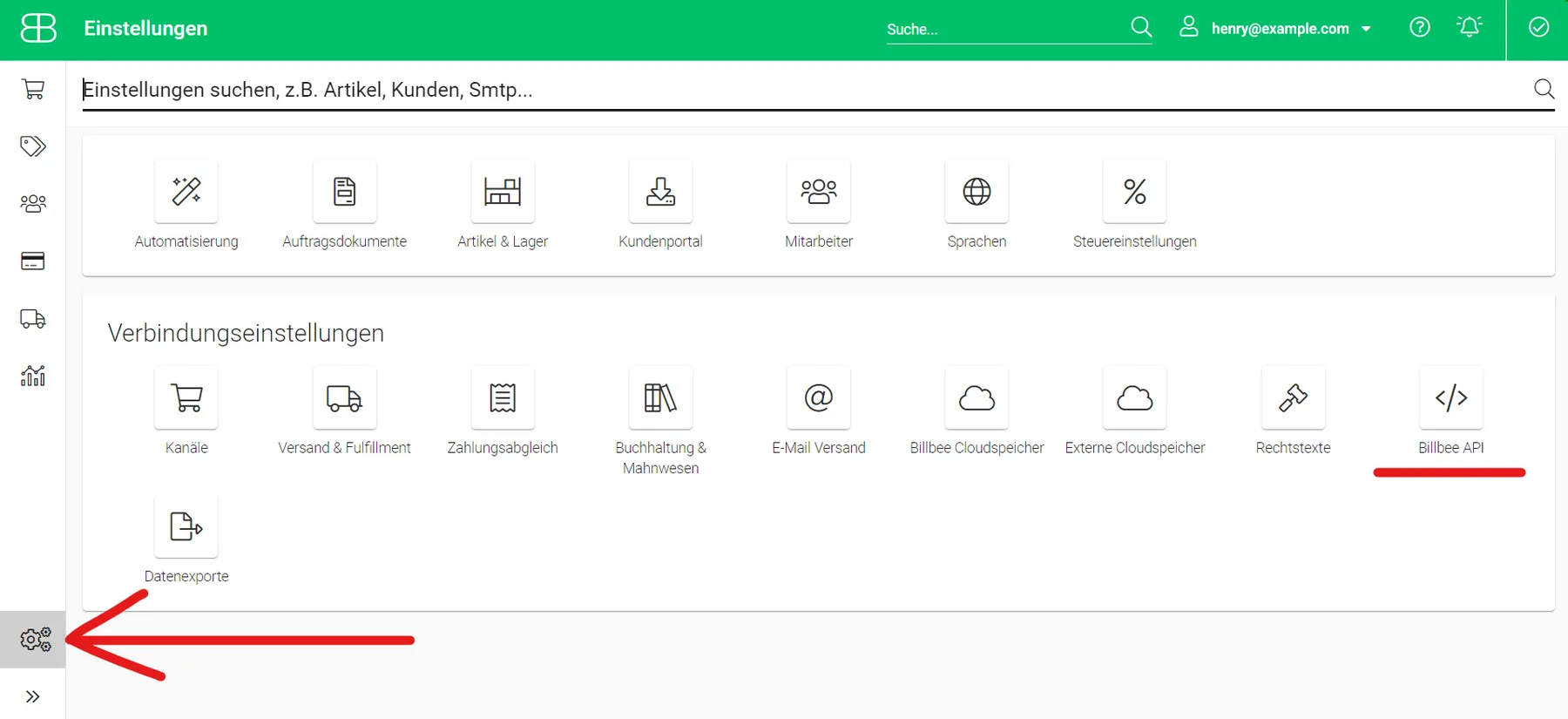
In Billbee, open the settings with the gear icon, then "Billbee API" under the connection settings. What this screenshot shows
- Screen
- ()
- Highlighted
- “”, , .
- Also visible
- gear icon at the bottom left, with an arrow; Verbindungseinstellungen (connection settings); Billbee API, underlined in red
- Purpose
On the General settings tab, switch on “Activate”, type an API password of your own into the API password field and select “Save”. Billbee’s German interface calls these “Aktivieren” and “Speichern”. Note the API password and the username of your Billbee main account.
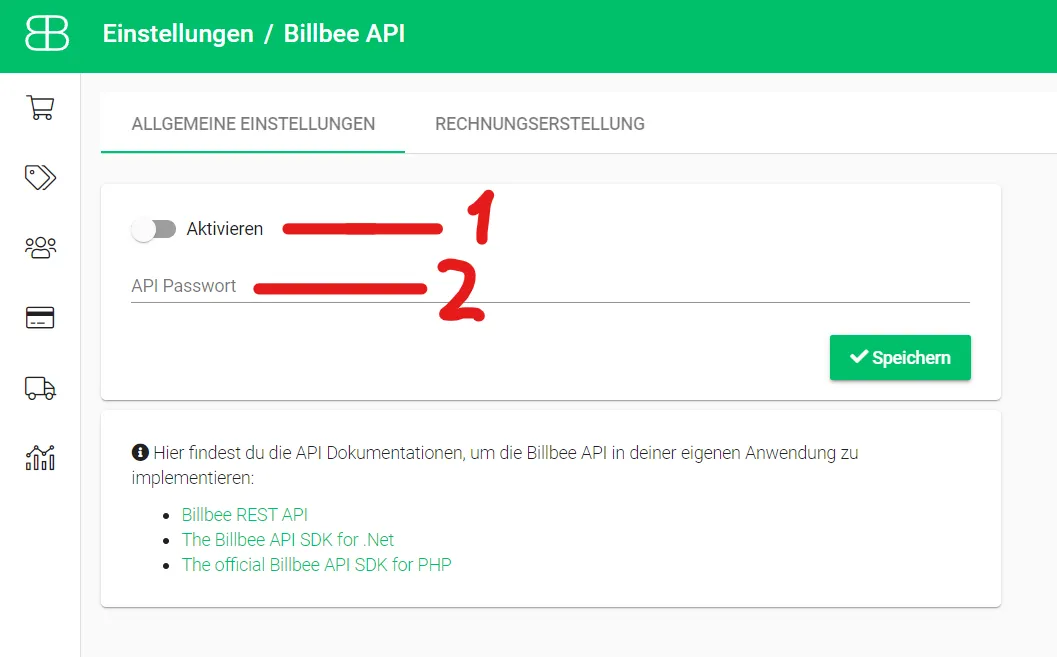
Switch on the API (1), type your own API password (2) and save. What this screenshot shows
- Screen
- ()
- Highlighted
- “”, , .
- Also visible
- Aktivieren (Activate) switch, 1; API-Passwort (API password) field, 2; Speichern (Save); API documentation links
- Purpose
-
Connect Billbee. Select + Add Account in the top bar, then the Billbee tile under Order Management System Accounts. At AUTHORIZE, select Authorize; enter Username and API Password and select Authorize again. Replyco checks both with Billbee, saves the account as “Billbee” and shows Your Billbee account is now ready.. Select Finish.
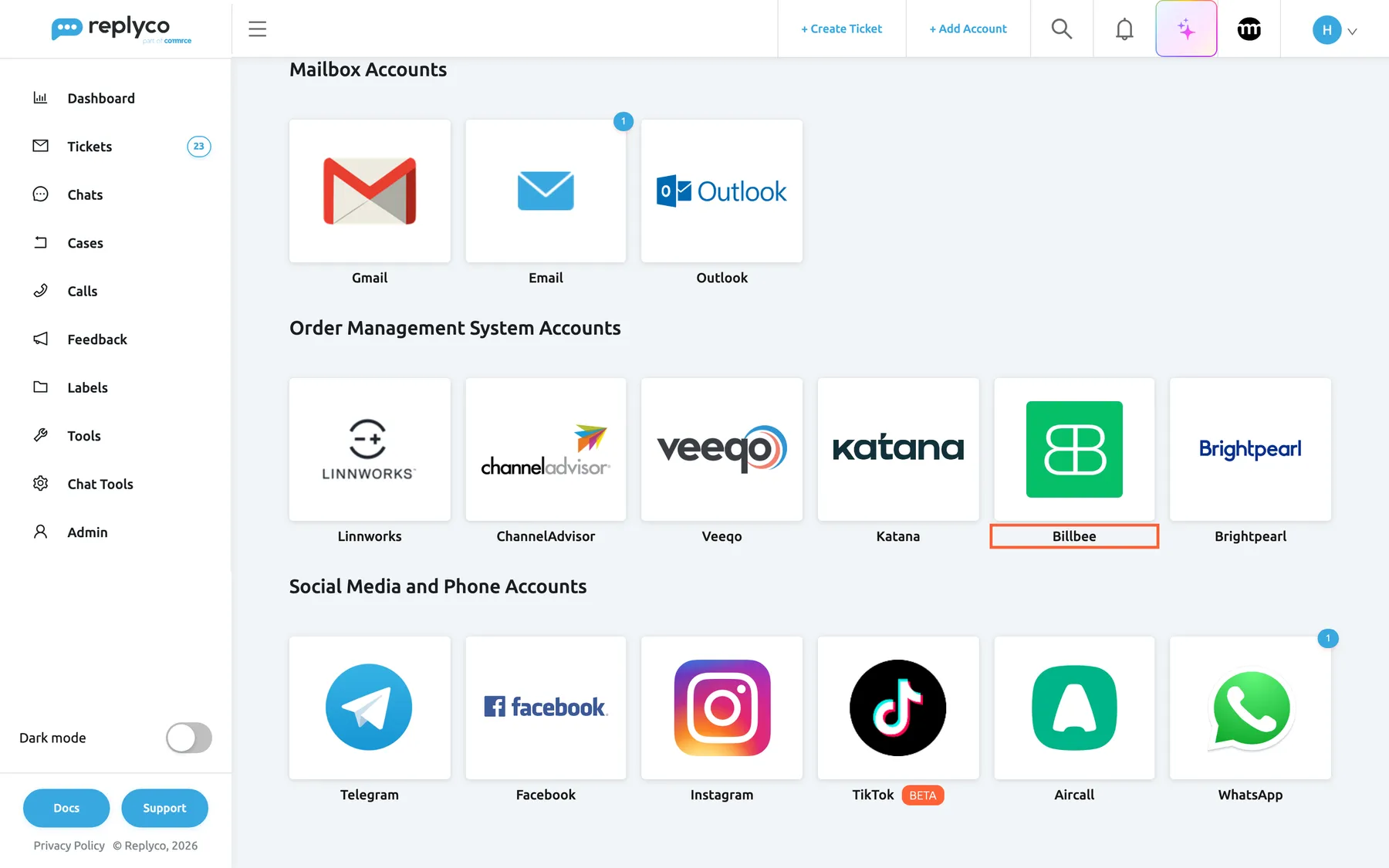
Billbee is in the order management group of Add Account. What this screenshot shows
- Screen
- Add Account (/integrations/add)
- Highlighted
- button “”, oms-group, enabled. opens the Billbee connection dialog
- Also visible
- Mailbox Accounts: Gmail, Email, Outlook; Order Management System Accounts: Linnworks, ChannelAdvisor, Veeqo, Katana, Billbee, Brightpearl
- Purpose
- entry point for connecting Billbee
-
Add custom triggers (optional). Open AdminBillbee Configuration, select Create New, enter the exact name of a custom event your Billbee rules react to, and select Save.
-
Show the Billbee fields (optional). Each agent opens a ticket with an order, selects the gear in Order Details and moves Billbee Order ID and Billbee Tags to Visible Fields. An administrator can apply this for all users at once.
Every setting, explained
Section titled “Every setting, explained”Billbee has two connection details, set when you connect, a company-wide list of custom triggers, and two order fields each user can show or hide.
Username, the Billbee main account
Section titled “Username, the Billbee main account”The INFO step of the Billbee dialog on Add Account. Later: AdminAccounts, the Billbee row, Edit. Saved with Authorize.
The login of your Billbee main account. Required: an empty field shows You must complete ALL FIELDS in order to save this account!. Replyco tests the username and API password with Billbee before it saves; when Billbee refuses them, Replyco shows “Wrong credentials” and saves nothing.
Billbee’s API works with the main account’s login, so the username decides which Billbee account Replyco reads.
API Password, the key to Billbee’s API
Section titled “API Password, the key to Billbee’s API”Next to Username in the same dialog. Shown as dots while you type.
The API password you set in Billbee’s API settings, not the password you sign in to Billbee with. Required, and tested together with the username. When you change the API password in Billbee, enter the new one in Replyco with Edit on the Billbee account.
A separate API password lets you revoke Replyco’s access in Billbee without changing your own sign-in.
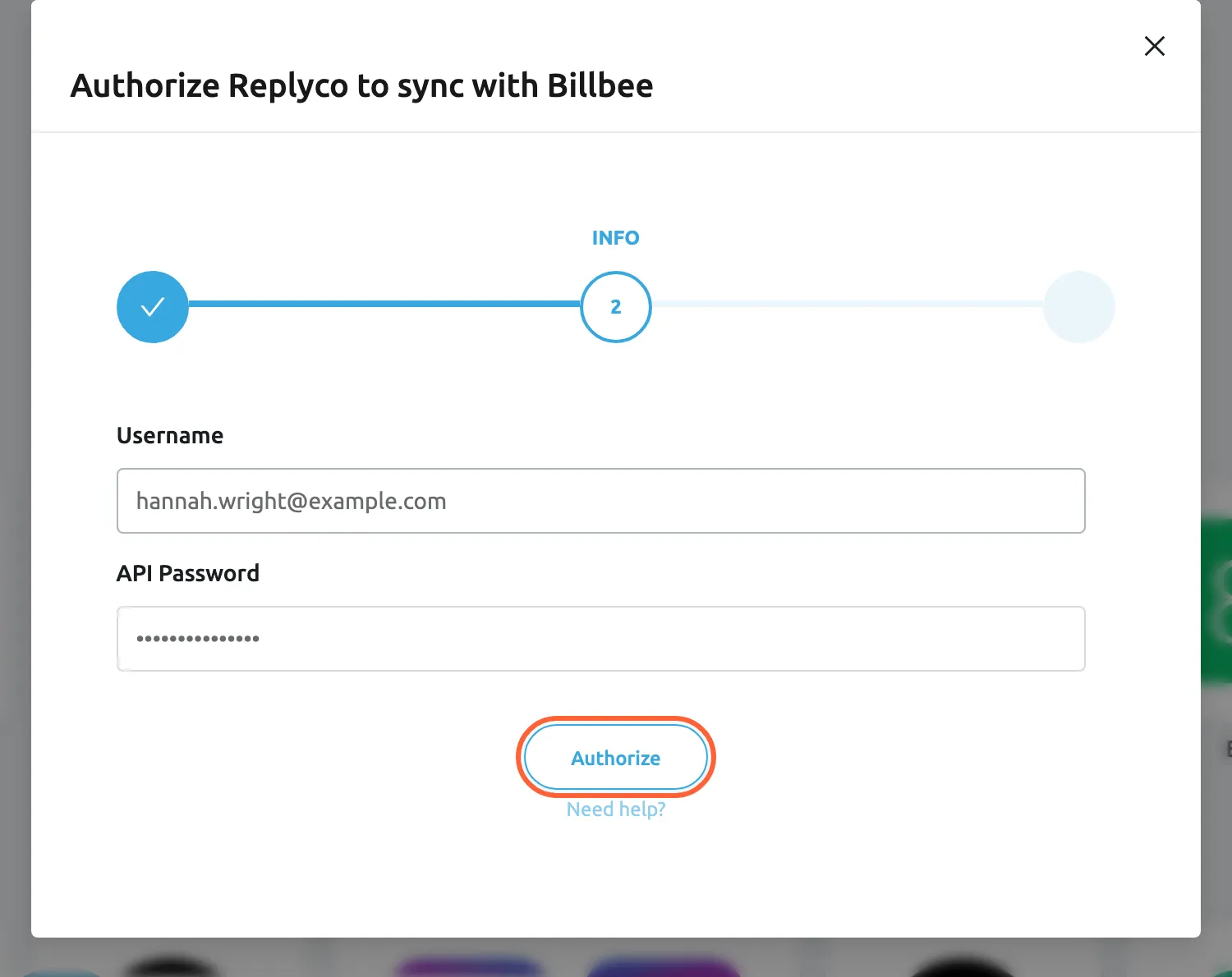
What this screenshot shows
- Screen
- Add Account (/integrations/add)
- Highlighted
- button “Authorize”, dialog-bottom, enabled. checks the credentials with Billbee and saves the account
- Also visible
- step INFO of AUTHORIZE, INFO, FINISH; Username: hannah.wright@example.com; API Password: masked
- Purpose
- connect Billbee with its API credentials
Custom triggers, the company’s list of Billbee events
Section titled “Custom triggers, the company’s list of Billbee events”AdminBillbee Configuration, which appears in the menu once Billbee is connected. Create New opens the field Trigger Name; Save saves the list for the whole company.
A list of names. Each name is sent to Billbee as a custom event when an agent runs it on an order, and Billbee starts the rules that listen for that event. The name must match the event name in Billbee exactly. Replyco refuses an empty name with All fields must be completed. and a name already in the list with The Custom Trigger exists.. The list starts empty; while it is empty, the order panel offers no Custom Triggers. For every control on the screen, see Billbee Configuration.
Billbee’s rules already know how to resend a tracking email or hold a shipment. A trigger lets the agent who reads the customer’s message start that rule at the right moment.
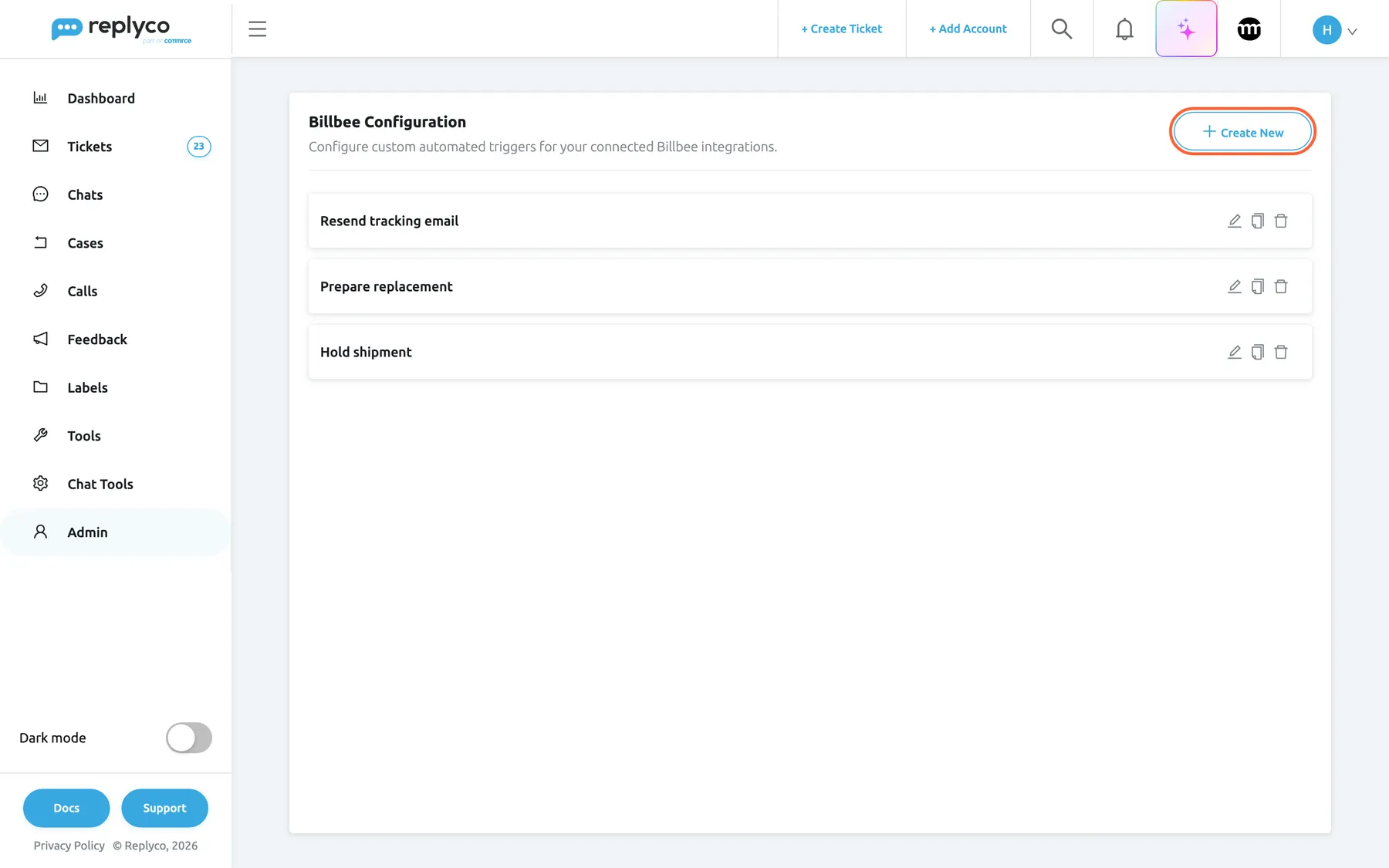
What this screenshot shows
- Screen
- Billbee Configuration (/billbee-configuration)
- Highlighted
- button “Create New”, header-right, enabled. opens the Trigger Name panel
- Also visible
- 3 custom triggers with edit, copy and delete icons
- Purpose
- the company's list of Billbee custom triggers
| Do | Don’t |
|---|---|
| Copy the event name from your Billbee rule | Retype it from memory; Hold Shipment and Hold shipment are different events |
| Name the action, as agents think of it: Prepare replacement | Use internal codes agents cannot read: RULE_07 |
| Keep one trigger per Billbee rule | Add triggers for events no Billbee rule listens to |
Billbee Order ID and Billbee Tags, your view of the order
Section titled “Billbee Order ID and Billbee Tags, your view of the order”The gear in Order Details of any ticket opens Manage Properties. Move the fields between Hidden Fields and Visible Fields and select Save; Apply for all users sets them for everyone.
Both fields are hidden until you show them. They appear only while Billbee is connected, and they show N/A for an order Billbee does not know.
Teams that work mostly in Billbee want the number and tags in view; others prefer a shorter panel.
Auto-sync notes from order management systems, the notes switch
Section titled “Auto-sync notes from order management systems, the notes switch”AdminCompany Settings, General card, shown when an order management system is connected. See Company Settings. AdminCompany Settings needs the Admin permission with Edit rights.
On by default. While it is on, opening an order’s notes also brings in the latest seller comment from Billbee. Off: the notes stay as they are until someone selects Sync Notes with Billbee.
Your warehouse writes its remarks in Billbee; the agent answering the customer should see them.
How the settings combine
Section titled “How the settings combine”| Billbee account | Custom triggers | Billbee fields shown | What agents get |
|---|---|---|---|
| Connected | None | Hidden | Billbee icons in the order panel; invoice and full order; tags written in Billbee |
| Connected | One or more | Hidden | As above, plus Custom Triggers in the ⋮ menu |
| Connected | One or more | Shown | As above, plus the Billbee number and tags in the panel |
| Login refused by Billbee | Any | Any | No new Billbee data; the account is not blocked, so enter the login again with Edit |
Billbee in the ticket
Section titled “Billbee in the ticket”The order panel of a ticket, Order Details, is where agents meet Billbee.
| What you see | Meaning |
|---|---|
| Billbee Order ID with a number | Billbee knows the order; the number opens Billbee’s search for it in a new tab |
| Billbee Order ID with N/A | Replyco found no Billbee order for it |
| Billbee Tags | The order’s tags in Billbee, separated by commas, as of the last sync |
| A Billbee field under the order panel | No order is linked yet; type a Billbee or marketplace order number to link one |
| A note from Billbee Note | Billbee’s seller comment on the order |
Billbee Tags, what the warehouse sees
Section titled “Billbee Tags, what the warehouse sees”Shows every tag of the order in Billbee, including the two tags Replyco sets. Why: a tag your warehouse added, such as a packing hold, is visible to the agent before they reply.
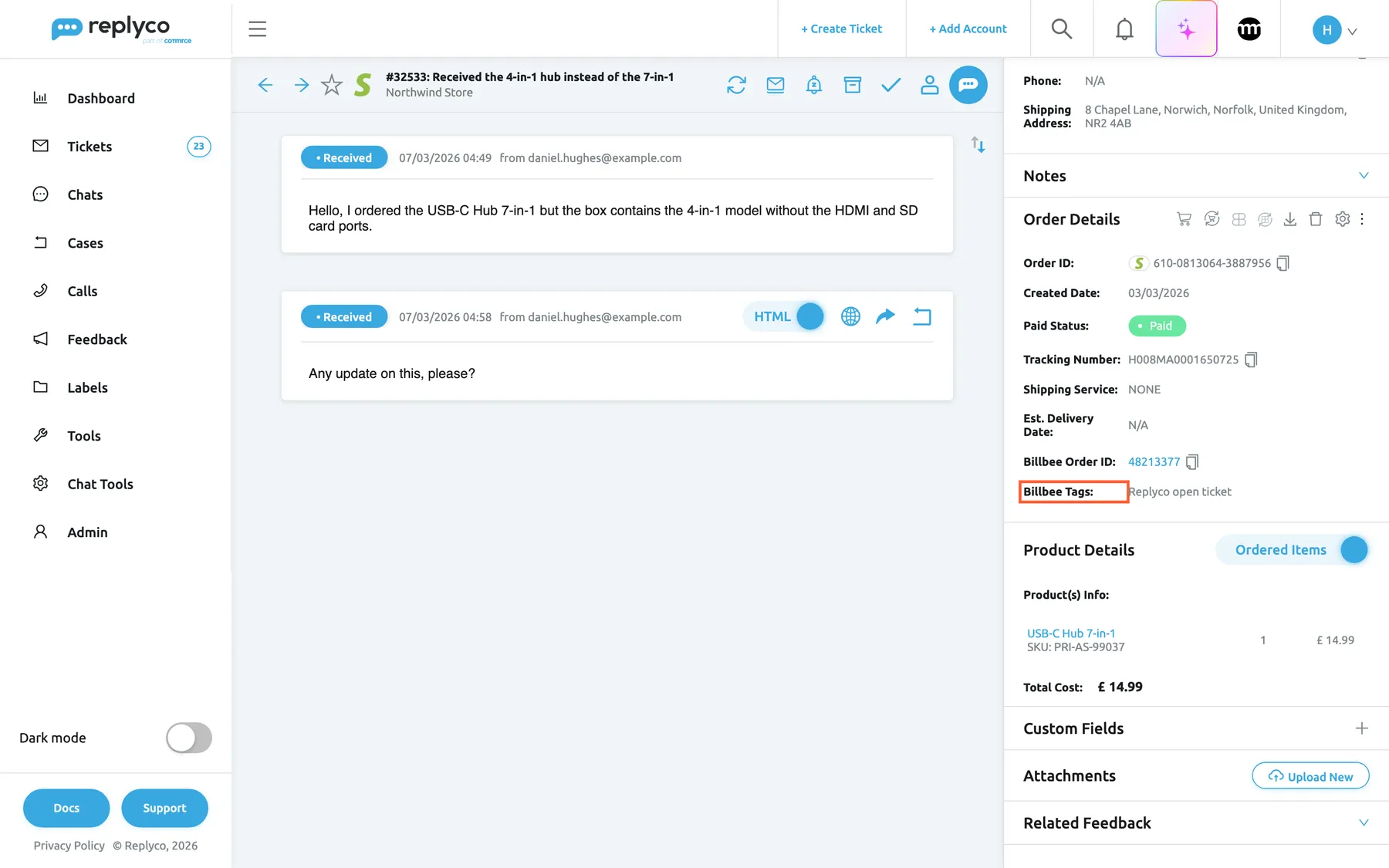
What this screenshot shows
- Screen
- Order Details (/ticket/:threadId)
- Highlighted
- “”, right-panel-order, shows "Replyco open ticket". none
- Also visible
- Billbee Order ID 48213377 (link to Billbee); Billbee Tags: Replyco open ticket; Billbee icons: show full order, sync, download invoice
- Purpose
- Billbee order data in a ticket
The Billbee icons
Section titled “The Billbee icons”Next to the marketplace icons at the top of the panel, an order that Billbee knows has three more:
| Icon | What it does |
|---|---|
| Show full Billbee Order | Opens Full order details with the order as Billbee has it |
| Sync Order from Billbee | Asks Billbee for the order again and updates its number, tags and details in Replyco |
| Download Invoice from Billbee | Asks Billbee for the order’s invoice and opens the PDF in a new tab; Billbee creates the invoice if the order has none yet |
When you use more than one order management system, these actions move into the ⋮ menu, as Sync from Billbee and Show full Billbee.
Custom triggers, from the ⋮ menu
Section titled “Custom triggers, from the ⋮ menu”Custom Triggers is in the ⋮ menu of the order panel when the order has a Billbee number and your company has at least one trigger. It opens Select Custom Trigger: choose a trigger under Choose Custom Trigger and select Ok. Replyco sends the event to the order in Billbee, closes the dialog, shows Success and marks the ticket as read. Why: the agent who promised the customer a replacement starts it in Billbee from the same screen.
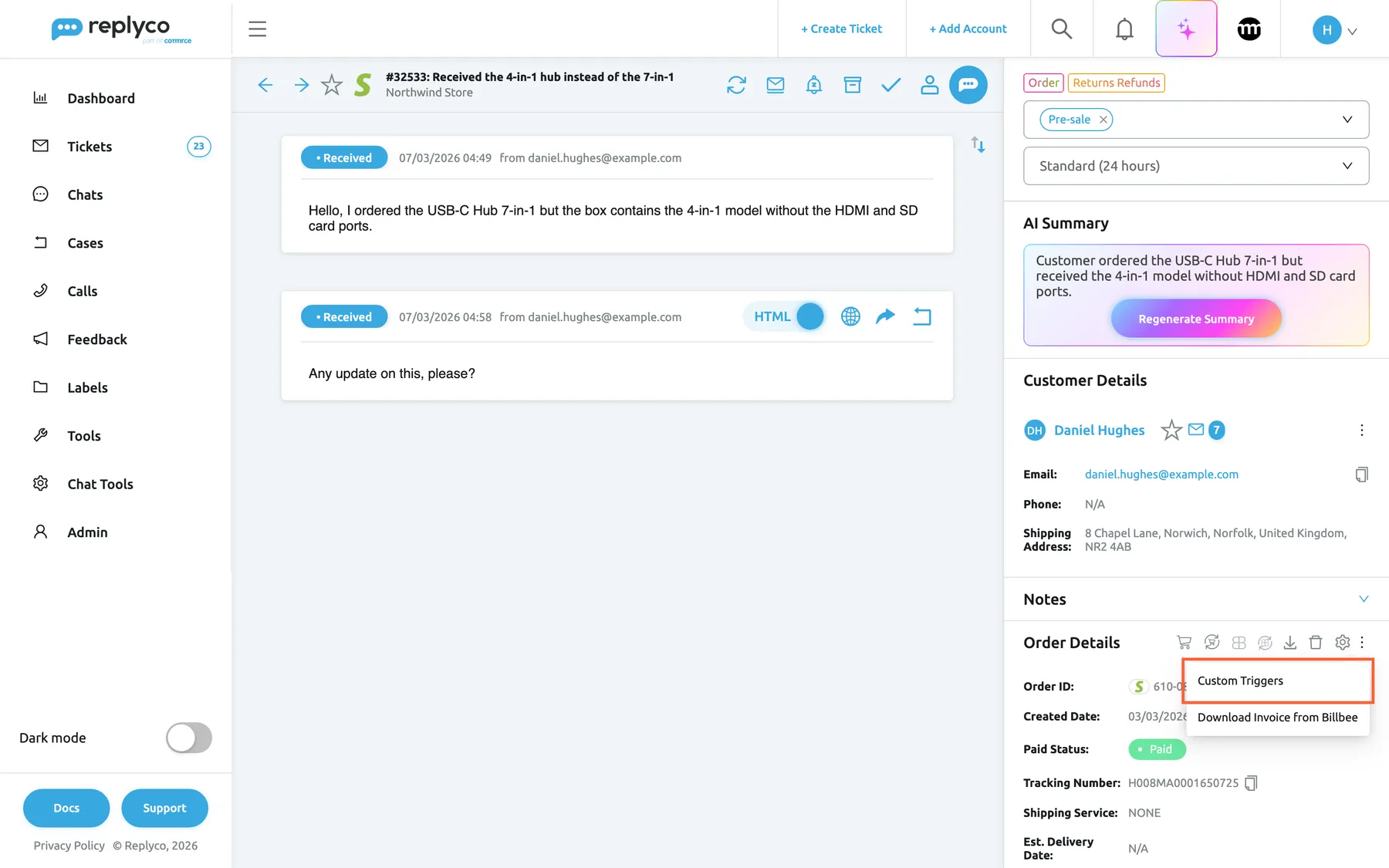
What this screenshot shows
- Screen
- Order Details (/ticket/:threadId)
- Highlighted
- menuitem “Custom Triggers”, right-panel-order, menu-open. opens Select Custom Trigger
- Also visible
- menu: Custom Triggers, Download Invoice from Billbee
- Purpose
- entry point for running a custom trigger
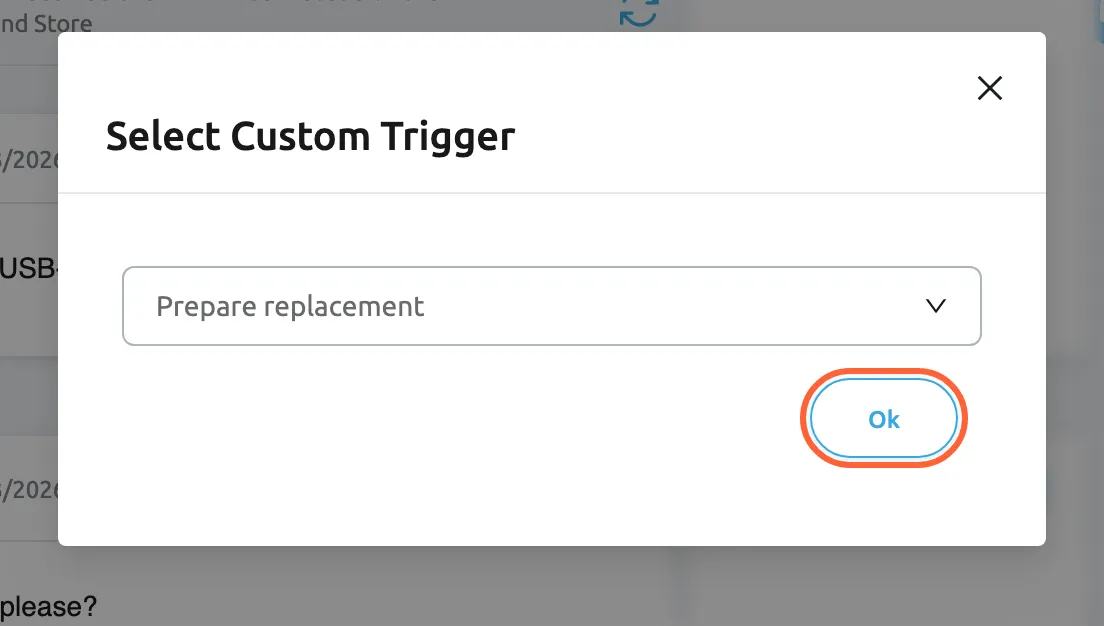
What this screenshot shows
- Screen
- Select Custom Trigger (/ticket/:threadId)
- Highlighted
- button “Ok”, dialog-bottom-right, enabled. sends the chosen trigger to the order in Billbee
- Also visible
- Choose Custom Trigger: Prepare replacement
- Purpose
- run a Billbee custom trigger on an order
For example: Daniel Hughes writes that his USB-C hub is the wrong model. Hannah replies with an apology, opens the ⋮ menu, chooses Prepare replacement and selects Ok. In Billbee, the rule listening for Prepare replacement creates the replacement order.
Order notes from Billbee
Section titled “Order notes from Billbee”When Replyco saves an order that Billbee knows, the order’s seller comment in Billbee becomes a note on the order, written by Billbee Note. Sync Notes with Billbee in the notes updates it when the comment changed in Billbee; with Auto-sync notes from order management systems on, opening the notes does the same. Notes written in Replyco stay in Replyco. Why: remarks such as “Customer called, deliver to neighbour” follow the order into every ticket about it.
When no order is linked
Section titled “When no order is linked”If Replyco found no order, the panel shows a field for the Billbee order ID under Order Details. Type the Billbee order number or the marketplace’s order number and select the save icon in the field; Replyco links the order and tags it in Billbee as open. For the other search tools of the panel, see The ticket screen.
Billbee on the Orders screen
Section titled “Billbee on the Orders screen”ToolsOrders, the order window of an order Billbee knows.
The same Billbee icons and the same ⋮ menu with Custom Triggers as in a ticket, and the fields Billbee Order Number and Billbee Tags. Running a trigger here sends it to the order without a ticket.
Team leads who work through orders rather than tickets get the same Billbee actions.
Examples: open an order a customer phoned about and run Resend tracking email; check Billbee Tags before you cancel an order on the marketplace; download the invoice for your accounts team. For the screen itself, see Orders.
Tags and ticket status
Section titled “Tags and ticket status”Automatic. Nothing to switch on: it works for every order with a Billbee number that is linked to a ticket.
Replyco adds the tag Replyco open ticket to the order in Billbee when an order is linked to a ticket, when a new message arrives on the ticket, and when the ticket is set back to unresolved. It swaps it for Replyco resolved ticket when the ticket is resolved: from the ticket, from the list, by sending a reply that resolves the ticket, or by a rule whose action resolves it. Your other Billbee tags are left as they are. The tags are in English in every language.
Billbee users can filter or build rules on the tags, for example to hold shipping while a customer conversation is open.
- A customer asks to change the address → Replyco open ticket appears in Billbee → a Billbee rule on that tag holds the shipment.
- A rule resolves “Thank you” messages → the order swaps to Replyco resolved ticket.
- An agent resolves the ticket after sending the tracking link → Billbee shows the conversation as closed.
For the rule action, see Rules for incoming tickets.
The Billbee order number in templates
Section titled “The Billbee order number in templates”Reply templates, auto-responses and snippets: the placeholder #billbee_order_id#, offered in the placeholder list only while Billbee is connected. Its fallback is on ToolsFallbacks.
Replaced by the Billbee order number of the ticket’s order when the reply is sent. When the order has no Billbee number, the fallback is used.
Some merchants quote their Billbee number to customers, for example on invoices.
Examples: “Your invoice for order #billbee_order_id# is attached”; an auto-response to invoice requests that quotes the number; a snippet for your warehouse team. See Templates and Fallbacks.
What you need to know
Section titled “What you need to know”| Topic | Fact |
|---|---|
| One account | A company connects one Billbee account. It counts towards your plan’s number of accounts. |
| No messages | Billbee adds order data and actions; messages come from your other accounts. |
| No scheduled sync | Replyco asks Billbee when an order is saved or looked up, not on a timer. The account’s details show Account sync is queued. while nothing is being fetched. |
| Search length | Billbee’s search runs only for terms of four or more letters or digits without a hyphen. |
| Tags | Replyco open ticket and Replyco resolved ticket, in English; the other tags of the order stay. |
| Triggers | Company-wide, sent verbatim, and started in Billbee by the rules that listen for the event. |
| Fields | Billbee Order ID and Billbee Tags are hidden until each user or an administrator shows them. |
| Invoice | Billbee creates an invoice for the order when it has none, then Replyco opens it. |
| Failures | Replyco retries a failed request to Billbee three times. Replyco does not block a Billbee account when Billbee refuses the login; if Billbee data stops appearing, enter the login again with Edit. |
| Other systems | With Linnworks connected too, Linnworks is asked first, then Billbee. |
Frequently asked questions
Section titled “Frequently asked questions”General
Section titled “General”What does the Billbee integration do in Replyco?
Section titled “What does the Billbee integration do in Replyco?”It finds the Billbee order behind each ticket and shows its Billbee number and tags in Order Details. From there agents open the full Billbee order, refresh it, download its invoice and run custom triggers. Replyco also tags the order in Billbee as Replyco open ticket or Replyco resolved ticket.
Does Billbee bring customer messages into Replyco?
Section titled “Does Billbee bring customer messages into Replyco?”No. Billbee adds order data to tickets that your marketplace, shop and mailbox accounts create. Connect those accounts under + Add Account for the messages to arrive.
Which plan do I need for Billbee?
Section titled “Which plan do I need for Billbee?”Any plan: every plan includes Billbee, and it counts as one of the plan’s accounts. Replyco adds Billbee data while order sync saves the orders from your marketplaces, and looks the order up when a ticket needs it. Companies on an older plan may not have order sync; then only the lookup applies. See What each plan includes.
Can we connect two Billbee accounts?
Section titled “Can we connect two Billbee accounts?”No. A company connects one Billbee account, and Replyco refuses a second one. To use a different Billbee account, change the username and API password with Edit on the Billbee row of AdminAccounts.
Where do I find the API password?
Section titled “Where do I find the API password?”You set it in Billbee, in the API section of Billbee’s settings, where the API must also be active for your account. It is a separate password for API access, not the one you sign in to Billbee with. Enter it in API Password when you connect Billbee in Replyco.
Which username do I enter?
Section titled “Which username do I enter?”The login of your Billbee main account. Replyco tests the username and API password with Billbee and shows “Wrong credentials” when Billbee refuses them.
I changed the API password in Billbee. What do I do in Replyco?
Section titled “I changed the API password in Billbee. What do I do in Replyco?”Open AdminAccounts, select the Billbee row and choose Edit. Enter the username and the new API password and select Authorize. Replyco checks them with Billbee and saves them. Do this right after you change the password in Billbee: Replyco does not block the Billbee account when Billbee refuses the old one.
Why don’t agents see the Billbee number in tickets?
Section titled “Why don’t agents see the Billbee number in tickets?”The fields Billbee Order ID and Billbee Tags are hidden until someone shows them. Select the gear in Order Details, move both fields to Visible Fields and select Save; tick Apply for all users to show them to everyone.
Where do I manage the custom triggers?
Section titled “Where do I manage the custom triggers?”Under AdminBillbee Configuration in the menu, once Billbee is connected. It needs the Admin permission. The list you keep there is shared by the whole company and offered in every order Billbee knows.
Finding orders
Section titled “Finding orders”How does Replyco know which Billbee order belongs to a ticket?
Section titled “How does Replyco know which Billbee order belongs to a ticket?”It asks Billbee for the order by the marketplace’s order number when it saves the order, and by the first order-like number in the subject when a ticket arrives without an order. Billbee is asked for an exact reference first and searched only for terms of four or more letters or digits without a hyphen.
The ticket is linked to an order, but there is no Billbee number. Why?
Section titled “The ticket is linked to an order, but there is no Billbee number. Why?”Billbee returned no order for that order’s number. Check in Billbee that the order was imported with the marketplace’s order number, then select Sync Order from Billbee in Order Details or type the Billbee order number into the Billbee field of the panel.
A customer emailed us without an order number. How do I link the Billbee order?
Section titled “A customer emailed us without an order number. How do I link the Billbee order?”Open the ticket, find the Billbee order in Billbee, and type its number into the Billbee field under Order Details. Select the save icon in the field. Replyco links the order and tags it in Billbee as Replyco open ticket.
Billbee data stopped appearing in tickets. What do I do?
Section titled “Billbee data stopped appearing in tickets. What do I do?”The usual cause is that Billbee no longer accepts the username and API password Replyco has, for example after the API password was changed. Replyco does not block a Billbee account when that happens. Open AdminAccounts, select the Billbee row, choose Edit and enter the login again; Replyco checks it with Billbee before it saves. If Billbee accepts the login and data still does not appear, contact support; see Help and support.
We use Linnworks and Billbee. Which one wins?
Section titled “We use Linnworks and Billbee. Which one wins?”Both fill in their own order numbers. Linnworks is asked first, then Billbee, and the order panel lists the actions of both in the ⋮ menu. See Linnworks.
Custom triggers
Section titled “Custom triggers”What is a custom trigger?
Section titled “What is a custom trigger?”A name of a custom event in Billbee. When an agent runs it on an order, Replyco sends the event to that order and Billbee starts the rules that listen for it, such as resending a tracking email.
Why can’t I find the triggers in the ⋮ menu?
Section titled “Why can’t I find the triggers in the ⋮ menu?”It appears only when the order has a Billbee number and your company has at least one trigger on AdminBillbee Configuration. Add a trigger there, then open the ticket again.
I ran a trigger, but nothing happened in Billbee. Why?
Section titled “I ran a trigger, but nothing happened in Billbee. Why?”Billbee acts only when a rule listens for an event with exactly that name. Compare the name on AdminBillbee Configuration with the event in your Billbee rule, letter for letter, and check that the rule is active in Billbee.
Can agents create triggers?
Section titled “Can agents create triggers?”No. The list is on AdminBillbee Configuration, which needs the Admin permission. Agents choose from the list in the order panel.
Why won’t Replyco save my new trigger name?
Section titled “Why won’t Replyco save my new trigger name?”When Replyco shows The Custom Trigger exists., the list already has a trigger with that exact name. Each name can be in the list once; use the existing trigger or give the new one a different name.
Tags and ticket status
Section titled “Tags and ticket status”What are the tags Replyco adds in Billbee?
Section titled “What are the tags Replyco adds in Billbee?”Replyco open ticket while a ticket about the order is open, and Replyco resolved ticket once it is resolved. Replyco swaps one for the other and leaves your other Billbee tags alone.
When does the tag change to resolved?
Section titled “When does the tag change to resolved?”When the ticket is resolved from the ticket, from the ticket list, by a reply that resolves it, or by a rule whose action resolves it. A new customer message, linking the order or setting the ticket back to unresolved brings back Replyco open ticket.
Can I rename the tags?
Section titled “Can I rename the tags?”No. The tags Replyco open ticket and Replyco resolved ticket are fixed and in English in every language, so Billbee rules and filters built on them keep working.
Data and privacy
Section titled “Data and privacy”What does Replyco store from Billbee?
Section titled “What does Replyco store from Billbee?”The username and API password of the connection, and for each order the Billbee order number, its tags and the seller comment as a note. The full order is fetched from Billbee each time you open it.
Do customers see anything from Billbee?
Section titled “Do customers see anything from Billbee?”Only if a reply template, auto-response or snippet inserts #billbee_order_id#. Tags, notes and triggers stay between your team, Replyco and Billbee, and customers never see them.
What happens to tickets if we delete the Billbee account?
Section titled “What happens to tickets if we delete the Billbee account?”The tickets and orders belong to your marketplace, shop and mailbox accounts, not to Billbee. Deleting the Billbee account stops the lookups, tags and triggers; your custom trigger list stays on AdminBillbee Configuration for when you connect Billbee again.
Why does the Billbee account never seem to finish syncing?
Section titled “Why does the Billbee account never seem to finish syncing?”The account’s details show Account sync is queued. whenever Replyco is not fetching data for the account at that moment. Replyco does not sync Billbee on a timer; it asks Billbee when an order is saved or looked up.
Troubleshooting
Section titled “Troubleshooting”| Symptom | What to check |
|---|---|
| “Wrong credentials” when connecting | In order: is Username the login of the Billbee main account? Is API Password the API password, not your sign-in password? Is the API active in Billbee’s settings? |
| You must complete ALL FIELDS in order to save this account! | Fill in both Username and API Password. |
| Replyco refuses to add Billbee | Is a Billbee account already on AdminAccounts? A company connects one. Is your plan’s number of accounts used up? See Add Account. |
| Billbee Configuration is not in the menu | Is Billbee connected? Do you have the Admin permission? |
| Billbee Order ID and Billbee Tags are not in the order panel | Show them with the gear in Order Details; they are hidden by default. |
| Billbee Order ID shows N/A | Does Billbee have the order under the marketplace’s order number? Select Sync Order from Billbee, or type the Billbee number into the Billbee field. |
| An email ticket has no order | Does the subject contain the order number? If not, type the Billbee or marketplace order number into the Billbee field. |
| Billbee numbers no longer appear on new tickets | Does Billbee still accept the username and API password? Replyco does not block a Billbee account when Billbee refuses the login: enter both again with Edit on AdminAccounts, or contact support; see Help and support. |
| No Custom Triggers in the ⋮ menu | Does the order have a Billbee number? Is at least one trigger on AdminBillbee Configuration? |
| The trigger ran but Billbee did nothing | Does the trigger name match the Billbee event letter for letter? Is the Billbee rule active? |
| The Custom Trigger exists. | The list already has that name. |
| The order shows Replyco resolved ticket although a ticket is open | Another ticket about the same order was resolved; the next customer message sets Replyco open ticket again. |
| The Billbee note on the order is outdated | Select Sync Notes with Billbee, or turn on Auto-sync notes from order management systems on AdminCompany Settings. |