

Feedback details
A feedback entry shows one rating a buyer left on eBay or Amazon, with everything Replyco knows around it: the full comment, your public reply and the buyer’s follow-up, the eBay item details, and on the right the tickets, the customer and the order it belongs to. You open it from a row in FeedbackFeedback List or from Related Feedback in a ticket. Replyco shows the feedback but does not reply to it: replies are written on eBay or Amazon and appear here after the next import, and to talk to the buyer you use the related ticket. How the list works, and how feedback arrives, is explained in Feedback List.
What you can do here
Section titled “What you can do here”- Read the whole feedback. The buyer, the comment type, eBay’s star for the buyer, the full comment and the dates. For Amazon, the 1–5 rating in brackets. Read the feedback
- See what was said afterwards. Your public reply appears under Response, and the buyer’s answer to it under Followup, as eBay holds them. Read your reply and the buyer’s follow-up
- Follow up with the buyer. Open the ticket about the same order and reply there, or answer the feedback on the marketplace. Reply to the buyer
- Leave it for a colleague. Mark the feedback unread for the whole team. Mark the feedback unread
- See the order and the customer. The right panel lists the related tickets, the customer and the order. Go to the ticket, customer and order
The screen at a glance
Section titled “The screen at a glance”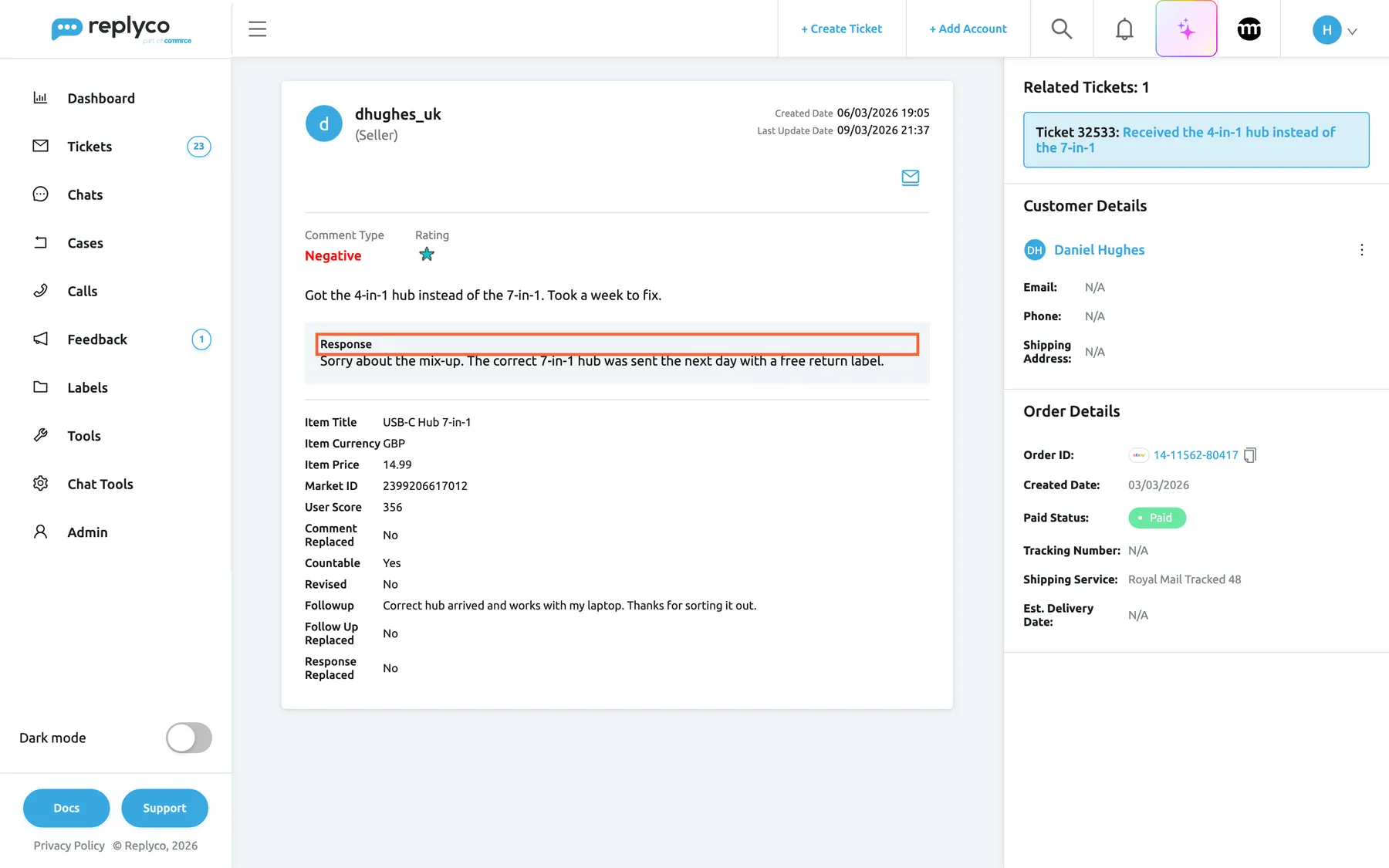
What this screenshot shows
- Screen
- Feedback (/feedbacks/:feedbackId)
- Highlighted
- text “Response”, feedback-card, visible. shows the seller's reply as eBay holds it
- Also visible
- commenting user dhughes_uk (Seller); Negative, turquoise star; Response box; eBay fields with Followup; Related Tickets: 1, Customer Details, Order Details
- Purpose
- read one eBay feedback with its reply and follow-up
| Region | What it shows | What you do there |
|---|---|---|
| Card header | The buyer’s eBay user ID or the Amazon rater’s email, the role in brackets for eBay, Created Date and Last Update Date, and an envelope icon | Mark the feedback read or unread |
| Rating row | Comment Type and Rating | See how the buyer rated the order |
| Comment | The buyer’s full comment | Read it |
| Response | Your public reply, when there is one | Check what the buyer and other shoppers see |
| eBay fields | Item, price, IDs, the buyer’s score, the follow-up and eBay’s flags; eBay only | Find the item and check eBay’s status of the feedback |
| Related Tickets, right | Tickets linked to the same order | Open the ticket to write to the buyer |
| Customer Details, Order Details, Product Details | The customer and the order | Check who bought what and when |
Read the feedback
Section titled “Read the feedback”The header names who left the feedback: the eBay user ID, or for Amazon the email address in Amazon’s feedback report. For eBay, the role eBay sends with the feedback follows in brackets, Seller or Buyer. Created Date is when the buyer left the feedback; Last Update Date is when Replyco last stored it.
The rating row. Comment Type is green for Positive, red for Negative and yellow for the others. Rating is eBay’s feedback star of the buyer; point at it for its meaning, such as Turquoise (100 to 499 ratings). It describes the buyer’s eBay history, not your order.
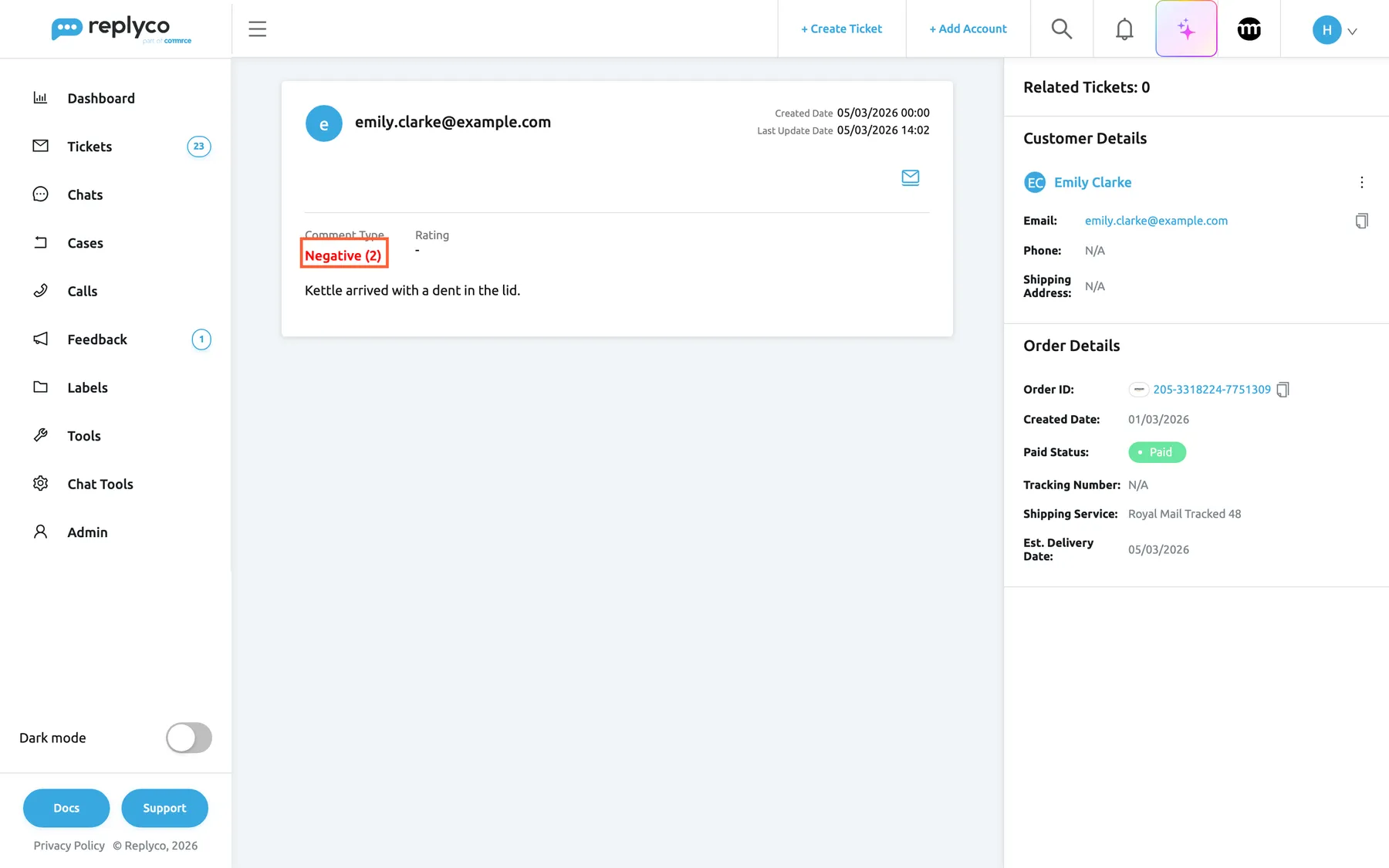
Amazon feedback is shorter. It has no role, no star and no eBay fields, and its 1–5 rating follows the comment type in brackets.
What this screenshot shows
- Screen
- Feedback (/feedbacks/:feedbackId)
- Highlighted
- text “Comment Type”, feedback-card, Negative (2). shows Amazon's rating in brackets
- Also visible
- rater email as name; Negative (2); Rating dash; Related Tickets: 0; Customer Details and Amazon Order Details
- Purpose
- read one Amazon feedback
Example. Emily Clarke rated her Smart Kettle order 2 out of 5: “Kettle arrived with a dent in the lid.” The entry reads Negative (2), with a dash under Rating, and the right panel shows her Amazon order 205-3318224-7751309 with no related ticket yet. The entry is where the team decides whether to contact her through the marketplace.
An address that no longer exists, for example a feedback deleted after its retention time, shows We didn't find feedback!.
Read your reply and the buyer’s follow-up
Section titled “Read your reply and the buyer’s follow-up”On eBay, you can answer a feedback publicly, and the buyer can then add a follow-up. Replyco shows both as eBay holds them:
| Field | What it holds |
|---|---|
| Response | Your reply, in a grey box under the comment; shown only when there is one. For Amazon, the reply from Amazon’s report |
| Followup | The buyer’s follow-up to your reply; eBay only |
| Response Replaced | Yes when eBay removed your reply’s text under its policies |
| Follow Up Replaced | Yes when eBay removed the follow-up’s text |
| Comment Replaced | Yes when eBay removed the buyer’s comment |
| Revised | Yes when the buyer revised the feedback |
Example. Daniel Hughes received the 4-in-1 hub instead of the 7-in-1 and left Negative feedback. The team sent the right hub and replied on eBay: “Sorry about the mix-up. The correct 7-in-1 hub was sent the next day with a free return label.” Two days later Daniel added the follow-up “Correct hub arrived and works with my laptop.” The entry shows all three, and Last Update Date tells you when Replyco picked up the latest change.
When a reply appears. eBay replies and follow-ups arrive when Replyco fetches that feedback again from eBay.
Reply to the buyer
Section titled “Reply to the buyer”Replyco has no field to reply to feedback or to ask the buyer to revise it. You have two ways to follow up:
-
Write to the buyer through the ticket. Under Related Tickets on the right, select the ticket. It opens in Replyco, and you reply as to any message; the answer goes to the buyer through the marketplace. See Answer a ticket.
-
Answer the feedback publicly on the marketplace (optional). Reply on eBay or in Amazon Seller Central. Your reply appears under Response here after the next import.
When Related Tickets shows 0, the buyer has not written about this order, or Replyco could not link the feedback to an order; contact the buyer on the marketplace instead.
Mark the feedback unread
Section titled “Mark the feedback unread”Opening an unread feedback marks it read at once, for the whole team, and the sidebar count goes down. To leave it for someone else:
-
Select the envelope icon at the right of the card header. Point at it to see Mark Unread.
-
Replyco marks the feedback unread and takes you back to FeedbackFeedback List, where the row is bold again.
When the feedback is unread, the same icon reads Mark Read and marks it read without leaving the screen. Marking needs the Feedback permission with Edit rights.
Go to the ticket, customer and order
Section titled “Go to the ticket, customer and order”The right panel is the same as in a ticket, filled with the feedback’s order.
Related Tickets lists the tickets linked to the same order as the feedback, each as Ticket with its number and subject. Select one to open it. A feedback without an order has no related tickets.
Customer Details shows the customer Replyco matched to the feedback, with email, phone and address when known, and the ⋮ menu of the ticket screen. Order Details shows the order number with the marketplace logo, its date, payment status, tracking and delivery date. What each panel does is described in The ticket screen.
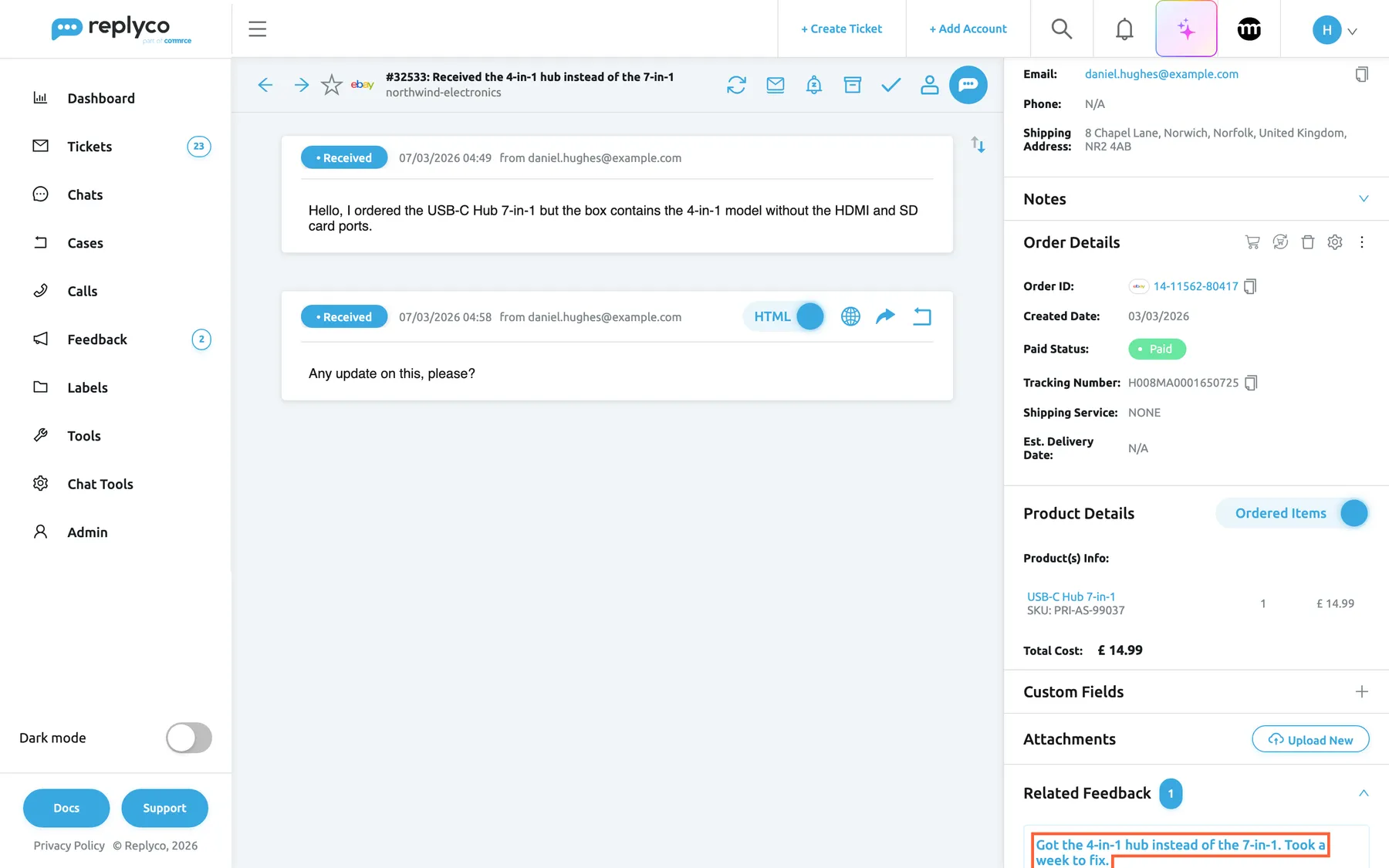
From the ticket back to the feedback. In a ticket whose order has feedback, the right panel ends with Related Feedback and the number of entries. Expand it and select an entry: the feedback opens in a new browser tab.
What this screenshot shows
- Screen
- Related Feedback (/ticket/:threadId)
- Highlighted
- link “Related Feedback”, right-panel-bottom, expanded. opens the feedback entry in a new tab
- Also visible
- Related Feedback expanded with badge 1; one feedback block; Order and Product Details above
- Purpose
- reach the feedback from the linked ticket
Every control, explained
Section titled “Every control, explained”The read-state icon
Section titled “The read-state icon”The envelope at the right of the card header.
Mark Unread when the feedback is read: marks it unread for everyone and returns to the list. Mark Read when it is unread: marks it read and stays. Needs the Feedback permission with Edit rights.
Share the reading of feedback in a team without losing an entry.
The eBay fields
Section titled “The eBay fields”A field appears only when eBay sent a value for it.
| Field | What it shows | Why |
|---|---|---|
| Item Title | The listing title of the item | Know which product the buyer rated |
| Item Currency, Item Price | The item’s price and currency | See the value at stake |
| Item Market ID, Transaction ID, Order Line Item ID | eBay’s item number, and the transaction and order line of the sale | Find the listing and the sale on eBay |
| Market ID | eBay’s ID of the feedback | Find the feedback on eBay or tell support |
| User Score | The buyer’s eBay feedback score | Tell an experienced buyer from a new one |
| Comment Replaced | Whether eBay removed the comment | Know why a comment is empty |
| Comment Time | When the comment was left, for older eBay connections | Date the comment |
| Countable | Whether the feedback counts towards your eBay feedback score, as eBay reports it | Know whether it affects your rating |
| Revised | Whether the buyer revised the feedback | See whether a problem was resolved |
| Followup | The buyer’s follow-up to your reply | Read the last word |
| Follow Up Replaced, Response Replaced | Whether eBay removed the follow-up or your reply | Know why a text is missing |
Related Tickets
Section titled “Related Tickets”The top of the right panel, with the number of tickets.
Lists the tickets linked to the feedback’s order. Each block opens its ticket.
The ticket is where you write to the buyer and see what was already said.
Customer Details, Order Details, Product Details
Section titled “Customer Details, Order Details, Product Details”The right panel, below Related Tickets.
The shared panels of the ticket screen, for the feedback’s customer and order.
Check the order, delivery and customer before you follow up.
Who sees what
Section titled “Who sees what”| Part of the screen | What decides whether you see it or can use it |
|---|---|
| The screen | The Feedback permission and marketplace feedback, which every current plan includes; see User permissions and roles |
| Role, star and eBay fields | eBay feedback only |
| Response | A reply exists on the marketplace |
| Marking read or unread | The Feedback permission with Edit rights |
| Related Feedback in a ticket | The Feedback permission |
What you need to know
Section titled “What you need to know”| Topic | Fact |
|---|---|
| Replies | Not written in Replyco; shown from eBay and Amazon |
| Read state | Opening marks read for the whole company; Mark Unread returns to the list |
| Related tickets | Tickets on the same order as the feedback |
| From a ticket | Related Feedback opens the feedback in a new tab |
| Amazon | No role, star or eBay fields; rating in brackets |
| eBay updates | Replies and follow-ups arrive when Replyco fetches the feedback again |
| Retention | Three months by default; older feedback shows We didn't find feedback! |
Frequently asked questions
Section titled “Frequently asked questions”Replies
Section titled “Replies”Can I reply to feedback from Replyco?
Section titled “Can I reply to feedback from Replyco?”No. The feedback screen has no field for a public reply or a follow-up. Reply on eBay or in Amazon Seller Central; Replyco shows your reply under Response after the next import. To write privately to the buyer, open the ticket under Related Tickets.
I replied on eBay. Why is my reply not shown?
Section titled “I replied on eBay. Why is my reply not shown?”eBay replies appear when Replyco fetches that feedback again from eBay, which happens with the regular import rather than at once. Check again later in FeedbackFeedback List. If Response Replaced reads Yes, eBay removed your reply’s text.
What is the Followup field?
Section titled “What is the Followup field?”Followup holds the buyer’s follow-up to your public reply on eBay, for example after you sent a replacement. It appears only when the buyer wrote one. Amazon feedback has no follow-up.
How do I ask the buyer to change their feedback?
Section titled “How do I ask the buyer to change their feedback?”Write to the buyer through the ticket listed under Related Tickets, or through the marketplace. Replyco cannot revise feedback; only the buyer can, on eBay or Amazon. When they do, Revised reads Yes after the next import.
The screen
Section titled “The screen”Why are there no related tickets?
Section titled “Why are there no related tickets?”Related Tickets lists the tickets linked to the same order as the feedback. It shows 0 when the buyer has not written about the order, or when Replyco could not link the feedback to an order, so Order Details is empty too.
Why do Amazon entries show so little?
Section titled “Why do Amazon entries show so little?”Amazon’s feedback report contains only the date, the rating, the comment, your reply, the order and the rater’s email. So an Amazon entry has no role, star or eBay fields; the rating appears in brackets after Comment Type.
What does the message that no feedback was found mean?
Section titled “What does the message that no feedback was found mean?”Replyco shows We didn't find feedback! when the feedback of the address does not exist, for example because it was deleted after the retention time of three months by default, or because a saved link belongs to another company.
Read state
Section titled “Read state”Why did the feedback become read when I only looked at it?
Section titled “Why did the feedback become read when I only looked at it?”Opening an unread feedback marks it read for the whole company, so the next person sees it as handled. To put it back, select the envelope icon, Mark Unread, which also takes you back to FeedbackFeedback List.
Troubleshooting
Section titled “Troubleshooting”| Symptom | What to check |
|---|---|
| The screen shows We didn't find feedback! | The feedback is older than the retention time, or the link belongs to another company; look for it in FeedbackFeedback List |
| Your eBay reply is missing | Wait for the next import; check Response Replaced |
| Related Tickets shows 0 | Order Details is empty: Replyco could not link an order. Otherwise the buyer has not written about the order |
| The envelope icon returns you to the list | Expected: Mark Unread goes back to the list |
| Related Feedback is missing in a ticket | The ticket has no order, or your user lacks the Feedback permission |